

How to Integrate AI Into Your Laravel App: A CTO's Practical Roadmap for 2026
Most CTOs know AI belongs in their Laravel app. Very few know the right order to add it. This phase-by-phase roadmap covers what to build, what to avoid, and how to ship AI features that stick.

Acquaint Softtech
The Question Every CTO Is Asking Right Now
Every CTO with a Laravel application is facing the same pressure in 2026. Competitors are shipping AI features. Investors are asking about the AI roadmap. Users are expecting intelligent behaviour from products that used to be purely transactional. The question is no longer whether to integrate AI. The question is how to do it without destabilising a working product. As a trusted Laravel Development Company, Acquaint Softtech has worked through this exact challenge across dozens of active Laravel SaaS engagements. This roadmap is what we have learned.
Most AI integration mistakes happen not because the technology is hard but because the order is wrong. CTOs add a chatbot before they have clean data. They integrate an LLM before they have defined what it should and should not do. They ship AI features to all users before they have tested them on a subset. The result is AI that embarrasses the product instead of enhancing it.
This roadmap covers four phases of Laravel AI development, what to build at each phase, what to defer, the specific Laravel packages and APIs involved, and the mistakes that cause expensive mid-flight corrections.

- CTOs with an existing Laravel application who need a structured approach to adding AI features
- SaaS Founders evaluating how to respond to competitive AI pressure without a full product rebuild
- Engineering leads who have been asked to add AI and need to sequence the work correctly
- Laravel development teams who want a practical framework for AI integration rather than vendor marketing
Why the Order of AI Integration Determines Success or Failure
The pattern we see consistently across failed AI integrations is not bad technology. It is good technology applied in the wrong sequence.
Here is what wrong-sequence AI integration looks like in a Laravel product:
A chatbot is added before the underlying data is structured and clean. The chatbot gives wrong answers. Users lose trust in the entire product.
An LLM is wired directly to the database without a retrieval layer. Every query hits the production database. Costs explode and performance degrades.
AI-generated content is shipped to all users without a feedback loop. Nobody knows whether it is good until users start complaining publicly.
AI features are built as one-off integrations. No shared service layer. Three months later, updating the model or switching providers requires touching seven different parts of the codebase.
The right-sequence approach builds each phase on the one before it. Data infrastructure before AI features. Retrieval layer before generative features. Internal testing before user-facing rollout. Shared service architecture before scale.
That is the structure this roadmap follows.
The Four-Phase Laravel AI Integration Roadmap
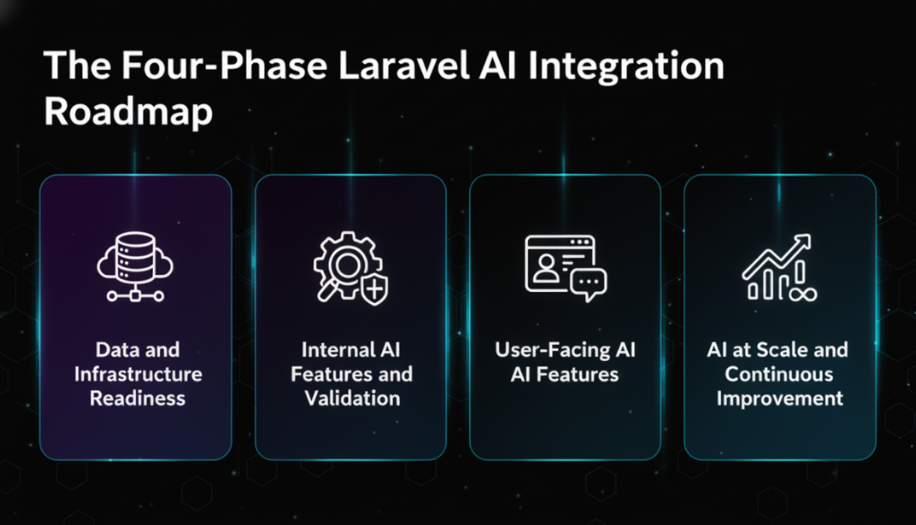
Phase 1: Data and Infrastructure Readiness
Weeks 1 to 4 | Before any AI feature is built
Goal: Make your data AI-ready. AI is only as useful as the data it works with. Unstructured, inconsistent, or incomplete data produces unreliable AI output regardless of which model or API you use.
Audit your data model: Map every table and field that an AI feature might need to read or write. Identify gaps: missing fields, inconsistent formats, null values in critical columns, relationships that are implied but not enforced.
Introduce vector storage: Add a vector database for semantic search and retrieval-augmented generation (RAG). Options include pgvector as a PostgreSQL extension, Pinecone, or Weaviate. pgvector is the lowest-overhead option for teams already on PostgreSQL.
Set up an embedding pipeline: Use Laravel queues (Horizon) to generate embeddings for your content as records are created or updated. Do not generate embeddings on the fly in the request cycle. Store embedding vectors alongside your records in the vector store.
Create an AI service layer: Build a dedicated AIService class in Laravel. All AI API calls (OpenAI, Anthropic, Google Gemini) route through this service. This gives you a single point to manage API keys, handle errors, add logging, and swap providers without touching feature code.
What to skip: Do not build user-facing AI features yet. Do not integrate an LLM into any user flow. Phase 1 is foundation work only.
Phase 2: Internal AI Features and Validation
Weeks 4 to 8 | AI for your team before your users
Goal: Build AI features for internal use first. Your team becomes the test environment. Mistakes happen privately before they happen in front of customers.
Admin panel AI tools: Add AI-assisted features to your Laravel admin panel first. Auto-generated content drafts, AI-powered data summaries, intelligent search across your product data. These features deliver immediate internal value and generate real feedback before any user-facing rollout. For content-focused features, an AI detector can provide an additional review signal by identifying text that may require closer human assessment before publication.
RAG implementation: Wire your vector store to your LLM using retrieval-augmented generation. When a query comes in, retrieve the most relevant documents from your vector store and pass them as context to the LLM. This produces grounded, accurate responses instead of hallucinated ones. Implementing multi LLM approaches can improve the robustness of retrieval-augmented generation by distributing tasks across specialized models to better handle diverse queries.
Laravel Prism or OpenAI PHP: Use the Laravel Prism package for a clean, provider-agnostic LLM integration layer. Alternatively the official OpenAI PHP client integrates directly with Laravel. Route all calls through your AIService class regardless of which package you use.
Feedback capture: Build a simple thumbs up / thumbs down mechanism on every AI output from day one. Store the feedback with the prompt, the response, and the user context. This data is how you measure whether the AI is actually working.
Feature flags: Gate every AI feature behind a feature flag. This lets you enable features for specific users, roll back instantly if something breaks, and test on a subset before full rollout.
Phase 3: User-Facing AI Features
Weeks 8 to 16 | Controlled rollout to real users
Goal: Ship AI features to users in a controlled, measurable way. Start with a small cohort, measure impact, iterate, then expand.
Start with one feature: Pick the single highest-value AI feature for your users. Ship it to 5 to 10 percent of users first. Measure engagement, error rates, and feedback scores before expanding.
Streaming responses: Use Laravel's streaming support for long-form AI responses. Nobody waits 8 seconds for a response to appear at once. Stream the output token by token for a significantly better user experience.
Prompt engineering discipline: Store prompts as versioned records in your database, not hardcoded strings. This lets you update prompt behaviour without a code deployment and gives you a history of what changed when.
Cost monitoring: Add token usage logging to your AIService from day one. OpenAI, Anthropic, and Google all charge per token. Without monitoring, AI costs scale invisibly. Set alerts for unusual consumption spikes before they become invoice surprises.
Caching strategy: Cache AI responses for identical or near-identical queries using Redis. Semantic caching (responses for similar but not identical queries) reduces API costs significantly at scale. Laravel's cache layer makes this straightforward to implement.
Phase 4: AI at Scale and Continuous Improvement
Weeks 16 onwards | Production-grade AI operations
Goal: Operate AI features reliably at scale with continuous improvement loops and cost control.
Model evaluation pipeline: Build a lightweight eval system that tests your prompts against a set of known good and bad examples before each deployment. This prevents prompt regressions from shipping to users without detection.
Fine-tuning consideration: Evaluate fine-tuning only after you have 1,000+ feedback examples demonstrating a consistent gap between what the base model produces and what your users need. Fine-tuning is expensive and complex. It is not the right first step.
Async AI processing: Move heavy AI workloads (document analysis, batch embedding updates, report generation) to Laravel queues. Never run multi-second AI calls synchronously in the user request cycle at scale.
Multi-model strategy: Use different models for different tasks. A fast, cheap model (GPT-4o mini, Claude Haiku) for classification, routing, and short completions. A powerful model (GPT-4o, Claude Sonnet) for complex reasoning and long-form generation. Route through your AIService layer.
Observability: Log every AI interaction: prompt, model, tokens used, latency, cost, and user feedback. This data drives improvement decisions and gives you the audit trail that enterprise clients increasingly require.
The Eight Highest-Value AI Use Cases for Laravel SaaS Products
Based on our Laravel Application Development work across SaaS, FinTech, and e-commerce products, these are the AI features that deliver measurable value fastest.
Intelligent Search: Replace basic Eloquent LIKE queries with semantic search powered by vector embeddings. Users find what they mean, not just what they type. Implementation: pgvector + Laravel Scout + OpenAI embeddings.
Outcome: Search result relevance improves significantly. Support tickets related to 'cannot find' drop measurably.
AI-Assisted Content Generation: Draft generation for emails, product descriptions, reports, and summaries. The AI produces a draft, the user edits and approves. Reduces time-to-publish significantly.
Outcome: Content production time reduced by 50 to 70 percent in measured rollouts.Document Q&A and RAG: Users ask questions about uploaded documents, knowledge bases, or product data. RAG retrieves the relevant context and the LLM answers with grounded, accurate responses.
Outcome: Support deflection rate increases. Users get answers without opening a ticket.
Anomaly Detection: Flag unusual patterns in user behaviour, financial transactions, or operational data. Works well in FinTech and SaaS products where deviation from baseline is a meaningful signal.
Outcome: Fraud detection and operational alerting without manual monitoring overhead.
Predictive Churn Scoring: Score users on churn risk based on engagement patterns, feature usage, and support history. Surface high-risk accounts in the admin panel for proactive outreach.
Outcome: Customer success teams contact at-risk users before they cancel, not after.
Automated Data Extraction: Extract structured data from unstructured inputs: PDFs, emails, form submissions, scanned documents. Convert free-text into structured database records automatically.
Outcome: Manual data entry eliminated for common input types. Error rates drop.
Personalisation Engine: Tailor content, recommendations, and UI behaviour to individual users based on their history and preferences. Works well in e-commerce, eLearning, and content platforms.
Outcome: Engagement and session depth increase. Conversion rates improve on personalised flows.
Intelligent Support Triage: Classify incoming support tickets by type, urgency, and required team automatically. Route tickets to the right agent without manual triage. Draft suggested responses for common queries.
Outcome: First-response time drops. Agent productivity increases on high-volume support teams.
The Laravel AI Technology Stack We Use in 2026
These are the specific packages, APIs, and tools our Laravel development team uses across active AI integrations. Each choice is based on production performance, maintenance overhead, and provider reliability.
Layer | Tool / Package | Why We Use It |
LLM Integration | Laravel Prism / openai-php/laravel | Provider-agnostic. Supports OpenAI, Anthropic, Gemini from one interface |
Embeddings | OpenAI text-embedding-3-small | Cost-effective, high quality, 1536 dimensions |
Vector Storage | pgvector (PostgreSQL extension) | No new infrastructure if already on PostgreSQL |
Vector Storage Alt | Pinecone | Managed, scalable, better for large embedding sets |
RAG Framework | Custom via Laravel service class | Full control, no black-box dependencies |
Queue Processing | Laravel Horizon + Redis | Async embedding generation and batch AI jobs |
Caching | Redis tagged cache | Cache AI responses by prompt hash. Reduces cost at scale |
Streaming | Laravel Streaming + SSE | Token-by-token response streaming to frontend |
Prompt Management | Database-stored versioned prompts | Update prompts without code deployment |
Monitoring | Custom AI log table + Sentry | Token usage, latency, cost, and error tracking per request |
Feature Flags | Custom Laravel flag system | Gate AI features per user, plan, or cohort |
Cost Control | Token budget middleware | Hard limits per user tier to prevent runaway API costs |
The Seven AI Integration Mistakes That Cost CTOs the Most
.png "The Seven AI Integration Mistakes That Cost CTOs the Most")
Every mistake below is drawn from a real engagement. None of them are theoretical.
1 | Shipping AI features without feature flags When an AI feature breaks in production, you need to turn it off instantly without a deployment. If it is not behind a feature flag, you are deploying a hotfix under pressure. We have seen this cause 2 to 4 hour incidents that a feature flag would have resolved in 30 seconds. |
2 | Calling AI APIs synchronously in the request cycle OpenAI and Anthropic API calls can take 2 to 15 seconds. Blocking a web request for that duration at any scale breaks response time SLAs and destroys user experience. All AI calls that are not streaming responses belong in a Laravel queue job. |
3 | No cost monitoring from day one AI API costs are invisible until they are not. A prompt that works fine at 100 requests per day becomes a $4,000 monthly invoice at 50,000 requests per day. Token usage logging, per-user budgets, and cost alerts need to be in place before the first user-facing AI feature ships. |
4 | Hardcoding prompts in the codebase Every prompt change requires a code deployment. In a product where AI behaviour needs frequent tuning (which is all of them), this creates a bottleneck. Store prompts in the database with version history. Update them through the admin panel. Deploy code for logic changes only. |
5 | Skipping the retrieval layer and relying on LLM memory Asking an LLM to answer questions about your product data without a retrieval layer produces hallucinations. The model invents plausible-sounding answers when it does not know. RAG (retrieval-augmented generation) grounds the response in your actual data. It is not optional for any product where factual accuracy matters. |
6 | Building AI features before cleaning the underlying data Garbage in, garbage out is more literal with AI than anywhere else. An AI feature trained or prompted on inconsistent, incomplete, or duplicated data produces unreliable output. Data readiness is Phase 1 for a reason. Skipping it does not save time. It creates a more expensive problem later. |
7 | No feedback loop on AI outputs Without a thumbs up / thumbs down mechanism and output logging, you have no signal on whether the AI is actually working. You cannot improve what you cannot measure. A basic feedback capture mechanism takes one afternoon to build and pays for itself in the first week of user data. |
The Team You Need to Execute This Roadmap
You do not need a dedicated AI engineering team to execute this roadmap. You need senior Laravel developers who understand AI integration patterns. Our staff augmentation model deploys exactly this profile into active engagements within 48 hours.
- 1 Senior Laravel Developer (AI integration lead): Owns the AIService layer, RAG implementation, and phase sequencing. Must have production Laravel experience and hands-on familiarity with OpenAI or Anthropic APIs.-
- 1 Backend Developer: Implements feature-level AI integration, queue jobs, caching, and feedback capture.
- 1 QA Engineer (part-time): Tests AI output quality, edge cases, and cost behaviour across user scenarios.
- Optional: 1 Data Engineer if the embedding pipeline involves complex data transformation from multiple sources.
Timeline: Phase 1 and 2 in 6 to 8 weeks with this team. Phase 3 rollout in weeks 8 to 16. Phase 4 ongoing.
If you need to move faster or do not have this capacity in-house, hire Laravel developers from Acquaint Softtech. We deploy pre-vetted senior engineers with AI integration experience into your sprint process within 48 hours. No recruitment cycle, no onboarding lag, direct Slack access from day one.
The Window for First-Mover Advantage Is Closing
AI features that felt like differentiators in 2024 are becoming table stakes in 2026. The CTOs who shipped early built user trust, usage data, and feedback loops that late adopters cannot replicate quickly.
The roadmap in this article is designed to help you ship AI features that actually work, in the right order, without destabilising your existing product. If you want a technical review of where your Laravel application sits against this framework, we offer a free 30-minute Laravel AI development scoping call with no obligation.
Book a Free Laravel AI Integration Review
Tell us what your current Laravel stack looks like and where you want AI to add value.
We will map your product against the four phases and identify the fastest path to your first AI feature in production.
FAQ's
-
What is the best way to integrate OpenAI into a Laravel application?
Use the openai-php/laravel package or Laravel Prism for a provider-agnostic layer. Route all API calls through a dedicated AIService class rather than calling the API directly from controllers or models. This gives you a single point for error handling, logging, cost tracking, and provider switching. Combine with Laravel Horizon and Redis for async processing of non-streaming AI tasks.
-
How much does AI integration in a Laravel app typically cost to run?
API costs depend entirely on token volume. OpenAI's text-embedding-3-small model costs approximately $0.02 per million tokens for embeddings. GPT-4o costs approximately $2.50 per million input tokens and $10 per million output tokens. With caching, prompt optimisation, and model routing (using cheap models for simple tasks), most mid-scale SaaS products keep AI API costs under $500 per month until they reach significant user volume.
-
Can AI features be added to an existing Laravel application without a major refactor?
Yes, if the existing application has a reasonably clean service layer. The AIService class, vector store, and queue-based embedding pipeline can be added without touching existing business logic. The higher risk is data quality: if the underlying data is messy, cleaning it is unavoidable before AI features can be reliable. Phase 1 of this roadmap addresses data readiness specifically for this reason.
-
What is retrieval-augmented generation (RAG) and does my Laravel app need it?
RAG is the process of retrieving relevant context from your data store and passing it to an LLM as part of the prompt before it generates a response. Without RAG, LLMs answer from their training data, which does not include your product's specific content, user data, or documents. If your AI features involve answering questions about your product, summarising user data, or searching your content, you need RAG. It is the difference between an AI that sounds plausible and one that is actually accurate.
-
How do I hire Laravel developers with AI integration experience?
Through Acquaint Softtech's staff augmentation model. We maintain a bench of pre-vetted senior Laravel developers with hands-on AI integration experience across OpenAI, Anthropic, and RAG implementations. Deployment takes 48 hours from confirmation. Developers work directly inside your sprint process with full Slack access and no account manager layer. Visit acquaintsoft.com/hire-laravel-developers to start the process.
We’re Acquaint Softtech, your technology growth partner. Whether you're building a SaaS product, modernizing enterprise software, or hiring vetted remote developers, we’re built for flexibility and speed. Our official partnerships with Laravel, Statamic, and Bagisto reflect our commitment to excellence, not limitation. We work across stacks, time zones, and industries to bring your tech vision to life.
Table of Contents
Get Started with Acquaint Softtech
- 13+ Years Delivering Software Excellence
- 1300+ Projects Delivered With Precision
- Official Laravel & Laravel News Partner
- Official Statamic Partner