

Blue-Green vs Canary Deployment: Which Strategy Does Your Platform Need and What Does It Cost?
Blue-Green gives instant rollback in seconds. Canary limits blast radius to 5% of users. The right deployment strategy depends on your platform's risk profile. Honest comparison with 2026 implementation costs.

Taukir katava
As a DevOps Engineer at Acquaint Softtech, a software development partner, I have implemented Blue-Green deployments for gaming platforms handling millions of concurrent users and Canary deployments for design platforms where gradual rollout was more important than instant switching. Both strategies eliminate deployment downtime. They do it differently, and choosing the wrong one for your platform's risk profile and traffic patterns produces unnecessary complexity or unnecessary risk. This article covers what each strategy actually does, when each is the right choice, and what a DevOps engineer charges to implement it in 2026.

- CTOs and engineering leads whose current deployments take the application offline or cause user-visible errors
- SaaS founders preparing for a production launch who need zero-downtime deployments from Day 1
- Teams currently using rolling deployments who want to understand whether Blue-Green or Canary would serve them better
- Companies hiring a DevOps engineer and wanting to brief them on the deployment strategy before the engagement starts
The deployment strategy conversation often gets conflated with the CI/CD tool conversation. They are separate decisions. The CI/CD tool (GitHub Actions, Jenkins, GitLab CI) is the pipeline that runs the deployment. The deployment strategy is how the new version of your application gets released to users. A DevOps engineer who understand the difference selects the right strategy first and then configures whichever pipeline tool implements it. Getting the strategy wrong means the pipeline runs correctly but releases goes badly.
The CI/CD pipeline that runs your deployment strategy is covered in the CI/CD pipeline setup cost guide. And if your current pipeline is slow before you have even addressed the strategy question, the deployment pipeline fix guide covers the root causes and priority fixes.
What Blue-Green Deployment Actually Is
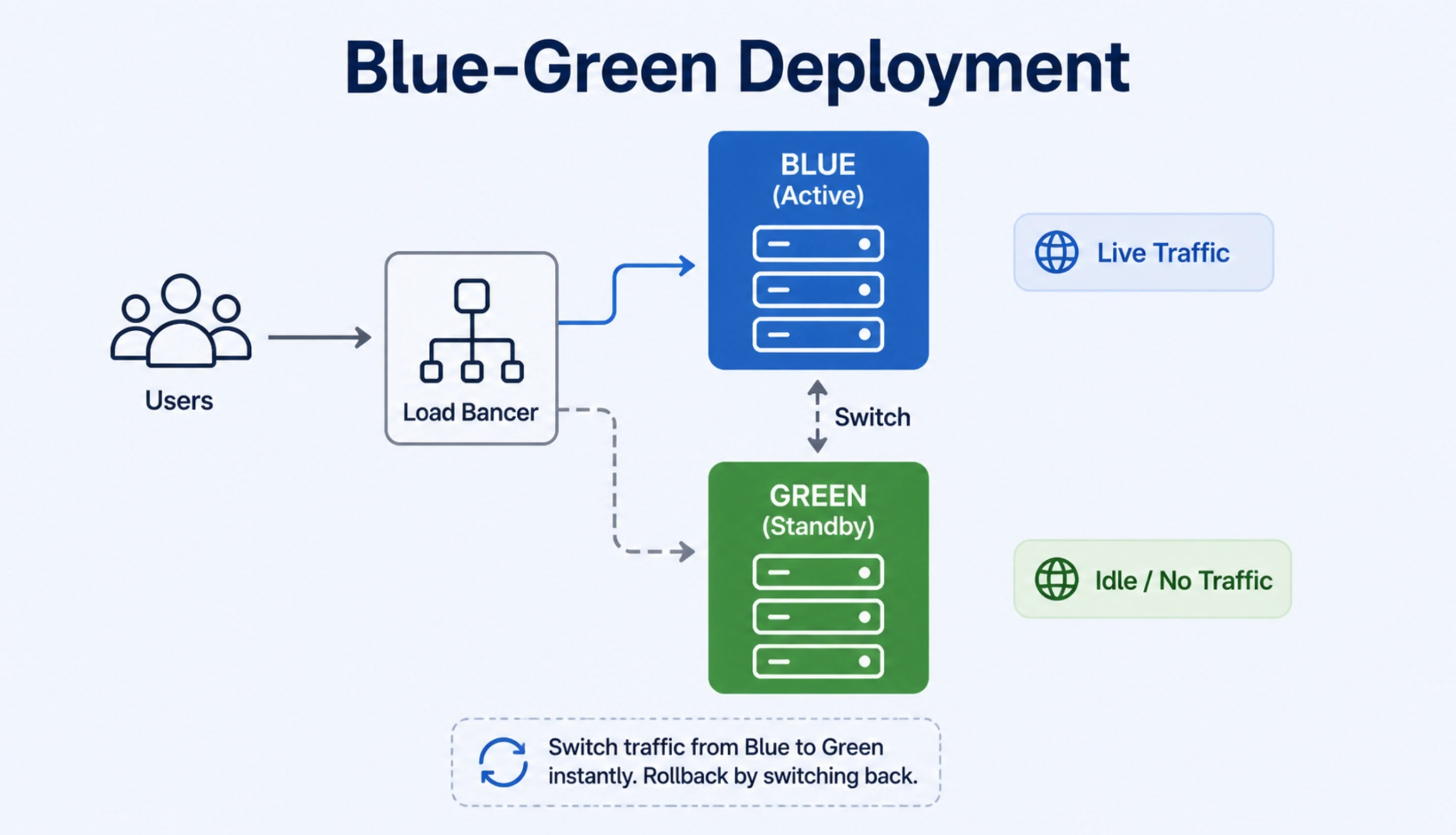
Blue-Green deployment runs two identical production environments simultaneously. One serves live traffic (Blue). The other receives the new release (Green). When Green is tested and ready, traffic switches from Blue to Green instantly. If something goes wrong, the switch reverses in seconds.
Blue-Green in plain steps
Step 1: Blue environment is live. All user traffic goes to Blue.
Step 2: New release is deployed to Green. No user traffic yet.
Step 3: Green is tested in production conditions using synthetic traffic or a small internal team.
Step 4: Traffic is switched from Blue to Green at the load balancer. Takes seconds.
Step 5: Blue stays live as standby. If an issue appears, traffic switches back to Blue instantly.
Step 6: Once Green is confirmed stable, Blue is updated with the next release and the cycle repeats.
Where Blue-Green excels |
Platforms where any downtime is unacceptable. Real-money gaming platforms, financial transaction systems, e-commerce at peak, and any SaaS where a 60-second outage generates support tickets and churn. The instant rollback is the key advantage: if a bad release reaches production, Blue-Green means the recovery is measured in seconds, not the 10 to 30 minutes a rolling deployment rollback often requires. |
Where Blue-Green has limitations |
Infrastructure cost is the primary constraint. Running two full production environments doubles the compute cost during the deployment window. For platforms with large, expensive infrastructure, this can be significant. AWS CodeDeploy and ALB make Blue-Green straightforward on AWS. Azure has native Blue-Green support through deployment slots. The infrastructure cost is manageable with spot instances on standby environments. |
What Canary Deployment Actually Is
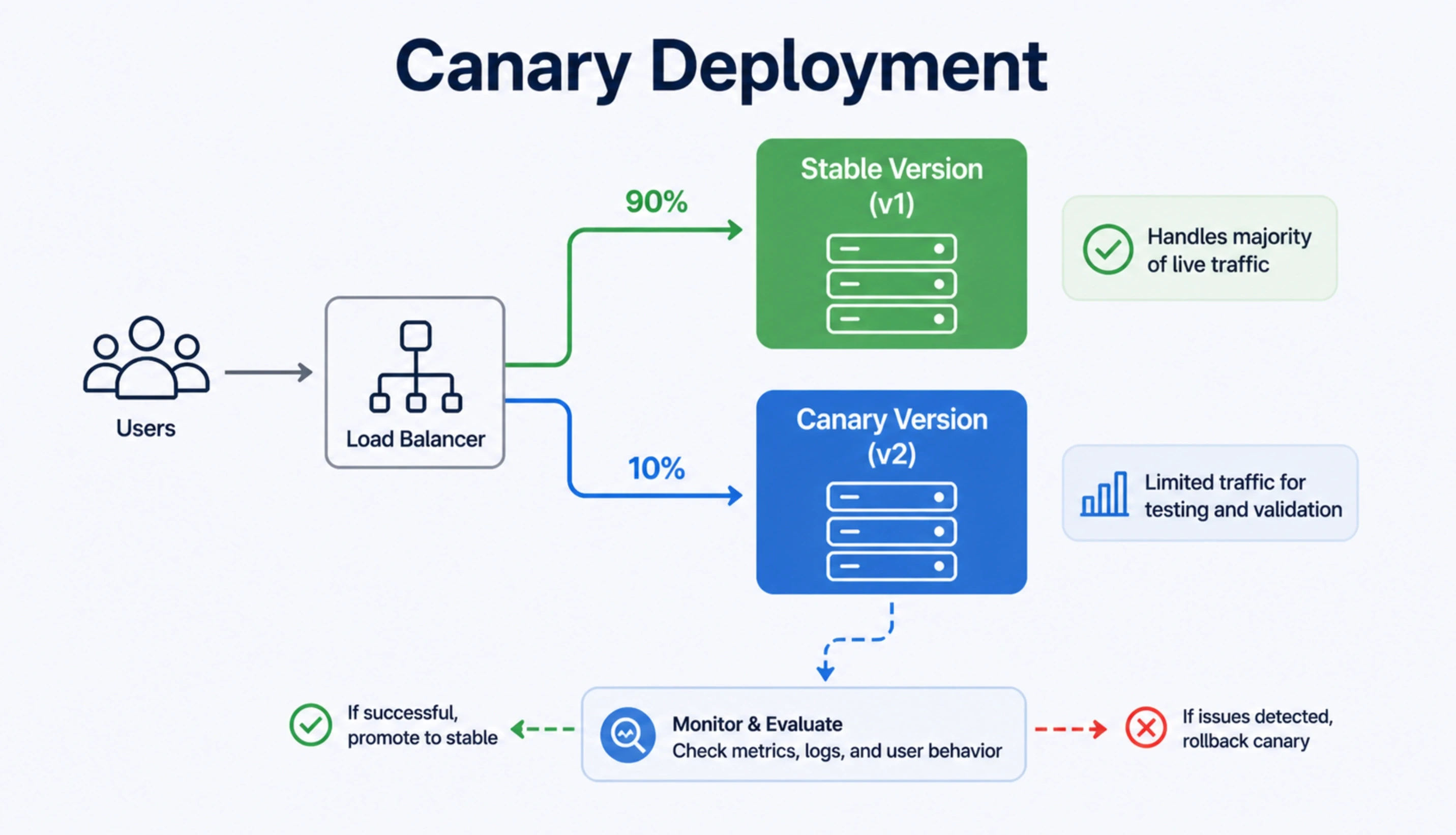
Canary deployment routes a small percentage of live traffic to the new version before rolling it out to everyone. The name comes from the practice of sending a canary into a coal mine before the miners: if the canary comes back safely, the miners proceed.
Canary deployment in plain steps
Step 1: New release is deployed alongside the current production version.
Step 2: 5% of live user traffic is routed to the new version. 95% stays on the current version.
Step 3: Monitoring watches the new version: error rates, latency, user behaviour.
Step 4: If metrics are healthy, the percentage increases: 5% to 25% to 50% to 100%.
Step 5: If a problem appears at any percentage, traffic routes back to the current version.
Only 5% of users were affected rather than 100%.
Where Canary excels |
Platforms where the risk of a bad release affecting all users at once is more concerning than the time it takes to roll out. Mobile platforms with diverse device types, SaaS products with complex user flows, and platforms where A/B testing insights are valuable during the rollout window. Canary also suits platforms where the new version includes a significant feature change and the team wants production-scale validation before full rollout. |
Where Canary has limitations |
Canary requires more sophisticated monitoring and traffic routing than Blue-Green. If your monitoring is not granular enough to detect a problem in 5% of traffic, Canary's risk-control advantage is diminished. Canary also adds deployment complexity: managing partial traffic splits requires more DevOps configuration than an instant Blue-Green switch. |
The zero-downtime deployment guide covers the full cost of setting up zero-downtime infrastructure regardless of which strategy you choose, including what a DevOps engineer configures for load balancers, health checks, and environment management.
Not Sure Which Strategy Fits Your Platform? Let a DevOps Engineer Map It.
Tell Acquaint Softtech your platform type, your current deployment frequency, and how much traffic you carry during peak hours. A vetted DevOps engineer will tell you which strategy fits your risk profile and what the implementation looks like. This conversation takes 15 minutes.
Side-by-Side Comparison: Blue-Green vs Canary vs Rolling
Rolling deployment is the third strategy most teams encounter. It is worth including here because many teams are on rolling deployments and wondering whether Blue-Green or Canary would serves them better. Here is the honest comparison across all three.
Dimension | Blue-Green | Canary | Rolling |
Rollback speed | Seconds (traffic switch) | Seconds (reroute %) | Minutes to hours (redeploy old version) |
Infrastructure cost | Higher (two full envs) | Medium (partial traffic split) | Lower (in-place update) |
Risk to users on bad release | Zero if switched fast | Only % on canary | All users as rollout proceeds |
Deployment complexity | Medium | High (traffic routing logic) | Low |
Monitoring requirement | Medium | High (granular metrics needed) | Low to medium |
Best for | High-availability platforms | Risk-sensitive rollouts, A/B | Low-risk updates, small teams |
Typical DevOps setup time | 2 to 4 days | 3 to 6 days | 1 to 2 days |
The Decision Framework: Which Strategy Is Right for Your Platform?
These four questions map your situation to the right deployment strategy. Most platforms land clearly in one category after the first two questions.
Q1: How much user-visible impact is acceptable if a bad release reaches production?
Zero tolerance (financial transactions, live gaming, medical): Blue-Green. Some tolerance (gradual feature rollout acceptable): Canary. Low risk updates to internal tools or dev teams: Rolling is adequate.
Q2: How fast must you be able to roll back?
Seconds: Blue-Green is the only strategy that guarantees this. Minutes with limited user impact: Canary. Minutes with potential wide impact acceptable: Rolling.
Q3: Do you have the monitoring infrastructure to detect problems in a small percentage of traffic?
Yes: Canary is viable and produces production-scale validation. No: Blue-Green is safer because the rollback trigger is simple (traffic switch) rather than requiring metric thresholds to fire correctly.
Q4: What is your deployment frequency?
Multiple times per day: Blue-Green infrastructure cost is justified by the deployment frequency. Once per day or less: Canary may be more appropriate as it does not require two full environments on standby.
In practice, Acquaint Softtech has used Blue-Green deployment for gaming and fantasy platforms on AWS where zero downtime during live events was non-negotiable, and Canary deployment for design and creative platforms on GCP where gradual rollout reduced the risk of a bad release affecting a user's in-progress creative session. The platform type drives the strategy, not the tool or the team preference. The CI/CD tool comparison (GitHub Actions vs Jenkins vs GitLab CI) that determines which tool runs your chosen strategy is covered in our CI/CD tool comparison guide.
What a DevOps Engineer Charges to Implement Each Strategy in 2026

The implementation cost for each strategy differs based on setup complexity, infrastructure requirements, and the monitoring configuration needed. Here are the honest 2026 numbers based on Acquaint Softtech's delivery experience.
Blue-Green on AWS (EC2/ECS/EKS) |
Setup time: 2 to 4 days. What is included: two identical environment configurations, ALB target group setup, AWS CodeDeploy configuration for Blue-Green, health check automation, traffic switch scripts, rollback procedure documentation, and monitoring for the Blue environment during standby. At Acquaint Softtech's rate of $22/hour, implementation cost: $704 to $1,408. Most Blue-Green setups are absorbed into the first 2 weeks of a monthly retainer engagement. |
Canary on AWS with ALB weighted routing |
Setup time: 3 to 6 days. What is included: weighted target group configuration on ALB, traffic shift automation (5% to 25% to 50% to 100%), monitoring dashboards with canary-specific error rate and latency thresholds, alerting rules that trigger rollback at defined thresholds, and deployment scripts that automate the percentage increment. Implementation cost: $4,200 to $10,800. |
Canary on GCP with GitHub Actions |
Setup time: 3 to 5 days. What is included: Cloud Run revision traffic splitting configuration, GitHub Actions workflow with canary percentage stages, Cloud Monitoring alert policies for canary metrics, and automated rollback scripts triggered by Cloud Monitoring. Implementation cost: $4,200 to $9,000. |
Blue-Green on Azure (AKS or App Service) |
Setup time: 2 to 4 days. What is included: Azure App Service deployment slots or AKS blue-green via Helm chart configuration, Azure DevOps pipeline stages for slot swap, Application Gateway routing rules, and Azure Monitor alerts for the standby environment. Implementation cost: $2,800 to $7,200. |
For the full DevOps engineer rate comparison by region and seniority, the DevOps engineer cost guide covers what each price tier delivers. Acquaint Softtech's staff augmentation model provides deployment strategy implementation as part of the first sprint of a monthly retainer engagement.
Know Which Strategy You Need? Get a DevOps Engineer Who Has Implemented It in Production.
Taukir and the Acquaint Softtech DevOps team have implemented Blue-Green deployments for gaming platforms with millions of concurrent users and Canary deployments for creative platforms on GCP. Tell us your platform, cloud provider, and deployment frequency. Matched profile within 24 hours.
Common Mistakes When Implementing Each Strategy
Both strategies are well-understood in the DevOps community, but each have specific implementation mistakes that appear regularly. Knowing what to watch for before you start prevents the most expensive errors.
Blue-Green mistake: Not testing Green under realistic load before switching
Some teams switch traffic to Green after functional testing only, without load testing under production-scale traffic. If Green has a memory leak that only appears at 1,000 concurrent users and the test was run at 10 users, the switch is as risky as a direct deployment. A DevOps engineer running Blue-Green correctly includes a realistic load test against Green before the traffic switch.
Blue-Green mistake: Forgetting database migration compatibility
Blue and Green environments share a database during the deployment window. A database schema change that is not backward compatible will break Blue the moment Green's migration runs. A DevOps engineer implementing Blue-Green correctly ensures all database changes are backward compatible with the previous version for the duration of the switch window.
Canary mistake: Insufficient monitoring granularity
If your monitoring only tracks overall error rates, a problem affecting 5% of traffic may not trigger the threshold that fires the rollback alert. A DevOps engineer implementing Canary correctly sets up separate monitoring dashboards for the canary instances with lower alert thresholds, so a problem in 5% of traffic is detected with the same sensitivity as a problem in 100%.
Canary mistake: Skipping the monitoring gate between percentage increments
Some Canary implementations increment the traffic percentage on a fixed schedule (5% to 25% every 10 minutes) rather than on a metric gate (increase only when error rate and latency are within thresholds). Fixed-schedule increments miss problems that appear at 15 minutes of production load. Metric-gated increments catch them before the percentage grows.
Acquaint Softtech's dedicated development teams include DevOps engineers who own the deployment strategy from design through implementation through ongoing monitoring. For teams starting with a DevOps engineer to set up the strategy and then managing it themselves, our hire DevOps engineers service provides vetted engineers with verified production deployment strategy experience.
Ready to Implement Zero-Downtime Deployments? Acquaint Softtech Has the DevOps Engineers to Do It.
Acquaint Softtech DevOps engineers have implemented Blue-Green and Canary deployments across AWS, Azure, and GCP for high-traffic production platforms. Monthly retainer from $3,200/month for a full-time dedicated DevOps engineer. Tell us your cloud provider and deployment requirements. Matched profile in 24 hours. Implementation in the first sprint.
Frequently Asked Questions
-
What is the difference between Blue-Green and Canary deployment?
Blue-Green deployment switches 100% of traffic instantly from the old version to the new version, with an identical standby environment ready for instant rollback. Canary deployment routes a small percentage of live traffic to the new version first, monitors it, and gradually increases the percentage if metrics are healthy. Blue-Green prioritises instant rollback capability. Canary prioritises limiting the blast radius of a bad release.
-
Which is safer: Blue-Green or Canary deployment?
Canary is safer in terms of user impact if a bad release reaches production, because only a small percentage of users are initially exposed. Blue-Green is safer in terms of rollback speed, because switching traffic back to the previous version takes seconds rather than the time needed to reroute canary traffic. The right choice depends on which risk matters more to your platform.
-
How does Blue-Green deployment work on AWS?
On AWS, Blue-Green deployment uses two Auto Scaling groups (or ECS services, or EKS deployments) behind an Application Load Balancer. The new version is deployed to the Green target group. Once tested, the ALB listener rule is updated to route traffic to Green. AWS CodeDeploy automates this process with built-in health check gates and configurable traffic shifting. The previous Blue target group remains available for instant rollback.
-
How do you implement Canary deployment on Kubernetes?
On Kubernetes, Canary deployment uses two deployments with different labels and a service that selects pods from both based on replica count ratio. For example, 1 canary pod alongside 19 production pods gives 5% canary traffic. Istio or AWS App Mesh provide more precise traffic splitting by percentage rather than pod count. A DevOps engineer configures the traffic split, the monitoring alerts on the canary pods, and the automation that increases the replica ratio as metrics validate.
-
How much does it cost to hire a DevOps engineer to set up Blue-Green on AWS?
A Blue-Green deployment setup on AWS takes 2 to 4 days for a senior DevOps engineer. At Acquaint Softtech's rate of $22/hour, this costs $704 to $1,408 for the implementation. This is typically included in the first sprint of a monthly retainer engagement ($3,200/month) rather than billed as a standalone project.
-
Can Acquaint Softtech DevOps engineers implement both Blue-Green and Canary?
Yes. Acquaint Softtech DevOps engineers have implemented Blue-Green deployments using AWS CodeDeploy and CodePipeline for gaming platforms, and Canary deployments using GitHub Actions and GCP Cloud Run for creative platforms. The engineer is assigned based on the cloud provider and deployment tooling match to the client's stack.
-
Is Rolling deployment ever the right choice over Blue-Green or Canary?
Rolling deployment is appropriate for internal tools, development environments, and low-traffic applications where a brief period of mixed-version requests is acceptable and the risk of a bad release is low. For any production SaaS or consumer platform, Blue-Green or Canary is the right choice. The additional complexity is justified by the reduction in user-visible deployment risk.
Taukir Katava is a DevOps Engineer at Acquaint Softtech with 4+ years of experience across AWS, Azure, and GCP. He specialises in Kubernetes cluster administration, CI/CD pipeline automation, and cloud infrastructure design for high-traffic platforms. Taukir writes about the practical side of production DevOps: what infrastructure decisions cost and what they actually deliver.
Table of Contents
Get Started with Acquaint Softtech
- 13+ Years Delivering Software Excellence
- 1300+ Projects Delivered With Precision
- Official Laravel & Laravel News Partner
- Official Statamic Partner
Related Reading
The Complete Guide to Hiring a DevOps Engineer in 2026: CI/CD, Cloud, Kubernetes, and What It All Costs
Everything you need before hiring a DevOps engineer in 2026. What the role covers, CI/CD to Kubernetes, what it costs in India vs the US, and how to start with a vetted engineer in 48 hours.

Acquaint Softtech
May 1, 2026
GitHub Actions vs Jenkins vs GitLab CI: Which CI/CD Tool Should You Hire a DevOps Engineer to Implement?
GitHub Actions, Jenkins, and GitLab CI each win in a different context. Here is the honest comparison from a DevOps engineer who has implemented all three in production, with the 5-question decision framework.
Taukir katava
May 5, 2026
Deployment Pipeline Taking Hours: What Hiring a DevOps Engineer Cuts It Down To
A deployment pipeline that takes hours is costing your business more than just developer time. Here is what a DevOps engineer diagnoses, fixes first, and delivers in the first 30 days.
Taukir katava
May 4, 2026India (Head Office)
203/204, Shapath-II, Near Silver Leaf Hotel, Opp. Rajpath Club, SG Highway, Ahmedabad-380054, Gujarat
USA
7838 Camino Cielo St, Highland, CA 92346
UK
The Powerhouse, 21 Woodthorpe Road, Ashford, England, TW15 2RP
New Zealand
42 Exler Place, Avondale, Auckland 0600, New Zealand
Canada
141 Skyview Bay NE , Calgary, Alberta, T3N 2K6