Deployment Pipeline Taking Hours: What Hiring a DevOps Engineer Cuts It Down To
A deployment pipeline that takes hours is costing your business more than just developer time. Here is what a DevOps engineer diagnoses, fixes first, and delivers in the first 30 days.

Taukir katava
I have been working as a DevOps Engineer at Acquaint Softtech, a software development partner, managing infrastructure across AWS, Azure, and GCP for platforms that cannot afford slow deployments. The most common infrastructure problem I see when I join a new platform is a deployment pipeline that takes 45 minutes to two hours for a routine code push. This is not a minor inconvenience. It is a compounding cost that shows up in delayed releases, reduced developer velocity, and a team that starts treating deployment as a planned event rather than a routine action. This article covers what causes slow pipelines, what I fix first, and what the pipeline looks like 30 days after a DevOps engineer takes ownership of it.

- CTOs and engineering leads whose deployments take longer than 20 minutes and are looking for the cause
- Development teams who avoid deploying frequently because the pipeline is slow or unreliable
- Founders whose developers spend significant time waiting for builds or managing deployment failures
- SaaS companies preparing to scale where deployment speed will directly affect release cadence
A slow deployment pipeline is one of the most visible sign of accumulated infrastructure debt. It does not appear overnight. It builds gradually: a test suite that was fast at 50 tests slows down at 500. A build step that was acceptable when the codebase was small becomes the bottleneck as dependencies multiply. A manual approval gate that made sense when deployments were risky becomes friction when the team has grown the confidence to deploy more frequently. By the time the pipeline is taking two hours, the problem is usually five or six things compounding, not one.
The full cost structure of a slow deployment pipeline, including the calculation of how much each additional deployment hour costs a development team at different sizes, is covered in the CI/CD pipeline setup cost guide. This article focuses on the diagnostic and fix process: what a DevOps engineer looks at first and what the realistic improvement timeline is.
The 6 Most Common Causes of a Slow Deployment Pipeline
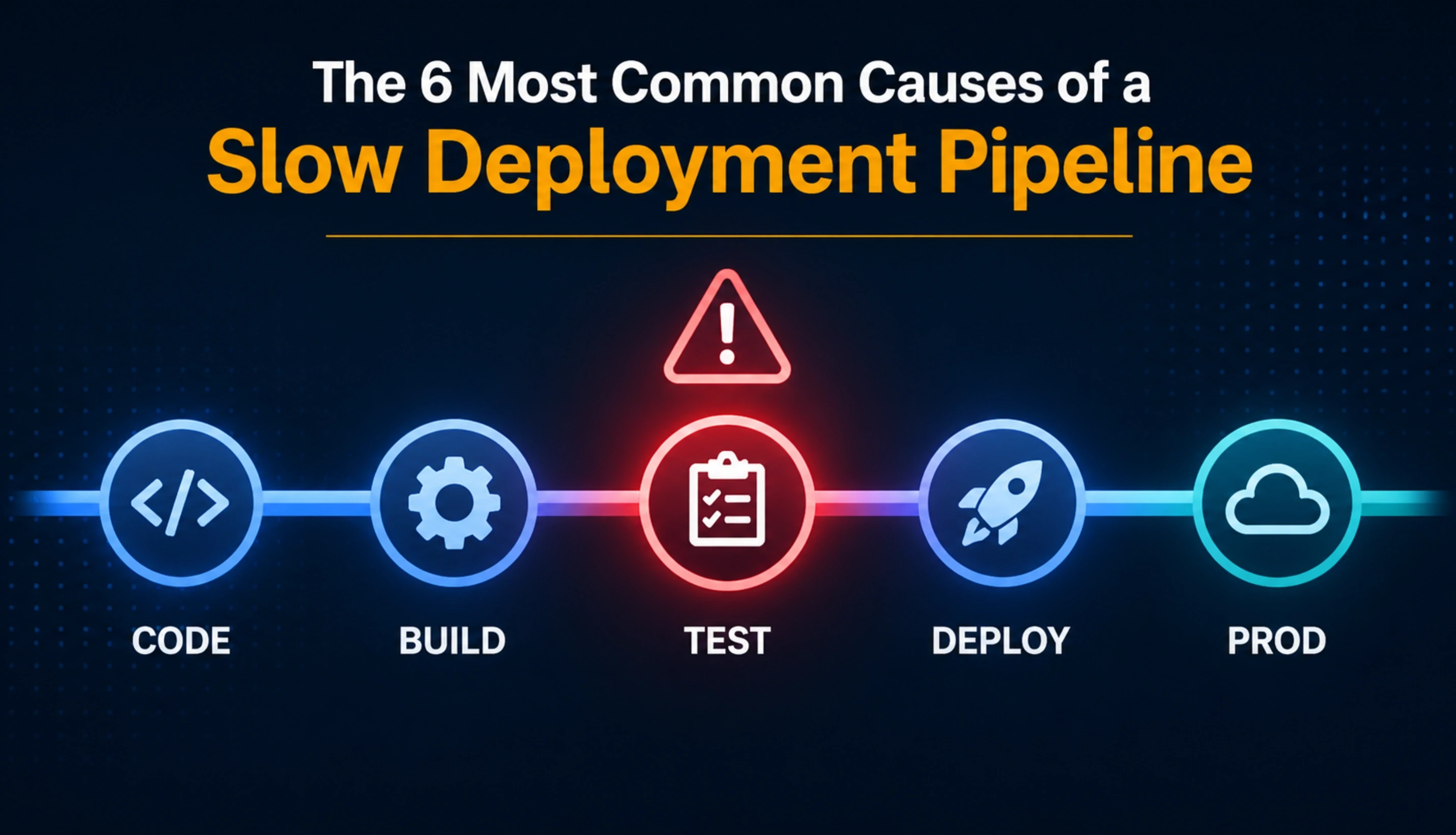
When I audit a slow pipeline, these are the causes I find in order of frequency. Most slow pipelines have at least three of these. Some have all six.
No parallelisation in the test stage
The test suite runs sequentially. Test 1 completes, then test 2 starts, and so on for 400 tests. Moving to parallel test execution across multiple runners or containers is the single change that most frequently cuts 30 to 50% off total pipeline time. This is almost always the first thing I check.
Docker images rebuilt from scratch on every run
The pipeline pulls the base image, installs all dependencies, and builds the container fresh every time a commit is pushed. Implementing multi-stage builds and layer caching means unchanged layers are reused from the previous run. A build that took 18 minutes drops to 3 to 5 minutes when dependency layers are cached instead of reinstalled.
No build artifact caching
The pipeline recompiles or rebuilds artifacts that have not changed since the last successful build. Implementing artifact caching (node_modules, compiled assets, build outputs) eliminates duplicate work. On a Node.js project with heavy dependencies, this alone can save 8 to 15 minutes per pipeline run.
Tests that are not actually testing anything useful
Slow pipelines often contain tests that were written years ago and test implementation details rather than behaviour. A test suite audit frequently identifies 15 to 30% of tests that can be removed or restructured without reducing coverage. Fewer tests that run fast and fail meaningfully beat more tests that run slow and produce noise.
Single deployment environment with no staging gate
Code deploys directly to a staging environment that shares resources with a slow acceptance test suite. Separating the deployment environments, running unit and integration tests in parallel rather than sequential, and structuring gates properly can cut pipeline end-to-end time significantly.
Over-specified resource allocation for build runners
The pipeline runs on under-powered build agents that queue jobs rather than running them concurrently. Right-sizing the CI runners, using spot instances for non-critical build stages, and implementing job-level concurrency controls produces faster throughput at lower cost.
Is Your Deployment Pipeline One of These Six Problems?
Tell me your current pipeline setup: the CI/CD tool, rough pipeline duration, and what stage takes longest. I will tell you which of the six causes applies to your situation and what the realistic fix looks like. This conversation takes 15 minutes.
What I Fix First: The DevOps Engineer's 30-Day Pipeline Priority Sequence
Not every pipeline problem is worth fixing in week one. Some fix takes two hours and cuts pipeline time by 30%. Others requires weeks of work and produces marginal improvement. Here is the sequence I follow when I take ownership of a slow deployment pipeline.
Week 1: The Quick Wins
I audit the pipeline end to end and identify the three to four changes that will produce the largest time reduction for the smallest effort. Parallelising tests, enabling Docker layer caching, and adding artifact caching almost always make this list. These changes typically cut 40 to 60% of total pipeline time and take one to two days to implement. By the end of week 1, the pipeline is measurably faster without any architectural changes.
Week 2: Test Suite Health
I audit the test suite for slow, flaky, or redundant tests. Flaky tests, tests that fail intermittently without a genuine failure in the code, are particularly expensive because they trigger manual retries that extend pipeline time without providing useful signal. Restructuring or removing these tests is not a performance optimisation. It is a correctness fix that also produces speed gains.
Week 3: Environment and Deployment Structure
I review the staging and production environment structure. If the pipeline is blocked waiting for a shared staging environment that another deployment is using, I introduce environment isolation. If deployment steps are sequential when they could be parallel (for example, deploying to multiple services at the same time), I restructure the deployment stage to run concurrently.
Week 4: Monitoring and Baseline Setting
I add pipeline duration metrics and trend tracking to the monitoring stack. From this point forward, pipeline duration is a tracked metric with an alerting threshold. If a future code change adds 10 minutes to the pipeline, the team knows about it on the same day rather than three months later.
For teams evaluating whether to bring in a DevOps engineer on a staff augmentation basis versus a fixed-price project, Acquaint Softtech's staff augmentation model is the right structure for ongoing pipeline ownership. A fixed-price engagement is appropriate for a discrete pipeline setup from scratch. The DevOps engineer hiring guide covers both engagement structures in detail.
What the Pipeline Looks Like Before and After: Real Numbers
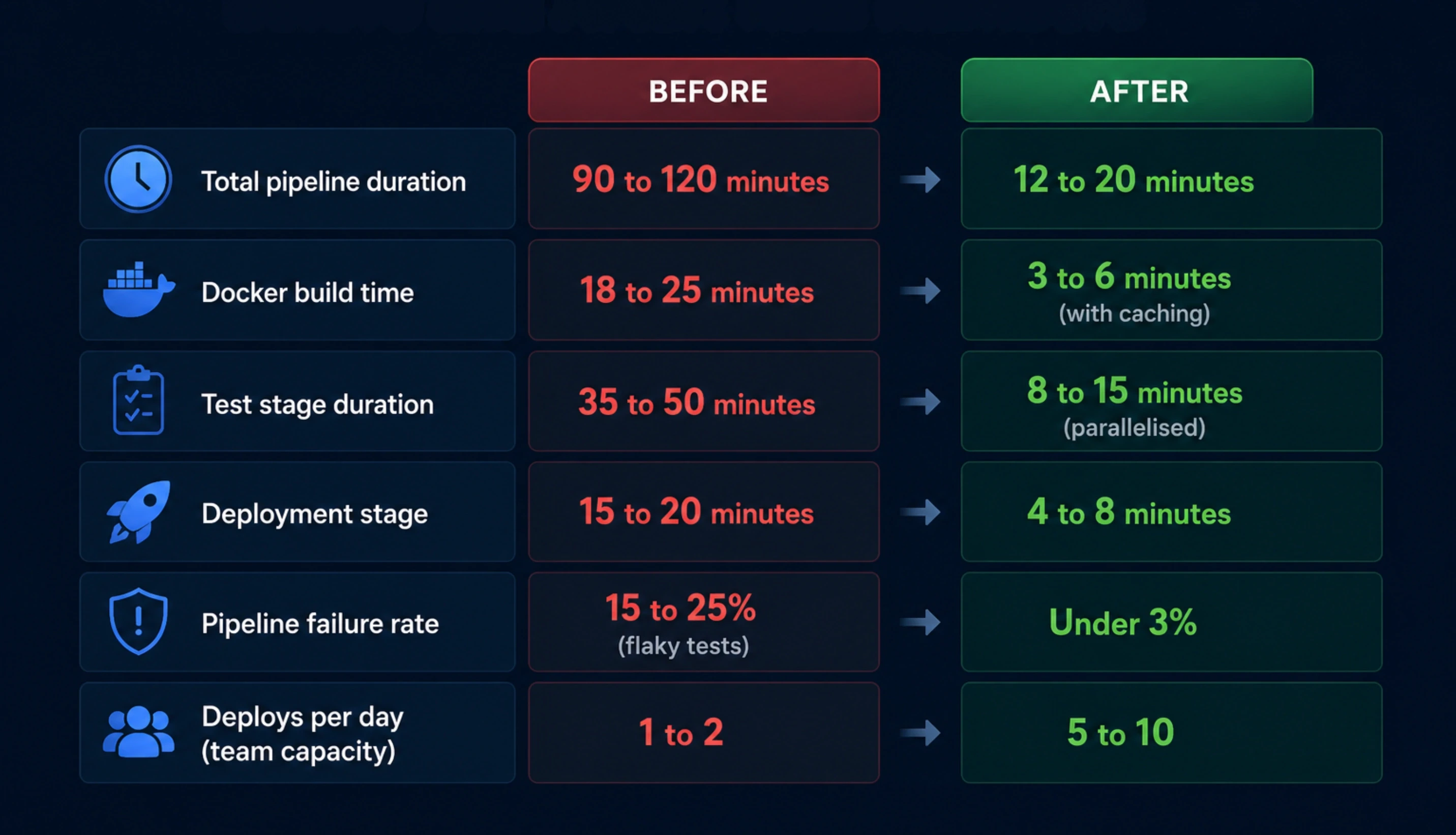
These are the before-and-after improvement figures from platform types I have worked on at Acquaint Softtech. The exact numbers vary by codebase, test suite size, and infrastructure, but the pattern is consistent: the biggest gains come from the first two weeks of work, not from architectural overhauls.
Pipeline metric | Typical before vs after 30 days |
Total pipeline duration | 90 to 120 minutes / 12 to 20 minutes |
Docker build time | 18 to 25 minutes / 3 to 6 minutes (with caching) |
Test stage duration | 35 to 50 minutes / 8 to 15 minutes (parallelised) |
Deployment stage | 15 to 20 minutes / 4 to 8 minutes |
Pipeline failure rate | 15 to 25% (flaky tests) / Under 3% |
Deploys per day (team capacity) | 1 to 2 / 5 to 10 |
What the business impact looks like
A team that deploys 5 to 10 times per day instead of 1 to 2 ships features faster, gets user feedback faster, and reduces the size and risk of each individual release.
Each hour saved in pipeline time multiplied by a 4-developer team multiplied by 10 deploys per day equals 40 developer-hours per day of recovered capacity.
At a blended developer rate of $60/hour, that is $2,400 per day in recovered capacity. A DevOps engineer at $3,200/month pays back in under 3 working days of pipeline improvement
The DevOps engineer hourly rate for this type of engagement, with comparisons by region and seniority, is in the DevOps engineer cost breakdown for 2026. For teams starting from no pipeline at all, the cost and timeline picture is covered in the no CI/CD pipeline guide.
Choosing the Right DevOps Engineer for Pipeline Work: What to Look For
Not every DevOps engineer has the same depth in deployment pipeline design. Here are the specific signals that indicate real pipeline expertise rather than surface-level CI/CD knowledge.
1. They can describe pipeline stages they designed from scratchA DevOps engineer with genuine pipeline experience can walk you through a specific pipeline they built: what triggered it, what the stages were, which tools they chose and why, and what the failure modes looked like. Someone who has only maintained pipelines gives a different answer. |
2. They know the difference between fast tests and meaningful testsPipeline expertise includes test strategy, not just infrastructure. A DevOps engineer who talks about test suite health alongside build times has worked in environments where both mattered. One who only discusses infrastructure may not surface the test quality issues that cause half the pipeline delay. |
3. They have implemented caching and parallelisation specificallyAsk them to describe a specific caching or parallelisation implementation. Which tool? What was cached? What were the before and after times? Specificity in the answer indicates real implementation experience. |
4. They track pipeline duration as a metricA DevOps engineer who treats pipeline duration as a tracked, alerted metric understands that fast pipelines degrade over time without active monitoring. This is the mindset that prevents the problem from returning after it is fixed. |
For the full hiring checklist and the red flags to look for in a DevOps vendor proposal, the DevOps engineer red flags guide covers the 10 warning signs that a proposal or profile will not deliver what it promises. Acquaint Softtech's dedicated development teams include DevOps engineers with verified production pipeline experience across AWS, Azure, and GCP.
Deployment Pipeline Still Taking Hours? Start With an Audit in 48 Hours.
Acquaint Softtech provides pipeline audits as part of every DevOps engagement. The engineer reviews your current pipeline, identifies the specific bottlenecks, and delivers a prioritised fix plan in the first week. Engagements start at $3,200/month for a senior DevOps engineer. Tell us your stack and we will send a matched profile today.
Frequently Asked Questions
-
Why is my deployment pipeline so slow?
The most common causes are: a test suite running sequentially rather than in parallel, Docker images being rebuilt from scratch on every pipeline run rather than using cached layers, and build artifacts like node_modules being reinstalled instead of cached. Most slow pipelines have three to five of these problems compounding simultaneously. The cumulative effect is what turns a 15-minute pipeline into a 90-minute one.
-
What is Docker layer caching and why does it speed up pipelines?
Docker builds images in layers. If a layer has not changed since the last build, Docker can reuse the cached version instead of rebuilding it. For a Node.js application, the layer that installs npm dependencies changes only when package.json changes. Enabling this cache means that routine code commits skip the dependency installation entirely, cutting build time from 15 to 20 minutes down to 2 to 4 minutes in many cases.
-
How do I reduce CI/CD pipeline time without a full infrastructure overhaul?
Start with parallelising your test suite. Most test runners support concurrent execution across multiple processes or containers. For a test suite of 300 to 500 tests, moving from sequential to parallel execution typically cuts test stage duration by 50 to 70%. Add Docker layer caching and artifact caching for dependencies in the same sprint. These three changes alone often cut total pipeline time by 40 to 60% without touching the deployment architecture.
-
How do I identify which pipeline stage is causing the delay?
Add duration timestamps to each pipeline stage in your CI/CD configuration. Most tools (GitHub Actions, GitLab CI, Jenkins) support step-level timing natively. Review the last 20 pipeline runs and identify which stage shows the most variability, as variable stages indicate flakiness, and which stages are consistently slow. The stage consuming the most average time is the first optimisation target.
-
How much does it cost to hire a DevOps engineer to fix a slow pipeline?
A DevOps engineer on a monthly retainer through Acquaint Softtech starts at $3,200/month for a full-time dedicated engineer. Most pipeline optimisation projects show measurable improvement in the first week, with full optimisation completed within 30 days. The ROI calculation: if a 4-developer team recovers one hour of deployment wait time per day, the pipeline improvement pays for the DevOps engineer's monthly cost in under 3 working days.
-
How quickly can a DevOps engineer from Acquaint Softtech start on a pipeline problem?
Acquaint Softtech delivers a matched DevOps engineer profile within 24 hours of a brief. Once the client approves the profile, the engineer joins the first standup in 48 hours. For pipeline work, the first audit and priority list is delivered in the first week. The first pipeline improvement is typically live within 7 to 10 days of engagement start.
-
Is it better to fix the pipeline myself or hire a DevOps engineer?
For a development team without a dedicated DevOps engineer, self-fixing a slow pipeline typically takes 2 to 6 weeks of interrupted developer time with inconsistent results, because the developer doing the work is also carrying sprint responsibilities. A dedicated DevOps engineer diagnoses and fixes the same problems in 5 to 10 working days as their only job. The cost of 6 weeks of interrupted developer time at senior developer rates often exceeds the first month of a DevOps engagement.
Taukir Katava is a DevOps Engineer at Acquaint Softtech with 4+ years of experience across AWS, Azure, and GCP. He specialises in Kubernetes cluster administration, CI/CD pipeline automation, and cloud infrastructure design for high-traffic platforms. Taukir writes about the practical side of production DevOps: what infrastructure decisions cost and what they actually deliver.
Table of Contents
Get Started with Acquaint Softtech
- 13+ Years Delivering Software Excellence
- 1300+ Projects Delivered With Precision
- Official Laravel & Laravel News Partner
- Official Statamic Partner
Related Reading

The Complete Guide to Hiring a DevOps Engineer in 2026: CI/CD, Cloud, Kubernetes, and What It All Costs
Everything you need before hiring a DevOps engineer in 2026. What the role covers, CI/CD to Kubernetes, what it costs in India vs the US, and how to start with a vetted engineer in 48 hours.

Acquaint Softtech
May 1, 2026
DevOps and CI/CD Strategy in Laravel Development
Build a production-ready Laravel DevOps CI/CD pipeline with GitHub Actions, automated testing, zero-downtime deployment, secure environment management, and rollback strategies.