

DevOps and CI/CD Strategy in Laravel Development
Build a production-ready Laravel DevOps CI/CD pipeline with GitHub Actions, automated testing, zero-downtime deployment, secure environment management, and rollback strategies.

Chirag Daxini
A CI/CD pipeline for a Laravel application is not complex to implement. GitHub Actions, a test suite, and a zero-downtime deployment script can be running within a day on most Laravel projects. The complexity is not in the tooling - it is in making the right decisions about pipeline stages, environment management, and rollback strategy that allow you to deploy to production with confidence rather than anxiety.
This article gives you a complete CI/CD pipeline design for Laravel applications: the GitHub Actions workflow structure, the test strategy that makes the pipeline trustworthy, zero-downtime deployment mechanics, environment and secrets management, and a rollback strategy that works when a production deployment reveals a problem.

- A production CI/CD pipeline for Laravel runs four sequential stages: lint and static analysis, automated tests, build and deployment, and post-deployment health checks.
- GitHub Actions is the default CI/CD platform for most Laravel projects - free for public repos, affordable for private, native GitHub integration.
- Zero-downtime deployment requires atomic symlink switching -- the Deployer tool handles this natively for Laravel.
- Environment-specific configuration must never live in version control - use GitHub Secrets or a secrets manager injected at deploy time.
- A rollback strategy must be defined before the first production deployment - not after the first production incident.
The Four-Stage CI/CD Pipeline
A complete Laravel CI/CD pipeline has four stages:
- 1. Lint and static analysis: PHP CS Fixer, PHPStan, Enlightn security scan
- 2. Automated tests: Pest unit, feature, and integration tests with a dedicated test database
- 3. Build and deployment: Compile assets, run migrations, symlink atomic deployment via Deployer
- 4. Post-deployment health checks: Endpoint probe, queue health check, application warm-up. All four stages run on every merge to main.
Stage 1: Lint and Static Analysis

Every pull request and every merge to main runs three checks before tests even begin.
PHP CS Fixer
PHP CS Fixer enforces consistent code style across the team. Configure a .php-cs-fixer.dist.php file with your team's rules (PSR-12 plus Laravel-specific additions). Run in -dry-run mode in CI - a style violation fails the build rather than auto-fixing and committing changes.
PHPStan at Level 6 or Above
PHPStan performs static type analysis. Level 6 catches undefined method calls, type mismatches, and dead code. Configure in phpstan.neon with paths set to app/ and a baseline file for existing issues. New code must pass the configured level - existing violations do not block the build but are tracked for resolution.
Enlightn Security Scan
Run php artisan enlightn -ci in the pipeline. Configure a minimum score threshold (85 or above for production applications). A failing Enlightn score fails the build. This catches misconfigured CSRF, exposed debug routes, and insecure session configuration before they reach production.
Stage 2: Automated Tests
Tests are the trust foundation of the pipeline. A pipeline with fast, comprehensive tests allows confident deployments. A pipeline with slow, sparse tests creates pressure to skip it.
Test Database Strategy
Use a dedicated in-memory SQLite database for unit tests (fast, isolated, no cleanup). Use a dedicated MySQL test database (mirroring production schema) for feature and integration tests. Never run tests against a staging or production database. In GitHub Actions, provision a MySQL service container in the workflow YAML.
Test Coverage Thresholds
Configure Pest's coverage report to fail the build below a minimum threshold (typically 70 to 80 percent for new code). Track coverage over time - a declining coverage trend in a growing application is a reliable predictor of increasing bug rates. Use pcov for fast coverage measurement rather than Xdebug in CI.
Parallel Test Execution
Pest supports parallel test execution with -parallel. On a four-core GitHub Actions runner, parallel execution typically cuts test suite runtime by 60 to 70 percent. Configure test parallelism in pest.config.php.
Stage 3: Zero-Downtime Deployment With Deployer
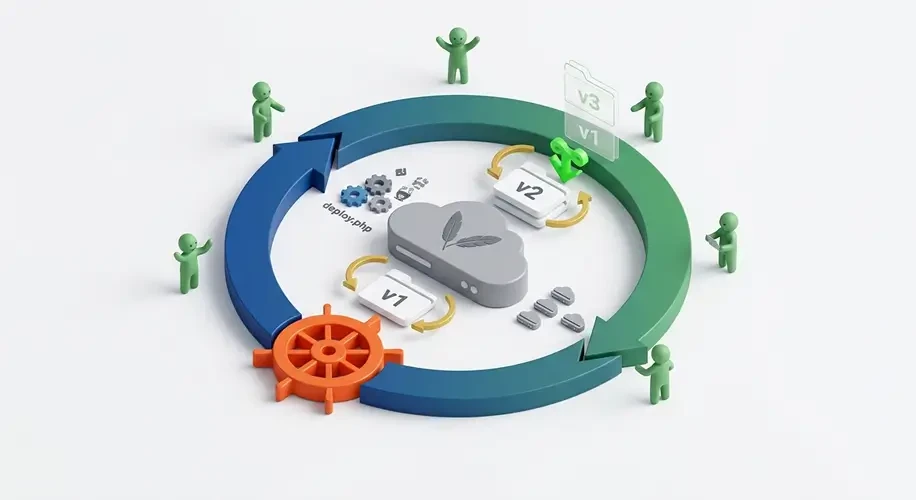
Deployer is a PHP-based deployment tool with native Laravel support. Its atomic deployment model eliminates the downtime window between code upload and service restart that occurs with naive rsync-and-restart deployments.
How Atomic Deployment Works
Deployer maintains a releases/ directory on the server with the last five deployments. Each deployment creates a new release directory, compiles assets, runs migrations, and caches configuration. When ready, Deployer switches the current/ symlink atomically from the previous release to the new one. The switch takes a single filesystem operation - the application goes from running the old code to running the new code without a service restart or downtime window.
Migration Strategy for Zero-Downtime
Database migrations must be backward-compatible to support zero-downtime deployments. The old code runs against the new schema for a short period during deployment. Rules for migration compatibility: additive migrations (new columns, new tables) are safe; destructive migrations (dropping columns, renaming) require a multi-step deployment. Step 1: add the new column, deploy. Step 2: update code to use the new column, deploy. Step 3: remove the old column, deploy.
Stage 4: Post-Deployment Health Checks
A deployment that completes without errors is not necessarily a successful deployment. Post-deployment health checks verify that the application is actually working after the code switch.
Endpoint Health Check
Create a /health route that checks application status: database connectivity, Redis connectivity, queue worker status, and storage disk accessibility. The route returns 200 OK with a JSON status payload or 503 Service Unavailable if any dependency is failing. The CI/CD pipeline calls this endpoint after deployment and fails the pipeline (triggering rollback) if it returns non-200.
Queue Worker Health Check
Laravel Horizon provides a health endpoint at /horizon/check. After deployment, queue workers must be restarted to pick up new code. Deployer's Laravel recipe handles this automatically with php artisan horizon:terminate followed by supervisor restarting Horizon. The health check verifies Horizon is running and processing jobs within 30 seconds of deployment.
Rollback Strategy
Define the rollback strategy before the first production deployment. A rollback that is figured out under incident pressure takes longer and makes more mistakes than one that is a documented, tested procedure.
Deployer rollback: deployer rollback production switches the current/ symlink back to the previous release. This is instantaneous - it takes one filesystem operation. Rollback does not reverse migrations (which is why backward-compatible migrations are essential).
Migration rollback: if a deployment included a migration that caused problems, php artisan migrate:rollback reverts the most recent migration batch. Test migration rollback in staging before every production deployment that includes migrations - a migration rollback that has never been tested in staging should not be the first execution under production incident pressure.
Feature flags: for high-risk feature launches, deploy the code with the feature behind a flag that is initially off. Enable the flag for a subset of users first. If problems are detected, disable the flag - no deployment or rollback required. Laravel Pennant provides a built-in feature flag system from Laravel 10 onwards.
CI/CD Pipeline Setup for Your Laravel Project We deliver a working four-stage pipeline as a day-one project deliverable. |
Environment and Secrets Management in the Pipeline
Environment-specific configuration (database credentials, API keys, queue connection details) must not live in the repository. Use GitHub Secrets for values the pipeline needs at deploy time. Reference secrets in the GitHub Actions workflow YAML as env variables injected at runtime.
For production servers, use a secrets manager (AWS Secrets Manager, HashiCorp Vault, or Doppler) to inject secrets into the .env file at deployment time. Deployer can run a secrets-fetch command as part of the deployment hook before php artisan config:cache. This ensures the application server never stores long-lived plaintext secrets.
For the complete secrets management strategy including rotation policies and production secret storage, see Security Blueprint for Enterprise Laravel Applications.
Conclusion
A complete Laravel CI/CD pipeline - static analysis, automated tests, zero-downtime deployment, post-deployment health checks - provides the confidence to deploy to production multiple times per day without anxiety. The pipeline is a one-time investment that pays back on every subsequent deployment. Our Laravel development services include CI/CD pipeline setup as a standard deliverable on all engagements - we hand over a working pipeline on day one of the project, not as an end-of-engagement addition.
FAQ's
-
How do I set up CI/CD for a Laravel application?
Use GitHub Actions with a four-stage workflow: (1) PHP CS Fixer and PHPStan static analysis, (2) Pest tests with a dedicated test database, (3) Deployer zero-downtime deployment to production, (4) endpoint health check after deployment. The complete workflow YAML for a standard Laravel application fits in under 100 lines. The Deployer Laravel recipe handles migration, cache, and queue restart automatically.
-
How do I deploy a Laravel application with zero downtime?
Use Deployer's atomic symlink deployment. Deployer creates a new release directory, compiles assets, runs migrations, caches configuration, and switches the current/ symlink atomically. The switch is instantaneous - the application goes from old code to new code with one filesystem operation, no service restart, no downtime window.
-
What is the rollback strategy for a Laravel deployment?
Deployer maintains the last five releases on the server. Running 'deployer rollback production' switches the current/ symlink back to the previous release instantly. Plan migration rollback separately - write backward-compatible migrations so rollback does not require a database revert. For high-risk features, use Laravel Pennant feature flags to disable without a deployment.
-
How do I manage environment secrets in a Laravel CI/CD pipeline?
Store secrets in GitHub Secrets and inject them into the deployment environment as runtime variables. For production servers, use a secrets manager (AWS Secrets Manager, HashiCorp Vault, or Doppler) that injects secrets into the .env file at deployment time rather than storing them in the repository or on the server long-term.
With over 11 years of experience in web application development and project management, I excel in leading cross-functional teams to deliver innovative digital solutions. My expertise spans eCommerce platforms, ERP systems, and JS & PHP-based frameworks, including WordPress, React JS, and Laravel. As a Technical Project Manager, I specialize in strategic planning, system design, and end-to-end project execution, transforming complex ideas into scalable, high-impact applications.
Table of Contents
Get Started with Acquaint Softtech
- 13+ Years Delivering Software Excellence
- 1300+ Projects Delivered With Precision
- Official Laravel & Laravel News Partner
- Official Statamic Partner
Related Reading

Why Businesses Choose Laravel for Scalable Applications
Over 1.5M websites run on Laravel. See why companies trust Laravel development services for scalable SaaS, enterprise modernization, API integrations, and long-term maintainability.

Mukesh Ram
March 2, 2026
Top Laravel Development Companies to Hire in 2026
Laravel is an open-source PHP framework based on the Model-View-Controller architecture, widely used to build secure and scalable web applications. BuiltWith reports that over 1.2 million live websites worldwide have used Laravel. Making it a trusted choice when selecting an experienced Laravel development company for modern backend systems.
However, searching for top Laravel development companies reveals hundreds of service providers, making evaluation time-consuming and complex. To simplify this process, we analyzed 100+ Laravel firms, shortlisted the top companies with 10+ years of experience, and focused on teams with proven large-scale project delivery, helping businesses identify reliable Laravel partners faster.

Zubair Pateljiwala
May 29, 2023
Laravel Partner vs Any Laravel Agency
Any agency can say they do Laravel. Only a handful are Official Laravel Partners. Here is what the certification actually means, what it requires, and how to verify it takes 30 seconds.

Acquaint Softtech
March 14, 2026India (Head Office)
203/204, Shapath-II, Near Silver Leaf Hotel, Opp. Rajpath Club, SG Highway, Ahmedabad-380054, Gujarat
USA
7838 Camino Cielo St, Highland, CA 92346
UK
The Powerhouse, 21 Woodthorpe Road, Ashford, England, TW15 2RP
New Zealand
42 Exler Place, Avondale, Auckland 0600, New Zealand
Canada
141 Skyview Bay NE , Calgary, Alberta, T3N 2K6