

App Crashes Every Traffic Spike: The Infrastructure a DevOps Engineer Builds to Stop It
If your app crashes every time traffic spikes, the problem is infrastructure gaps, not code. Here is what a DevOps engineer diagnoses, builds, and delivers in the first 30 days.

Taukir katava
As a DevOps Engineer at Acquaint Softtech, a software development partner, one of the most urgent calls I receive is from a CTO whose platform just went down during a live event, a product launch, or a sudden press mention. The app worked fine yesterday. Today it is returning 502 errors for 40% of users because traffic is three times the normal level. This is not a bug in the application code. It is a gap in the infrastructure architecture. This article covers what causes traffic spike failures, what a DevOps engineer builds to prevent them, and what that infrastructure costs in 2026.

- CTOs and engineering leads whose application slows down or goes offline during traffic spikes
- SaaS founders preparing for a product launch, press feature, or marketing campaign that will bring sudden traffic
- Gaming or media platforms that experience predictable traffic peaks (live events, tournaments, news cycles) and cannot guarantee uptime during them
- Companies that have had a production incident caused by a traffic spike and need to prevent the next one
A traffic spike incident follows a predictable pattern. Traffic increases faster than the application's current server capacity. Response times climbs. The database connection pool exhausts. Errors start appearing for a growing percentage of users. By the time the on-call engineer responds, the spike may have already peaked and traffic is returning to normal. The damage is done: user trust, revenue loss, and a support queue that takes days to clear. The infrastructure problem that allowed it to happen is still there.
Traffic spike infrastructure is closely related to the deployment reliability work covered in the Blue-Green vs Canary deployment guide. A platform that crashes under traffic is also frequently a platform where deployments cause downtime. The DevOps engineer fixes both problems in the same engagement because they share the same infrastructure root cause.
Why Apps Crash Under Traffic Spikes: The 5 Root Causes
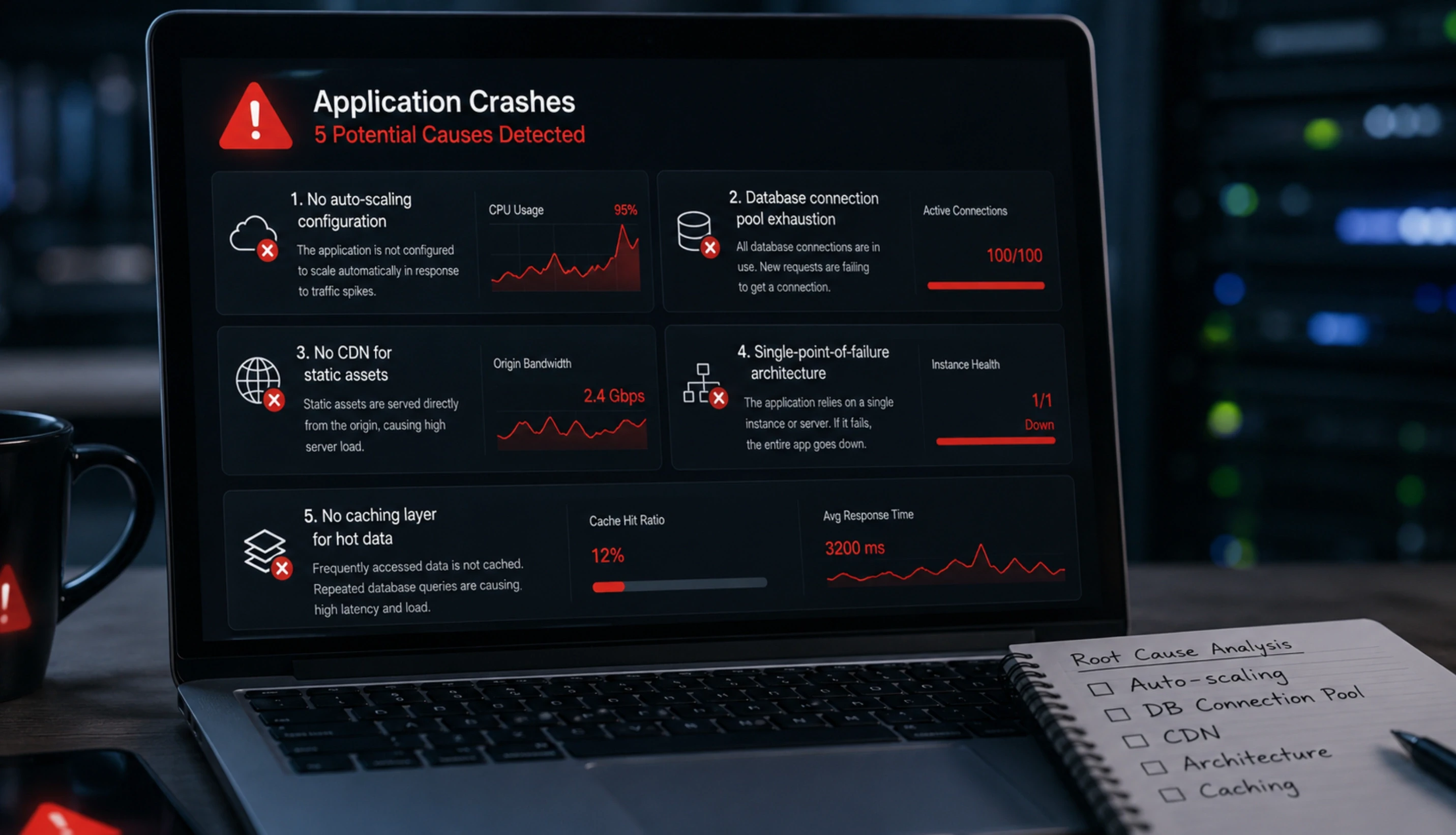
Traffic spike crashes are almost never caused by a single problem. They are caused by multiple infrastructure gaps that are each individually manageable at normal traffic but compound under load. Here are the five most common root causes, in order of frequency.
No auto-scaling configuration |
The application runs on a fixed number of servers. When traffic exceeds their capacity, requests queue, response times spike, and eventually the server returns errors. Auto-scaling solves this by adding server capacity automatically when CPU or request volume crosses a threshold. On AWS, this is EC2 Auto Scaling with Launch Templates. Without it, every traffic spike is a potential incident. |
Database connection pool exhaustion |
The application server opens connections to the database as requests arrive. Each connection consumes database resources. Under high traffic, new requests cannot get a connection and fail. The fix involves connection pooling configuration (PgBouncer for PostgreSQL, or the built-in connection pool in MongoDB Atlas), query optimisation to reduce connection hold time, and read replica routing for read-heavy traffic. |
No CDN for static assets |
Every request for a static asset (images, CSS, JavaScript) hits the origin server. Under high traffic, the origin server spends significant capacity serving files it should not be handling. A CDN (CloudFront on AWS, Azure Front Door, GCP Cloud CDN) serves static assets from edge nodes near the user. The origin server handles only dynamic requests. This alone can reduce origin server load by 40 to 70% during a traffic spike. |
Single-point-of-failure architecture |
The application runs as a single instance or in a single availability zone. A traffic spike that overwhelms one instance, or an instance failure during high load, takes the entire application offline. High-availability architecture distributes the application across multiple instances behind a load balancer, with health checks that route traffic away from unhealthy instances automatically. |
No caching layer for hot data |
Every user request triggers a fresh database query, even for data that changes infrequently. Under high traffic, the database becomes the bottleneck. A Redis or ElastiCache caching layer stores frequently accessed data in memory. Database queries for cached data are eliminated, dramatically reducing database load during spikes. |
Recognised One of These Root Causes in Your Platform? Let a DevOps Engineer Diagnose It.
Tell Acquaint Softtech what happens during your traffic spikes: at what traffic level does performance degrade, what errors appear, and which layer (server, database, or network) seems to fail first. A vetted DevOps engineer will identify the specific root cause and send a fix plan within the first week of engagement.
What a DevOps Engineer Builds: The Scalable Infrastructure Stack
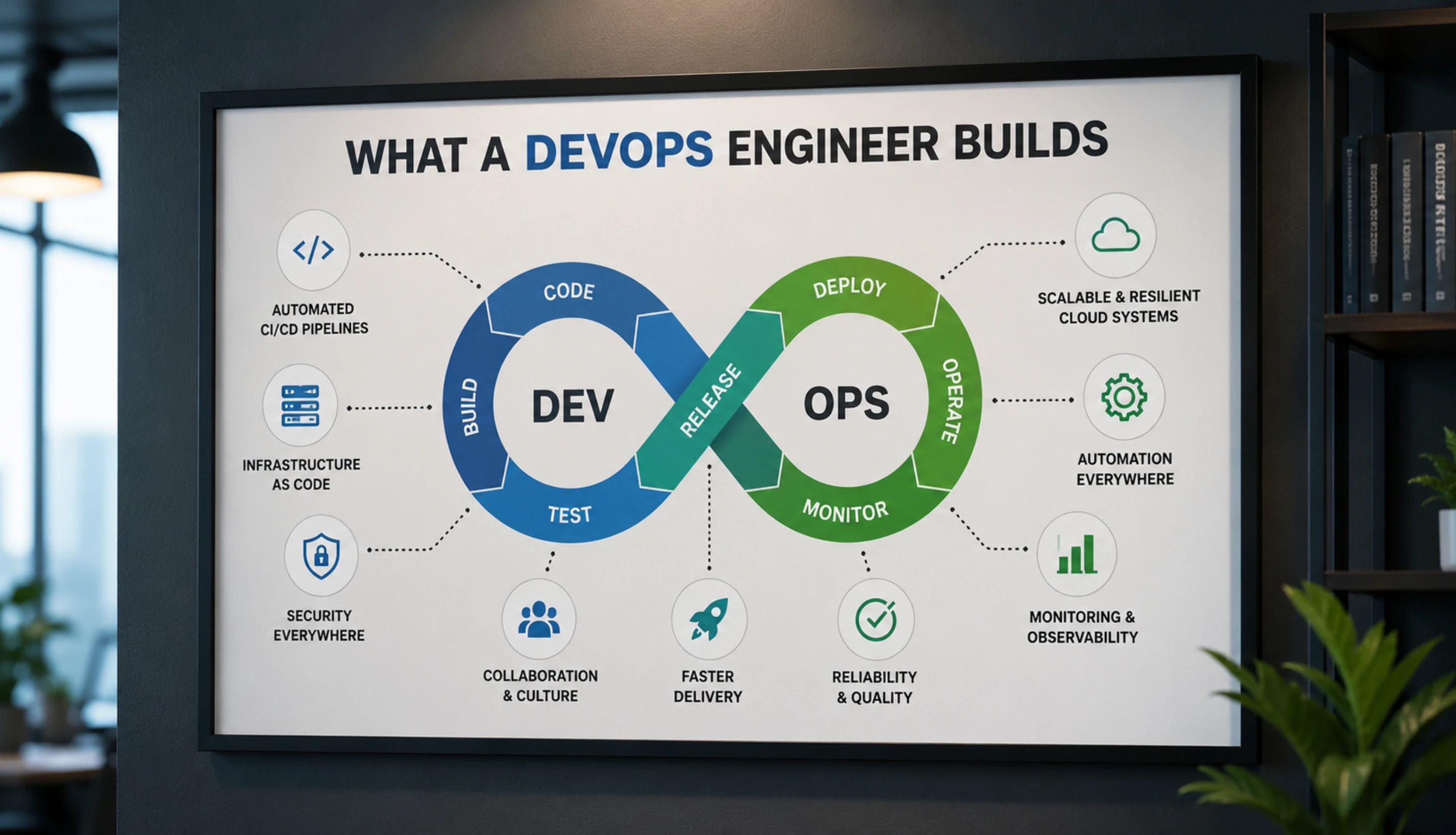
The infrastructure a DevOps engineer build to handle traffic spikes is not a single fix. It is a layered architecture where each layer handles a different type of load and reduces the pressure on the layers beneath it. Here is what that stack looks like from the top down.
Layer 1: CDN and Edge (CloudFront / Azure Front Door / GCP CDN)
The outermost layer. Handles all static asset requests at edge nodes close to the user. Absorbs DDoS-scale traffic patterns that would overwhelm origin servers. Also handles SSL termination and geographic routing. On AWS, CloudFront with an S3 origin for static assets and an ALB origin for dynamic requests is the standard configuration. Setup time: 1 to 2 days. A platform without a CDN during a traffic spike is fighting with one hand tied behind its back.
Layer 2: Load Balancer (AWS ALB / Azure Application Gateway)
Distributes incoming requests across multiple application server instances. Performs health checks on each instance and routes traffic away from unhealthy ones. Enables SSL offloading so application servers do not spend compute on encryption. On AWS, the Application Load Balancer (ALB) is the standard configuration for web applications. It integrates directly with Auto Scaling groups to add instances as they come online.
Layer 3: Auto-Scaling Application Servers
The application tier runs on an Auto Scaling group with Launch Templates. When CPU utilisation or request count crosses a defined threshold, new instances launch automatically. When traffic drops, instances terminate to reduce cost. Scaling policies can be predictive (based on time of day) or reactive (based on live metrics). For gaming and media platforms with predictable peak windows, scheduled scaling prevents cold-start latency during the spike.
Layer 4: Caching Layer (Redis / ElastiCache)
A Redis cluster sits between the application servers and the database. Hot data (frequently accessed, infrequently changing) is cached in memory. Read requests for cached data return in under 1 millisecond without touching the database. Under high traffic, the cache hit rate is the single most important metric for database protection. A DevOps engineer configures cache eviction policies, TTL (time to live) values, and cache-aside or write-through patterns to match the application's data access patterns.
Layer 5: Database Scaling and Connection Management
The database tier is configured with connection pooling and read replicas. Connection pooling (PgBouncer for PostgreSQL, built-in pooling in MongoDB Atlas) limits the total connections to the database and queues excess requests rather than failing them. Read replicas handle read traffic, leaving the primary database with capacity for write operations. For AWS RDS, Multi-AZ deployment provides automatic failover if the primary database instance fails under load.
The Kubernetes layer above this stack, for platforms that have containerised their application, is covered in the Kubernetes for startups guide. Kubernetes adds orchestration capabilities including pod auto-scaling and node auto-scaling that complement the EC2 auto-scaling approach described above for non-containerised platforms.
Want This Infrastructure Built for Your Platform? Acquaint Softtech Has the DevOps Engineers to Do It.
Taukir and the Acquaint Softtech DevOps team have built scalable infrastructure for gaming platforms handling millions of concurrent users, sports media platforms serving live match traffic, and mobile gaming platforms with unpredictable global traffic patterns. Tell us your cloud provider, current traffic level, and peak traffic target. Matched DevOps profile in 24 hours.
What the Infrastructure Costs: 2026 Numbers
The cost of traffic spike infrastructure has two components: the DevOps engineer's time to design and implement it, and the ongoing cloud infrastructure cost to run it.
Infrastructure component | Setup cost (DevOps time) | Monthly running cost |
CDN setup (CloudFront + S3) | 1 to 2 days: $1,400 to $3,600 | $20 to $200/month depending on traffic volume |
ALB and load balancer config | 0.5 to 1 day: $700 to $1,800 | $18/month + data transfer |
Auto Scaling group + Launch Template | 1 to 2 days: $1,400 to $3,600 | Pay for actual instances used; standby instances minimal |
Redis / ElastiCache cluster | 0.5 to 1 day: $700 to $1,800 | $50 to $300/month depending on node size |
RDS Multi-AZ + connection pooling | 1 to 2 days: $1,400 to $3,600 | 2x single-AZ RDS cost; varies by instance type |
Full stack (all 5 layers) | 4 to 8 days total: $5,600 to $14,400 | $150 to $800/month infrastructure overhead |
What the ROI looks like
A gaming platform that generates $50,000/day in revenue and crashes for 2 hours during a traffic spike loses approximately $4,200 in direct revenue from that incident.
One traffic spike incident pays for the full 8-day DevOps infrastructure setup at Acquaint Softtech rates.
A DevOps engineer on a monthly retainer ($3,200/month) who prevents one incident per month produces positive ROI on any platform generating more than $7,000/day in revenue.
For platforms below that revenue level: the infrastructure setup cost is $5,600 to $14,400.
The ongoing infrastructure overhead is $150 to $800/month.
This is the cost of not crashing during your next traffic spike.
The full DevOps engineer cost comparison by region and seniority, covering hourly rates and monthly retainer structures, is in the DevOps engineer cost guide.
Acquaint Softtech's hire DevOps engineers service provides vetted engineers with verified scalability infrastructure experience across AWS, Azure, and GCP. Profiles delivered within 24 hours. Engineer in your first standup in 48 hours.
For individual DevOps capacity, our staff augmentation model provides a dedicated engineer on a monthly retainer. For a vendor-managed DevOps function, dedicated development teams covers the full team structure.
App Still Crashing Under Traffic? Start With a Scalability Audit in the First Week.
Acquaint Softtech DevOps engineers audit your current infrastructure and identify the specific components missing from your scalability stack. The audit findings and priority fix plan are delivered in the first week of engagement. Monthly retainer from $3,200 for a full-time dedicated DevOps engineer. Tell us your current cloud provider and traffic profile.
Frequently Asked Questions
-
Why does my app crash specifically during traffic spikes but work fine at normal traffic?
Because infrastructure problems that are invisible at normal traffic become critical at peak. A fixed server count that handles 500 concurrent users without problems will fail at 2,000 concurrent users. A database connection pool that is never fully utilised at normal traffic exhausts instantly when 5x the normal users arrive simultaneously. Traffic spikes expose infrastructure gaps that normal load does not reveal.
-
What is auto-scaling and how does it prevent traffic spike crashes?
Auto-scaling automatically adds new server instances when traffic exceeds defined thresholds and removes them when traffic drops. On AWS EC2, an Auto Scaling group monitors CPU utilisation and request count. When either metric crosses the threshold you set, a new instance launches from a Launch Template (a pre-configured server image). New instances are added behind the load balancer automatically. The result: your platform grows its own capacity in response to demand rather than failing under it.
-
How quickly can a DevOps engineer prevent the next traffic spike crash?
For a platform with no scalability infrastructure at all, a DevOps engineer implements the most critical components, CDN and auto-scaling, in 3 to 5 days. This covers the majority of traffic spike protection. The full 5-layer stack takes 4 to 8 days. If you have a known traffic event in the near future, the critical path items can be prioritised and delivered first.
-
How much does auto-scaling cost to run on AWS?
Auto-scaling itself has no direct cost. You pay only for the EC2 instances that are actually running. During a traffic spike, additional instances launch and you are billed for the time they run. When traffic drops, the instances terminate and billing stops. For most web applications, the cost of auto-scaling instances during a 2-hour spike is less than $50. The cost of not having it during a production incident is typically orders of magnitude higher.
-
Can a DevOps engineer prevent all traffic spike crashes?
A properly designed scalability stack with auto-scaling, CDN, caching, and database scaling handles most traffic spike scenarios. The limits are: a spike that grows faster than AWS auto-scaling can provision new instances (typically faster than 2 to 3 minutes), a database schema that produces queries too slow to cache effectively, or application code with architectural bottlenecks that no infrastructure change can solve. A DevOps engineer identifies which category applies to your platform during the initial audit.
-
How much does it cost to hire an Acquaint Softtech DevOps engineer for scalability work?
Acquaint Softtech DevOps engineers start at $22/hour or $3,200/month for a full-time dedicated engineer. A full scalability infrastructure setup takes 4 to 8 days and is absorbed into the first sprint of the engagement. From initial brief to a DevOps engineer in your first standup: 48 hours. From first standup to full scalability stack deployed: 7 to 14 days depending on platform complexity.
-
Is there a difference between handling traffic spikes and handling sustained high traffic growth?
Yes. Traffic spikes are sudden, short-duration increases. Sustained high traffic growth is gradual and predictable. The auto-scaling architecture handles both, but the configuration differs. For spikes, aggressive scale-out thresholds and pre-warmed launch templates are the priority. For sustained growth, capacity planning, database sharding strategy, and microservices decomposition become relevant as the platform approaches its architecture limits.
Taukir Katava is a DevOps Engineer at Acquaint Softtech with 4+ years of experience across AWS, Azure, and GCP. He specialises in Kubernetes cluster administration, CI/CD pipeline automation, and cloud infrastructure design for high-traffic platforms. Taukir writes about the practical side of production DevOps: what infrastructure decisions cost and what they actually deliver.
Table of Contents
Get Started with Acquaint Softtech
- 13+ Years Delivering Software Excellence
- 1300+ Projects Delivered With Precision
- Official Laravel & Laravel News Partner
- Official Statamic Partner
Related Reading
The Complete Guide to Hiring a DevOps Engineer in 2026: CI/CD, Cloud, Kubernetes, and What It All Costs
Everything you need before hiring a DevOps engineer in 2026. What the role covers, CI/CD to Kubernetes, what it costs in India vs the US, and how to start with a vetted engineer in 48 hours.

Acquaint Softtech
May 1, 2026
GitHub Actions vs Jenkins vs GitLab CI: Which CI/CD Tool Should You Hire a DevOps Engineer to Implement?
GitHub Actions, Jenkins, and GitLab CI each win in a different context. Here is the honest comparison from a DevOps engineer who has implemented all three in production, with the 5-question decision framework.
Taukir katava
May 5, 2026
Deployment Pipeline Taking Hours: What Hiring a DevOps Engineer Cuts It Down To
A deployment pipeline that takes hours is costing your business more than just developer time. Here is what a DevOps engineer diagnoses, fixes first, and delivers in the first 30 days.
Taukir katava
May 4, 2026India (Head Office)
203/204, Shapath-II, Near Silver Leaf Hotel, Opp. Rajpath Club, SG Highway, Ahmedabad-380054, Gujarat
USA
7838 Camino Cielo St, Highland, CA 92346
UK
The Powerhouse, 21 Woodthorpe Road, Ashford, England, TW15 2RP
New Zealand
42 Exler Place, Avondale, Auckland 0600, New Zealand
Canada
141 Skyview Bay NE , Calgary, Alberta, T3N 2K6