

How to Build an AI Chatbot With the MERN Stack (Step-by-Step)
To build an AI chatbot with the MERN stack, store your content and its embeddings in MongoDB, build an Express API on Node.js that retrieves relevant content and calls a language model, and build a React chat interface that streams the answers. Add guardrails, testing and monitoring before launch.

Chirag Daxini
Building an AI chatbot with the MERN stack means using MongoDB for your content and conversation history, Express and Node.js for the chat API and model calls, and React for the chat interface. The stack works well because JavaScript runs end to end and MongoDB can store vector embeddings next to your application data. Our MERN AI chatbot development team builds production chatbots on exactly this architecture.

- You run a MERN app and want to add an AI chatbot that answers from your own content.
- You want to understand the architecture before you build or hire.
- You need realistic costs and timelines for a production chatbot.
- You are a CTO, product owner, founder or engineering lead in the US, UK, Europe, Australia or New Zealand.
Most tutorials stop at a demo that sends a message to a model and prints the reply. This guide goes further: grounding answers in your own data, keeping keys secure, testing accuracy and controlling costs, which is what separates a demo from a chatbot customers can rely on.
If you are adding AI to an existing MERN product rather than building from scratch, the same steps apply. Our MERN AI integration work covers chatbots, semantic search and agent workflows on one stack.
How Does an AI Chatbot Work on the MERN Stack?
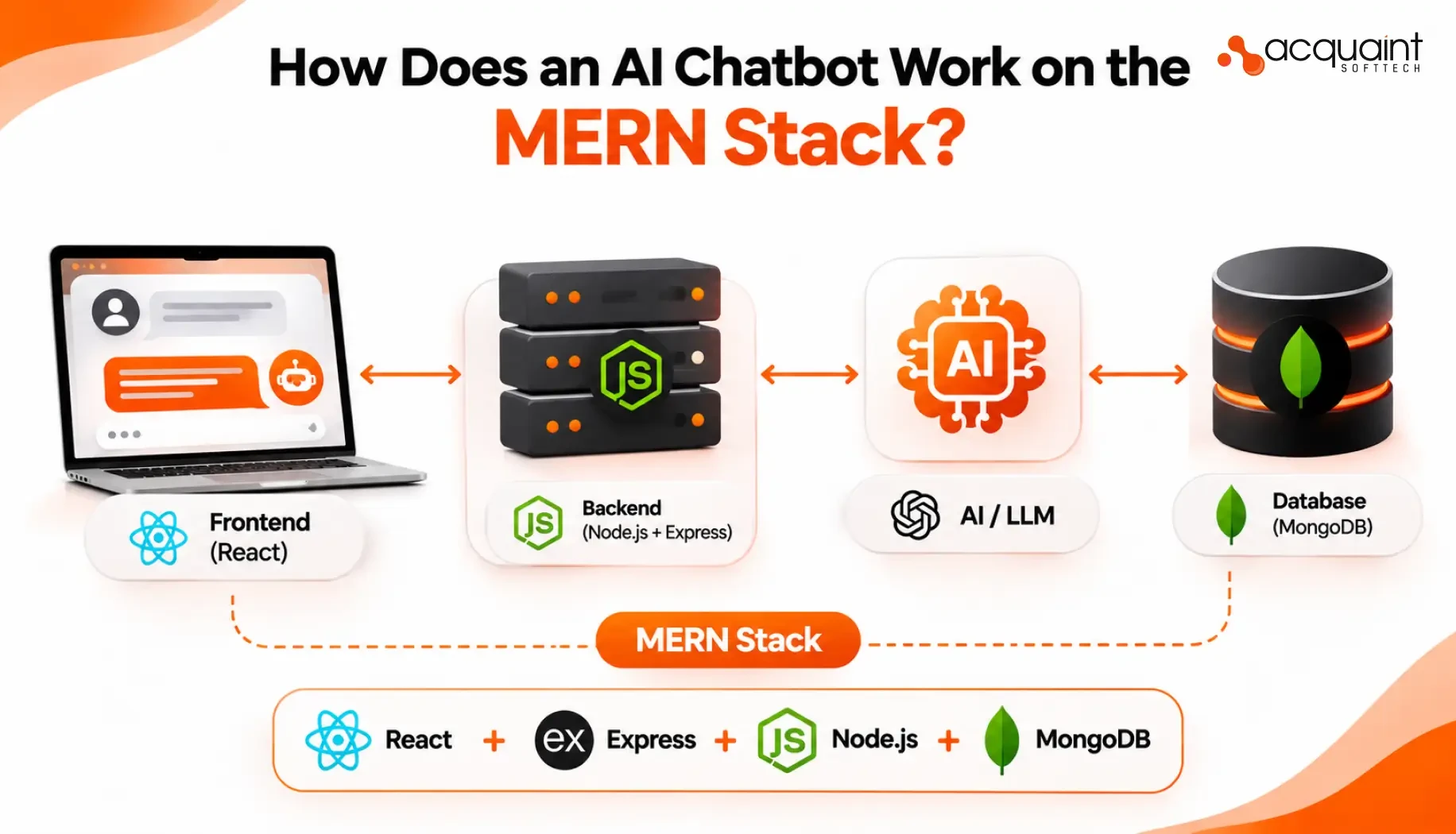
A production MERN chatbot has four layers. Each one maps to a part of the stack.
Layer | MERN component | Job |
Chat interface | React | Message list, input, streaming replies |
Chat API | Express on Node.js | Validation, retrieval, model calls |
Knowledge and memory | MongoDB | Content chunks, embeddings, conversations |
Language model | Hosted model API | Writes the answer from retrieved context |
The key design choice is retrieval-augmented generation (RAG): instead of asking the model to answer from memory, the API first finds the most relevant pieces of your content and passes them to the model. With MongoDB Atlas Vector Search, those embeddings live in the same database as your application, so you do not need a separate vector store.
Can You Build a Chatbot With React and Node.js?
Yes. React handles the chat interface and Node.js runs the server that talks to the language model. The model call must always happen on the Node.js server, never in React, so your API key stays private and you can apply validation, rate limits and logging in one place.
How to Build an AI Chatbot With the MERN Stack: 8 Steps
Step 1: Define Scope and Collect Test Questions
Pick one job for the chatbot, such as answering support questions, and collect 50 to 200 real questions with expected answers, including questions it should decline. This becomes your evaluation set.
Step 2: Set Up the MERN Project
Create an Express server on Node.js, a React client and a MongoDB database. Keep the model API key in an environment variable or secret manager on the server only.
Step 3: Prepare and Index Your Content
Split help articles, policies and product data into small chunks, create an embedding for each chunk and store it in MongoDB with its source link. Then create a vector index on the embedding field.
Step 4: Retrieve Relevant Content
When a question arrives, embed it and run a vector search to find the closest chunks:
const results = await Doc.aggregate([
  { $vectorSearch: {
      index: "docs_vector_index",
      path: "embedding",
      queryVector: await embed(question),
      numCandidates: 100,
      limit: 5
  } },
  { $project: { text: 1, source: 1,
      score: { $meta: "vectorSearchScore" } } }
]);
Step 5: Build the Chat API in Express
The API validates the message, retrieves context, calls the model and saves the conversation:
router.post("/chat", async (req, res, next) => {
  try {
    const { conversationId, message } = req.body;
    if (!message || message.length > 2000) {
      return res.status(400).json({ error: "Invalid message" });
    }
    const context = await retrieveContext(message);
    const answer = await callModel({ message, context });
    await Conversation.findByIdAndUpdate(conversationId, {
      $push: { messages: [
        { role: "user", content: message },
        { role: "assistant", content: answer }
      ] }
    }, { upsert: true });
    res.json({ answer });
  } catch (err) { next(err); }
});
Step 6: Connect the Language Model
Inside callModel, send the model a system instruction, the retrieved chunks and the user’s question. Tell it to answer only from the provided context, cite the source and say when it does not know. Keep the provider behind this one function so you can switch models later without touching the rest of the app.
Step 7: Build the React Chat Interface
Build a message list, an input box, a loading state and error handling. For a smoother experience, stream the reply token by token from Express using server-sent events instead of waiting for the full answer.
const res = await fetch("/api/chat", {
  method: "POST",
  headers: { "Content-Type": "application/json" },
  body: JSON.stringify({ conversationId, message })
});
const { answer } = await res.json();
setMessages(prev => [...prev, { role: "assistant", content: answer }]);
Step 8: Test, Deploy and Monitor
Run the evaluation set from Step 1 and measure accuracy, groundedness and response time. After launch, track cost per conversation, unanswered questions and user feedback, and add the misses back into your content.
For the full checklist of what a production chatbot should include, see our AI chatbot development services, which cover RAG, human handover, permissions and evaluation.
Guardrails Every Production Chatbot Needs
Server-side keys only: never expose the model API key in React.
Rate limits and cost caps: per user and per account, so usage cannot spike unchecked.
Personal data redaction: strip sensitive details before they reach the model.
Prompt injection defence: treat retrieved text and user input as data, not instructions.
Human handover: route complex or sensitive questions to a person with the conversation history.
Clear AI disclosure: tell users they are talking to AI.
Disclosure is becoming a legal requirement. New York signed a chatbot law on 28 October 2026 that bars chatbots from claiming to be human, with penalties of up to $25,000 per violation, according to a 30 October 2026 AI news roundup.
Want a production-ready chatbot on your MERN app?
Our MERN and AI engineers can scope your chatbot, test it on your real questions and give you a build and running-cost estimate, with an NDA signed first.
How Much Does It Cost to Build an AI Chatbot?
A MERN AI chatbot proof of concept costs $12,000 to $20,000, and a production support chatbot typically costs $20,000 to $50,000. These are Acquaint Softtech’s published MERN chatbot prices:
Engagement | Price | Timeline |
Proof of concept chatbot | $12,000 to $20,000 | 3 to 4 weeks |
Production MERN chatbot | $20,000 to $50,000 | 6 to 10 weeks |
Enterprise multi-channel chatbot | $50,000 to $150,000+ | 12 to 20 weeks |
Model and database running costs | $500 to $2,000 per month | At moderate volume |
Running costs depend on conversation volume and model choice. A 1 November 2026 roundup of model releases reports one new API model at $1 per million input tokens and $5 per million output tokens, and routing simple questions to a cheaper model lowers the bill further.
MERN AI Chatbot in Practice
A US B2B SaaS company with 40,000 monthly active customers replaced a third-party support chatbot platform with a custom MERN AI chatbot built by Acquaint Softtech. The project is described on our MERN AI chatbot development page.
Measure | Result | Why it mattered | |
Ticket deflection | 62% in the first 90 days | Fewer tickets for the support team | |
Monthly running cost | $1,400 vs $6,700 before | Lower cost at the same volume | |
Time to launch | 9 weeks from proof of concept | Fast route to production | |
Evaluation set | 180 test questions | Accuracy measured before launch | |
Ready to build your AI chatbot?
Start with a 3 to 4 week proof of concept on your own content, with fixed pricing, full IP ownership and code delivered to your repository.
Frequently Asked Questions
-
How do I build an AI chatbot?
Define its scope, index your content with embeddings, build an API that retrieves context and calls a language model, build a chat interface, then test and monitor it.
-
Can I build a chatbot with React and Node.js?
Yes. React runs the chat interface and Node.js runs the API that securely calls the language model.
-
How much does it cost to build an AI chatbot?
A MERN chatbot proof of concept costs $12,000 to $20,000, and a production chatbot $20,000 to $50,000, plus monthly running costs.
-
Why use MongoDB for an AI chatbot?
It stores content, embeddings and conversation history together, so you can add vector search without a separate database.
-
How long does it take to build an AI chatbot with MERN?
A proof of concept takes 3 to 4 weeks and a production chatbot 6 to 10 weeks.
With over 11 years of experience in web application development and project management, I excel in leading cross-functional teams to deliver innovative digital solutions. My expertise spans eCommerce platforms, ERP systems, and JS & PHP-based frameworks, including WordPress, React JS, and Laravel. As a Technical Project Manager, I specialize in strategic planning, system design, and end-to-end project execution, transforming complex ideas into scalable, high-impact applications.
Table of Contents
Get Started with Acquaint Softtech
- 13+ Years Delivering Software Excellence
- 1300+ Projects Delivered With Precision
- Official Laravel & Laravel News Partner
- Official Statamic Partner
Related Blog

How MERN Stack SaaS Speeds Up Development and Revenue?
Explore how MERN stack SaaS accelerates time-to-market, supports scalable SaaS architecture, and powers fast revenue growth for startups.

Mukesh Ram
March 3, 2026
MERN Stack Development: A Complete Guide in 2024 | Part 1
Learn about MERN Stack Development, a versatile toolset for creating dynamic websites and apps using JavaScript for everything.
Mukesh Ram
August 29, 2024
Ways to Build Scalable Web Apps with MERN Stack Architecture
Discover how to build scalable web apps with MERN stack by structuring code, databases, and deployment workflows for modern growth.

Acquaint Softtech
August 26, 2025India (Head Office)
203/204, Shapath-II, Near Silver Leaf Hotel, Opp. Rajpath Club, SG Highway, Ahmedabad-380054, Gujarat
USA
7838 Camino Cielo St, Highland, CA 92346
UK
The Powerhouse, 21 Woodthorpe Road, Ashford, England, TW15 2RP
New Zealand
42 Exler Place, Avondale, Auckland 0600, New Zealand
Canada
141 Skyview Bay NE , Calgary, Alberta, T3N 2K6