

Construction Management Software: Project Tracking, Material Planning, and Contractor Coordination
Construction projects often fail due to poor coordination, delayed materials, scheduling conflicts, and unmanaged change orders. Construction management software acts as a real time coordination system connecting the site team, office, suppliers, and subcontractors to keep projects on track.

Manish Patel
As Head of Tech at Acquaint Softtech, I've sat in project reviews where a $40M commercial build was being managed from WhatsApp, Excel, and printed Gantt charts, and three subcontractors had booked the same crane for the same morning because no single system owned the schedule.
That’s a coordination problem, and construction management software exists to solve it. With strong Acquaint Softtech expertise in building scalable platforms through their software product development services, these gaps can be systematically addressed. When the framing crew doesn’t know the concrete pour is two days behind, they show up at a site that isn’t ready. When procurement misses a three-week steel delay, the project director finds out on Monday morning. When change orders are approved verbally and never logged, the project finishes $180,000 over budget with no paper trail to resolve it.

- Construction and real estate teams managing multiple projects with manual workflows.
- Developers and CTOs evaluating custom construction software vs Procore or Buildertrend.
- Companies needing centralised tracking for budgets, procurement, and subcontractors.
- PropTech founders building construction management and coordination platforms.
Construction management software eliminates these gaps by connecting the three systems most firms run separately, project schedule, financials, and site operations, into one data model. A concrete delay automatically updates the framing schedule, the steel delivery date, and the revised completion forecast, without anyone manually syncing four files. Our dedicated software development team for construction platforms builds exactly on this principle: one source of truth, every stakeholder working from the same data.
This article covers how it actually works, project tracking, material planning, contractor coordination, mobile field tools, and build-vs-buy, with costs and architecture. For broader context, see the PropTech platform development guide for 2026. Stack decisions are covered in the PHP vs Python vs Node.js comparison.
Why Standard Project Management Tools Fail Construction Sites
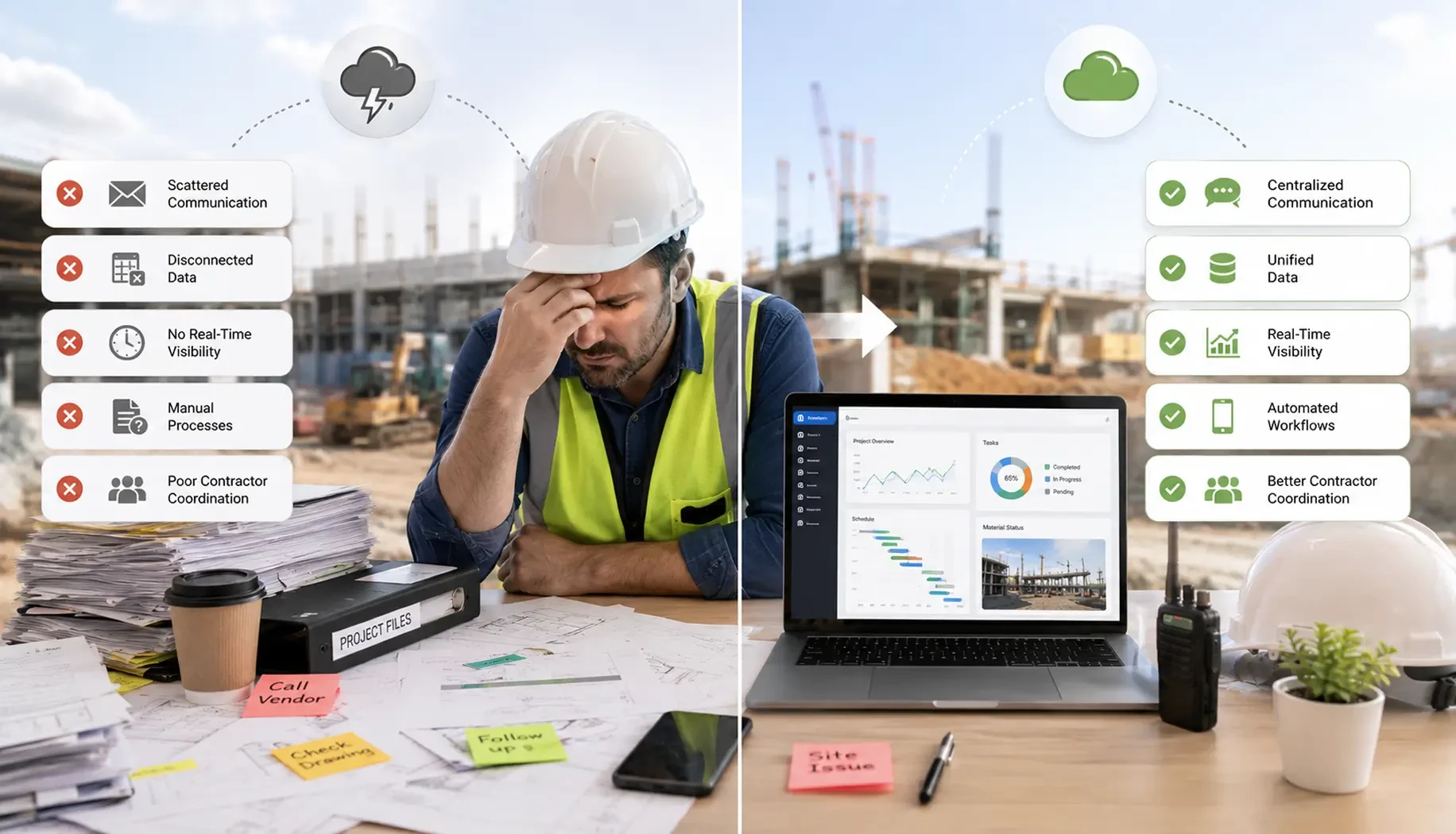
Asana, Monday.com, Jira, Paymo, Trello, and all the standard project management tools are built for knowledge work: tasks with descriptions, assignees, due dates, and status flags. They are excellent at managing software sprints, marketing campaigns, and content calendars. They fail at construction because construction does not run on tasks; it runs on dependencies, physical constraints, weather, inspections, permits, and the sequential logic of how a building is physically assembled.
The table below shows the specific capabilities that construction operations require and why generic project management tools cannot provide them. This is not a limitation of execution quality; it is a structural mismatch between the tool's data model and the construction's operational reality.
Construction Requirement | Generic Tools | Purpose Built CMS |
|---|---|---|
RFI Workflow | Managed through emails with missing history | Structured RFI tracking with approvals and schedule impact |
Submittal Management | File attachments without workflow | Approval workflow with revision and compliance tracking |
Change Order Management | Informal task updates | Formal cost, scope, and approval management |
Daily Site Logs | Basic task notes | Structured logs with weather, workforce, and photo records |
Inspection & Punch Lists | Simple checklists | Inspection records with pass/fail tracking and evidence |
Multi Trade Sequencing | Basic task dependencies | Hard dependency enforcement and critical path tracking |
The coordination cost of using the wrong tool
According to McKinsey Global Institute, large construction projects take 20 percent longer to finish than scheduled and run 80 per cent over budget on average. The leading cause is not poor craftsmanship — it is fragmented information flow between trades, between site and office, and between project phases. A purpose-built construction management platform is the coordination infrastructure that closes that information gap. Source: McKinsey Global Institute, Reinventing Construction, 2017 — updated industry benchmark still current in 2026.
Project Tracking Engine: Milestones, Critical Path, and Daily Site Logs
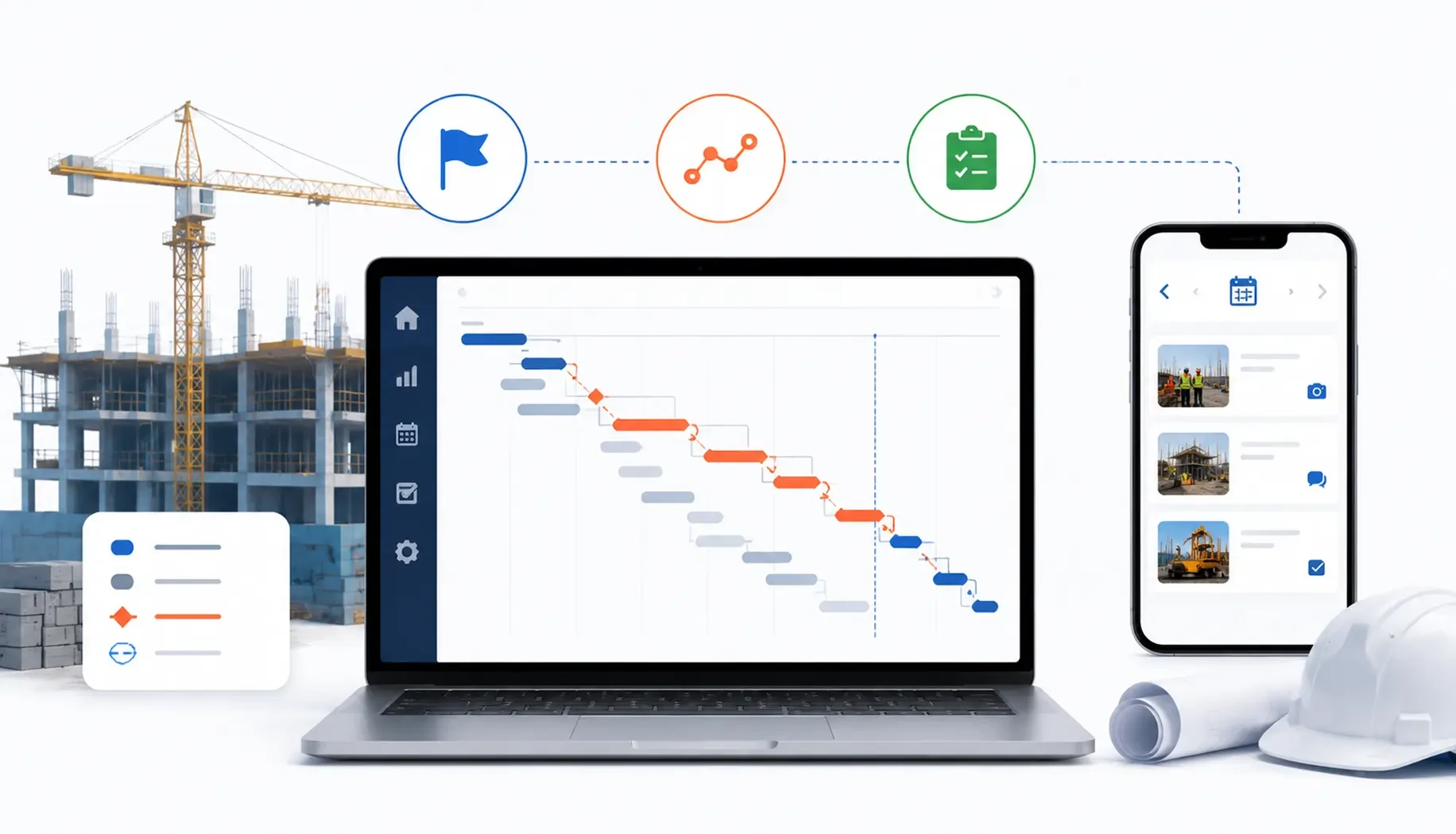
The project tracking engine is the operational centre of a construction management platform. It owns the master programme, the sequence of work across every trade, every phase, every site, and updates that programme in real time as work is completed, delayed, or resequenced.
Below is the four-phase construction lifecycle that the tracking engine must manage, followed by the specific modules it operates within each phase.
Construction Phase | Timeline | What the CMS Tracks in This Phase |
Phase 1: Pre-Construction | Weeks 1–6 | Design, permits, procurement planning, subcontractor selection |
Phase 2: Foundation & Structure | Weeks 7–18 | Excavation, concrete, structural framing, critical path work |
Phase 3: MEP & Envelope | Weeks 19–32 | Mechanical, Electrical, Plumbing, roofing, and cladding |
Phase 4: Fit-Out & Handover | Weeks 33–44 | Interior finishes, commissioning, punch list, and practical completion |
Project Tracking Module Architecture
Module | Purpose |
|---|---|
Programme Schedule Module | Manages project schedules, Gantt charts, task dependencies, milestones, and planned vs actual progress tracking |
Milestone Tracking Module | Tracks major contractual checkpoints and alerts teams about milestone risks before delays occur |
Daily Log Site Record Module | Records daily site activity, workforce, inspections, incidents, weather, and GPS tagged photos with digital signatures |
Critical Path Engine Module | Identifies tasks affecting project completion timelines and recalculates schedule impact after every update |
The project tracking database requires a database architecture that handles time-series programme data, recursive task dependency graphs, and real-time update propagation across thousands of concurrent task records on a single project. For construction companies managing 10 to 50 concurrent projects, the database architecture must handle cross-project reporting, portfolio-level milestone status, trade-specific schedule performance, and subcontractor delivery history, without full-table scans that slow dashboard load times.
The backend API powering the critical path engine and daily log sync is built on Laravel at Acquaint Softtech, chosen for its queue system, which handles real-time programme recalculation and milestone alert jobs cleanly at scale. Our hire Laravel developers page covers the specific team profile used across construction platform builds.
Need a Project Tracking Engine Built for Your Construction Programme?
Acquaint Softtech builds construction management platforms for developers and contractors managing 1 to 50+ concurrent projects. We design the WBS schema, critical path engine, and daily log mobile app before a line of code is written. Team structure and proposal within 48 hours.
Material Planning and Procurement: How to Stop Running Out of Steel on Friday
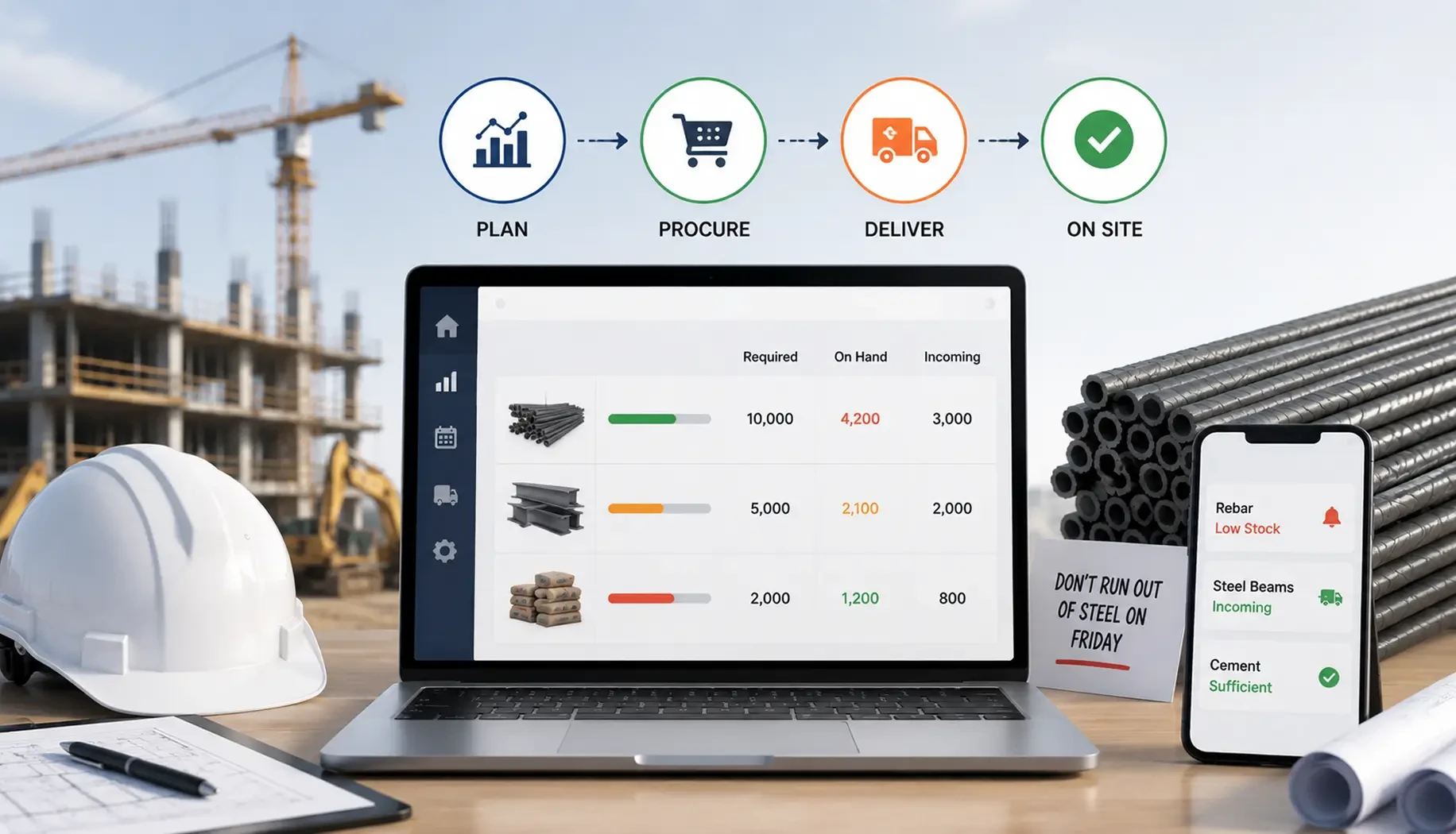
Material shortages stop projects. A missing structural steel delivery stops the framing crew for three days. A missing waterproofing membrane stops the external envelope from working while a weather window closes. Each stoppage costs the contractor in idle labour, extended equipment hire, and liquidated damages if the delay pushes past a contractual milestone. The material planning module in a construction management platform eliminates shortages by connecting the programme schedule to the procurement status of every material line item.
Below is the material planning workflow from specification through to on-site delivery, showing what happens at each stage and what the platform tracks.
Procurement Stage | Who Acts | What the CMS Tracks | Alert Triggered When |
Material takeoff and specification | Estimator/quantity surveyor at the design stage | Material type, quantity, specification reference, required-on-site date linked to programme task | The specification is not confirmed by the required procurement lead time before the task start date |
Supplier quotation and selection | Procurement manager | Supplier name, quoted price, delivery lead time, payment terms, comparison against budget rate | Quoted price exceeds budget rate by more than a configurable threshold (e.g., 5%) |
Purchase order issuance | Procurement manager | Purchase order number, supplier, material description, quantity, agreed price, delivery date, site delivery address | The purchase order is not issued by the procurement lock-in date for the programme task |
Supplier confirmation | Supplier | Confirmed delivery date, confirmed quantity, and dispatch notification when the material leaves the supplier | Confirmed delivery date is later than the required on-site date |
Site delivery and goods received | Site foreman/stores manager via mobile app | Delivery docket number, received quantity, condition on arrival, photo evidence, any shortfall or damage noted | Received quantity is less than the ordered quantity, or damage is noted on delivery |
Material reconciliation | Quantity surveyor | Actual material consumed vs estimated quantity, wastage percentage, variation to contract allowance | Actual consumption exceeds the estimated quantity by more than the contingency allowance |
Material Planning Dashboard: What the Project Director Sees
The material planning dashboard gives the project director a real-time view of every material line item's procurement status across the active programme. The dashboard surfaces three categories of material status:
On Track: Purchase order issued, delivery confirmed, date aligns with programme task start date. No action required.
At Risk: Purchase order issued, but the delivery date is within 5 days of the programme task start. Project director review required. Supplier to be contacted for delivery confirmation.
Critical: Purchase order not yet issued and procurement lead time has passed, OR confirmed delivery date is after programme task start date. Immediate escalation required. Programme impact to be calculated.
The material planning module integrates with the programme schedule via the task start date field. When the programme changes, and it always changes, the material planning dashboard updates automatically: a task pushed two weeks forward moves its associated material required-on-site date forward two weeks and recalculates the at-risk and critical status of every material line item linked to it. The backend development team at Acquaint Softtech builds this scheduling-to-procurement link as a trigger-based update system: programme task updates fire procurement status recalculations as a background job, so the dashboard is never stale.
Contractor Coordination Layer: Subcontractor Scheduling, RFI Workflow, and Payment Triggers
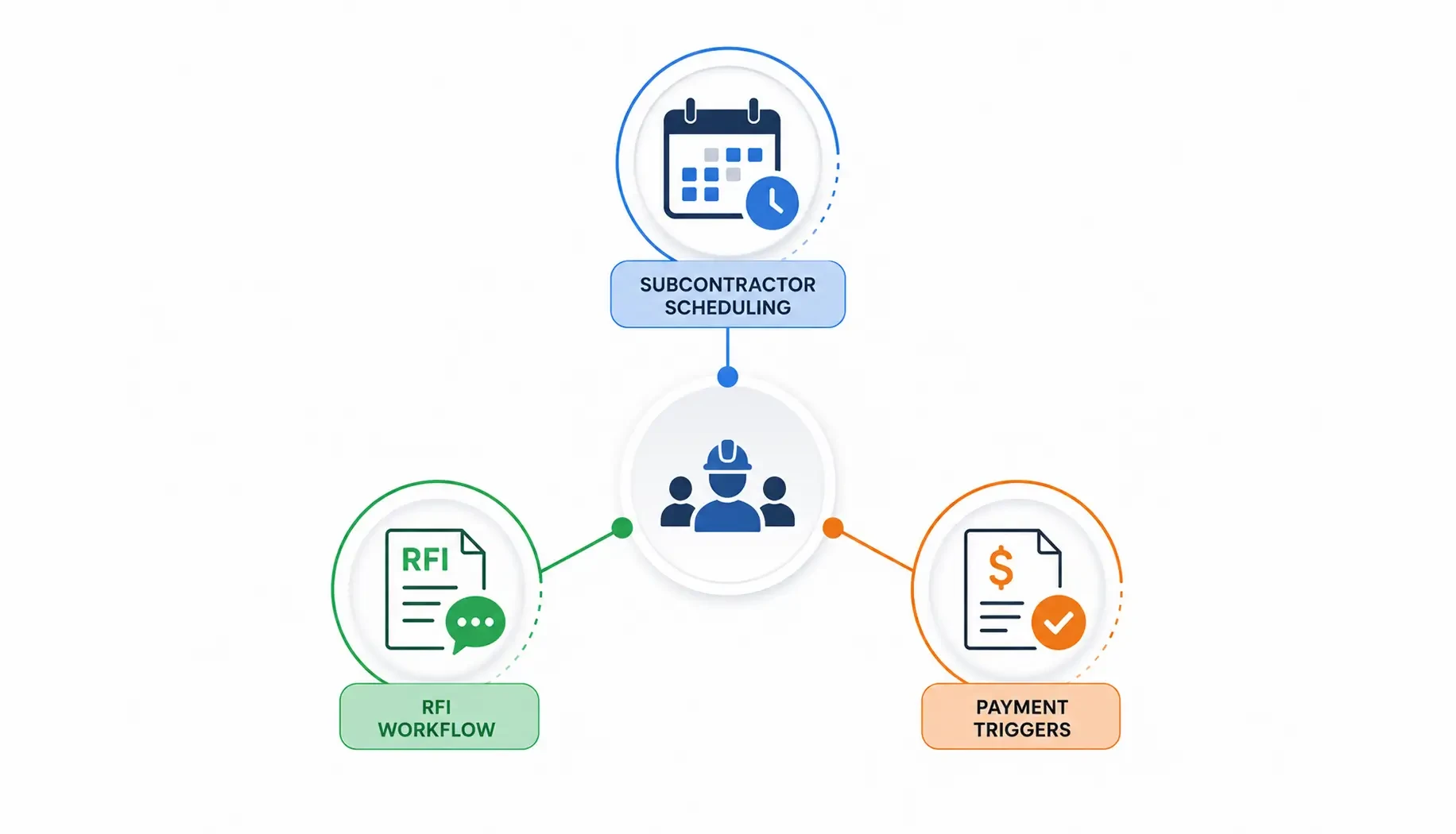
The contractor coordination layer is the multi-party interface between the main contractor and every subcontractor on the project. On a mid-size commercial build, that may be 15 to 30 subcontractors, structural, mechanical, electrical, plumbing, fire protection, facades, fit-out, landscaping, each with their own schedule, their own procurement requirements, and their own payment milestones. Coordinating this manually, via email and phone, is the single largest source of project delay and dispute in construction.
The coordination layer handles three operational areas: subcontractor scheduling, the RFI (Request for Information) workflow, and the payment certification chain. Below is how each works.
Subcontractor Scheduling
The subcontractor scheduling module holds the site access calendar for every trade. Each subcontractor is assigned their work areas, access periods, and resource requirements (crane bookings, scaffold access, temporary power) from the master programme. The subcontractor sees their schedule, confirms attendance, and flags conflicts from a subcontractor portal — a separate interface from the main contractor's project dashboard. The module tracks:
Trade start and finish dates per work area and floor level
Daily attendance confirmation by subcontractor (via mobile app sign-in at site gate)
Shared resource bookings: crane, hoist, concrete pump, scaffold, temporary power
Trade sequencing enforcement: Electrical cannot access the zone until framing inspection is passed
Early warning alerts: a subcontractor who has not confirmed attendance 48 hours before their scheduled start triggers an escalation to the site manager
RFI Workflow: From Site Question to Design Clarification
RFI Stage | Who Acts | Turnaround Target | What CMS Enforces |
RFI raised by subcontractor | Subcontractor submits via portal: question, affected drawing, urgency, photo evidence | N/A, submission | Mandatory fields: drawing number, affected work area, urgency classification. Incomplete submissions rejected. |
RFI reviewed by the main contractor | Site manager reviews for completeness, assigns to the design team | Same day as receipt | Unreviewed RFIs older than 4 hours are flagged to the site manager. Auto-escalation after 8 hours. |
RFI sent to the architect or engineer | Main contractor forwards to the design team with contextual notes | Within 24 hours of receipt | RFI clock starts on transmission. Design team receives an automatic reminder at 48 hours, 5 days. |
Design response received | The architect or engineer responds with clarification, a revised drawing, or an instruction | Target: 5 business days; contractual SLA varies | Overdue RFI responses flagged to the project director. The programme impact is calculated if the response is delayed. |
RFI closed and distributed | Main contractor distributes response to subcontractor, attaches to drawing register | Within 24 hours of response | Distribution confirmation logged. Subcontractor must acknowledge receipt via the portal. |
Programme impact assessed | The project director reviews if RFI response changes the scope or sequence | At RFI close | If RFI results in additional work, the change order module is triggered. If RFI results in a schedule delay, the critical path is recalculated. |
Contractor Payment Trigger Workflow
Subcontractor payments in construction are milestone-triggered and claim-based, not calendar-based. The subcontractor submits a payment claim at the end of each period, the main contractor assesses the claim against the completed work percentage, and a payment certificate is issued. The payment trigger module automates the assessment-to-certificate chain:
CLAIM Submission
Subcontractor submits payment claim via portal: work items completed, percentage of contract value claimed, supporting documentation (daily logs, delivery dockets, inspection records). The CMS validates the claim against the subcontract schedule of rates and the recorded daily logs.
ASSESS & Certify
The project quantity surveyor reviews the claim within the contractual response period (typically 10 to 15 business days, depending on jurisdiction and contract form). The CMS presents the claim line by line against the programme completion data, inspection records, and previous payment certificates. The quantity surveyor approves, modifies, or disputes each line item within the platform.
CERTIFY Payment
The approved amount becomes a payment certificate. The CMS issues the certificate to the subcontractor, records the certified amount against the subcontract value, updates the project cost report, and triggers the accounting system integration for payment processing.
RETENTION Tracking
Construction subcontracts typically retain 5 to 10 per cent of each payment until practical completion and the defects liability period ends. The CMS tracks retention balances per subcontractor, calculates release dates based on the programme, and generates retention release certificates automatically when the conditions are met.
Managing 10+ Subcontractors Across Multiple Sites Without a Coordination Platform?
Acquaint Softtech builds subcontractor scheduling, RFI workflow, and payment trigger modules for construction management platforms. We scope the contractor coordination layer before the first sprint and integrate it with your existing contract management process. Proposal in 48 hours.
The Field-to-Office Connection: Mobile Site Apps, Photo Logs, and Real-Time Dashboards
Field User | Mobile App Capability | Real Time Office Visibility |
|---|---|---|
Site Foreman | Daily logs, RFIs, photos, incident reports | Progress updates, photo evidence, delivery confirmations |
Subcontractor Supervisor | Attendance, task updates, payment claims | Trade progress and claim tracking |
Quality Inspector | Inspection checklists, defect reports | Inspection status and defect tracking |
Delivery Driver / Stores Manager | Delivery confirmation and quantity checks | Material receipt and procurement updates |
Project Director | Dashboard access, approvals, reports | Centralized project decisions and status updates |
Inspection logging and daily site records are not just operational tools; they are legal records under federal construction standards. OSHA's Construction Industry compliance page sets out the 29 CFR 1926 requirements for daily inspections, incident recording, and employer documentation obligations that every construction CMS must support. Platforms that capture GPS-tagged photos, timestamped daily logs, and signed foreman records are not over-engineering the data model; they are meeting a baseline legal requirement.
What the Real-Time Dashboard Shows
The office-facing dashboard aggregates field data into three views: the programme view, the financial view, and the operational view. Each updates within seconds of a field event being recorded.
Programme View
Overall project completion percentage against the planned. Critical path status. Milestone dates: planned vs forecast vs actual. Tasks at risk (within 7 days of the planned date and less than 50% complete). Inspection holds the blocking phase progress.
Financial View
Committed costs vs budget by trade and by phase. Change order value approved, pending, and disputed. Payment certificates issued vs subcontract values. Retention balance by subcontractor. Cost-to-complete forecast vs original contract sum.
Operational View
Subcontractor attendance today vs expected. Materials at a critical procurement status. Open RFIs by age and responsible party. Overdue inspections. Recent photo log from all active work areas. Open incidents not yet closed.
The mobile site app is built as a React Native application — iOS and Android from one codebase, with offline capability for areas of poor connectivity. The app stores actions locally when offline and syncs when connectivity is restored. This is not optional for construction: most active sites have unreliable LTE coverage in below-ground areas, plant rooms, and large floor plates. Our React Native app development team builds construction site apps with full offline-first architecture: the foreman can complete a daily log, submit an RFI, and record a material delivery in an underground car park with no signal, and the data synchronises to the platform the moment they walk back to street level.
Build vs Buy: How Custom CMS Compares to Procore, Buildertrend, and CoConstruct
The build-vs-buy decision for construction management software is more nuanced than in most software categories because the off-the-shelf options are genuinely capable for standard use cases. Procore is the enterprise standard. Buildertrend and CoConstruct (now merged into CoConstruct) serve residential construction well. There is also a middle category: no-code operations platforms like Quickbase that let construction teams assemble custom workflows without a full development engagement, which suits firms whose requirements sit between a standard product and a bespoke build. The decision hinges on whether your operation fits the standard model or departs from it in ways that the standard products cannot accommodate.
The three-way comparison below covers the dimensions that matter for a construction company's operational fit. Read it as a decision tool: where your requirements fall in the 'Custom Build' column is where an off-the-shelf product will cost you more in workarounds than a custom platform would cost to build.
Dimension | Custom Build | Commercial Platforms |
|---|---|---|
Best Fit | Custom workflows and multi project operations | Standard commercial or residential construction workflows |
Flexibility | Fully customizable modules, reporting, and integrations | Fixed workflows with limited customization |
Ownership & Cost | Full data ownership with long term build investment | Subscription based pricing with platform controlled data |
The Total Cost of Ownership comparison
A Procore enterprise licence for a 50-person construction company typically costs $30,000 to $80,000 per year. A custom construction management platform built by Acquaint Softtech at the Standard tier costs $120,000 to $200,000 to build and $24,000 to $48,000 per year to support and maintain. The Total Cost of Ownership break-even is typically reached in year 3 to 4 for organisations whose workflows require significant Procore customisation. For organisations that fit Procore's standard workflow, Procore remains the more cost-effective choice at any scale.
Not Sure Whether to Build Custom or License Procore? Let Us Run the Numbers.
Acquaint Softtech will assess your construction operation against the comparison above and return an honest build-vs-buy recommendation with Total Cost of Ownership projections over 5 years. If Procore is the right answer for your operation, we will tell you. If custom is the right answer, we will scope it. Response within 48 hours.
What Does It Cost to Build Construction Management Software in 2026?
The cost to build construction management software in 2026 ranges from $32,000 for a focused Minimum Viable Product (MVP) covering programme tracking, daily logs, and a basic mobile site app, to $140,000 to $260,000 for a full-featured platform with material procurement management, subcontractor payment certification, RFI and submittal workflows, multi-project portfolio reporting, and an offline-capable mobile app for iOS and Android. Below is how Acquaint Softtech structures the engagement across three tiers.
Platform Tier | Timeline | Monthly Rate (USD) | Key Coverage |
|---|---|---|---|
MVP Construction CMS | 3 to 5 months | $14,000 to $20,000/month | Programme tracking, daily logs, task management, material receipting, single site dashboard |
Standard Construction Platform | 6 to 9 months | $20,000 to $32,000/month | Critical path engine, RFI workflows, subcontractor portal, procurement tracking, multi site dashboard |
Enterprise Multi Project Platform | 9 to 16 months | $28,000 to $45,000/month | Portfolio reporting, BIM integration, IoT tracking, ESG reporting, white label deployment |
What the Monthly Rate Includes at Acquaint Softtech
Full-stack development team: Laravel or Node.js backend, React or Vue.js web frontend, React Native mobile app for iOS and Android, all matched to your construction workflow requirements
Programme engine development: Work Breakdown Structure (WBS) schema, Gantt display, critical path calculation, milestone tracking, and programme vs actual reporting
Mobile app development with offline-first architecture: daily logs, photo capture with GPS, task updates, and RFI submission are all functional without network connectivity
Quality Assurance (QA) engineering on every sprint: RFI workflow testing, payment calculation accuracy, programme dependency validation, offline sync verification
DevOps and infrastructure: AWS deployment, database optimisation for time-series programme data, CDN configuration for construction photo storage and drawing file serving
Integration development: accounting system integration for payment processing, email and SMS notifications for RFI and milestone alerts, and optional ERP connectivity
90-day post-launch support window: programme engine tuning, mobile app performance optimisation, user training support for site teams
The rate the client pays is the rate. No additional employer overhead or recruitment cost. Acquaint Softtech sends a team structure and developer profiles within 48 hours of the initial scoping call. The client interviews before the engagement starts.
Authority Context: The Cost of Construction Project Failure
KPMG's 2023 Global Construction Survey found that only 31 per cent of construction projects came within 10 per cent of their original budget, and only 25 per cent came within 10 percent of their original schedule. The primary causes cited were poor information flow between site and office, inadequate change management, and fragmented procurement tracking, all of which a purpose-built construction management platform addresses directly. Source: KPMG, Global Construction Survey 2023 — kpmg.com/construction
Get a Construction CMS Build Proposal for Your Project Scale
Tell us how many concurrent projects you manage, how many subcontractors per project, and whether you need offline mobile — and Acquaint Softtech will return a detailed proposal with module scope, team structure, and monthly rate within 48 hours.
The 7 Data Points Every Construction CMS Must Capture From Day One
Construction platforms fail in one of two ways: they capture too much data (complex forms that site teams ignore) or too little data (clean UI that lacks the fields needed for cost tracking and dispute resolution). The seven data points below are the minimum viable data set for a construction management platform, the ones that, if captured correctly from project day one, provide the audit trail for dispute resolution, the evidence base for change order valuation, and the analytical foundation for portfolio improvement.
Each is presented with the specific engineering requirement that makes it useful rather than decorative.
01 Daily Labour Headcount by Trade
Who was on site, in which area, on which trade package, for how many hours? Without this, a delay claim has no labour cost evidence. Captured via the daily log module with subcontractor sign-in confirmation.
02 Task Completion Percentage with Date and Author
Not just 'done / not done' — the percentage complete, the date it was recorded, and the name of the person who recorded it. The author field creates accountability and enables programme accuracy tracking over time.
03 Photo with GPS Coordinates and Timestamp
Every photo uploaded to the platform is tagged with the GPS coordinates of the device at capture time, the timestamp, and the user who took it. These are the primary evidence records for defect disputes, progress disputes, and insurance claims.
04 Weather Conditions per Day per Site
The requirement to maintain structured project records is not just good practice; it is a federal standard for any project touching government-funded construction. The GSA's Project Management Information System guidance mandates that all contractors on federally managed projects use a single shared platform, with all stakeholders logging against the same record, precisely because fragmented documentation creates audit failures. The seven data points above are the private-sector equivalent of that same principle.
05 Material Delivery Docket with Quantities and Condition
Every material delivery is receipted in the mobile app with a purchase order match, quantity received, condition on arrival, and a photo of the delivery. This is the procurement audit trail. Without it, quantity disputes with suppliers are irresolvable.
06 RFI Timestamps, Raised, Sent, Responded, Closed
Every RFI records four timestamps: when it was raised by the subcontractor, when it was forwarded to the design team, when the response was received, and when it was closed. RFI response time is a contractual obligation in most construction contracts. The timestamp record is the only way to enforce it.
07 Change Order - Scope, Cost Impact, Schedule Impact, Approval Chain
Every change order captures the scope description, the cost impact (positive or negative), the schedule impact in calendar days, the party who instructed the change, and the full approval chain with timestamps. A change order without an approval chain is legally unenforceable in most jurisdictions.
Why These 7 — Not 70
Construction platforms that try to capture 70 data points via complex forms get abandoned by site teams within 30 days. These 7 data points are the minimum viable data set that site teams will actually complete — because each one is directly connected to a consequence they care about: getting paid, winning a dispute, or proving a delay was not their fault.
Common On-Site Problems vs Software Reality
On-Site Problem: The project director discovers the concrete pour was delayed 3 days at the Monday morning meeting, a week after it happened and after the crane hire for the following Wednesday is already locked in.
Software Reality: The critical path engine recalculates the moment the pour task is marked delayed in the daily log. The project director receives an alert the same day, with the downstream programme impact shown, and the crane booking conflict flagged before it becomes a cost.
On-Site Problem: A subcontractor submits a payment claim for work they say is 80 per cent complete. The main contractor's quantity surveyor thinks it is 60 per cent. The dispute takes six weeks and three solicitor letters to resolve, with no agreed-upon evidence base.
Software Reality: The payment claim is assessed line by line against the daily log records, the inspection records, and the photo evidence from the corresponding task dates. The assessment is completed in 3 days. The quantity surveyor and subcontractor see the same data set. The disputed 20 percent resolves in one review meeting.
On-Site Problem: Structural steel does not arrive on Monday because the purchase order was issued one week too late to meet the supplier's 6-week lead time. The framing crew stands idle for 11 days. The main contractor absorbs the idle labour cost.
Software Reality: The material planning module calculates the latest purchase order issuance date for every material line item by working backwards from the programme task start date against the supplier's confirmed lead time. The procurement manager receives an alert 2 weeks before the last issuance date — not on the day it is too late.
On-Site Problem: At practical completion, the developer discovers that 14 change orders were verbally instructed and never formally documented. The main contractor claims an additional $340,000. The developer disputes the claim because they have no signed change orders. The dispute is irresolvable and goes to adjudication.
Software Reality: Every instruction that changes scope is processed through the change order module — no instruction is issued outside the platform. Every change order has a scope description, a cost impact, a schedule impact, and an approval chain with timestamps. At practical completion, the final contract value is agreed without dispute because both parties have used the same record.
Frequently Asked Questions
-
What features does construction management software need?
A production-grade platform needs seven key modules: programme tracking with Gantt and critical path, daily site logs with photo capture, procurement tracking linked to schedule, RFI workflow, subcontractor coordination portal, payment certification, and a real-time dashboard. Mobile access with offline support and integrations (accounting, weather, notifications) are essential.
-
How do you track project milestones in construction software?
Milestones are defined from the master schedule and tied to dependent tasks. They can only be marked complete after all linked work and inspections are done. The system sends early warnings if delays in preceding tasks put milestones at risk.
-
How does an RFI workflow work in construction management software?
A subcontractor submits an RFI with details and documents. The contractor reviews and forwards it to the architect or engineer. The response is logged, attached to drawings, and tracked with timestamps, alerts, and impact on the schedule if delayed.
-
What is the difference between Procore and custom construction management software?
Procore works well for standard workflows and large contractors. Custom software is better for organisations with non-standard contracts, complex workflows, or specific reporting needs, and can be more cost-efficient over time.
-
How much does it cost to build construction management software in 2026?
Costs vary by scope: an MVP ranges from $32K–$70K, a standard platform from $120K–$200K, and an enterprise solution from $200K–$350K, including development, QA, and support.
-
How does the construction site mobile app work offline?
The app follows an offline-first approach, storing data locally so site teams can log updates, RFIs, and deliveries without internet. Once connectivity returns, all data syncs automatically with the server.
-
What tech stack is best for construction management software?
Typical stack includes Laravel or Node.js for backend, React for web dashboards, React Native for mobile apps, PostgreSQL for database, Redis for real-time updates, and AWS for infrastructure, with support for BIM and analytics integrations.
I lead technology and client success at Acquaint Softtech with one goal in mind. Deliver work that feels personal, reliable, and worthy of long term trust. I stay close to both our clients and our developers to make sure every project moves with clarity, quality, and accountability.
Table of Contents
Get Started with Acquaint Softtech
- 13+ Years Delivering Software Excellence
- 1300+ Projects Delivered With Precision
- Official Laravel & Laravel News Partner
- Official Statamic Partner
Related Blog
.webp "How Property Management Software Works:")
How Property Management Software Works: Tenant Portals, Lease Tracking, and Maintenance Automation
Property management software unifies tenant onboarding, lease tracking, rent collection, and maintenance, all automated, with no manual handoffs. Most landlords notice the gap only after a dispute, missed payment, or backlog. The real questions: how it works, the build cost, and whether it custom-fits your portfolio.
Manish Patel
May 11, 2026
The Complete Guide to PropTech Software Development in 2026
PropTech is not a real estate website with a login. It is a system of record that manages listings, leases, ledgers, and work orders on a single accountable platform. Here is what it costs, how it is built, and how to pick a partner in 2026.

Acquaint Softtech
May 4, 2026
How to Build a Real Estate Marketplace Platform
Building a real estate marketplace isn't a listings website; it's a live system where buyers, agents, and data connect in real time. Auto-routing leads, refreshing listings instantly, and giving every agent a full working environment inside the platform. One architecture decision in week one determines whether you scale to 1,000 listings or 1,000,000.
Manish Patel
May 19, 2026India (Head Office)
203/204, Shapath-II, Near Silver Leaf Hotel, Opp. Rajpath Club, SG Highway, Ahmedabad-380054, Gujarat
USA
7838 Camino Cielo St, Highland, CA 92346
UK
The Powerhouse, 21 Woodthorpe Road, Ashford, England, TW15 2RP
New Zealand
42 Exler Place, Avondale, Auckland 0600, New Zealand
Canada
141 Skyview Bay NE , Calgary, Alberta, T3N 2K6