

PostgreSQL + Django ORM at Scale Query Optimisation Patterns That Matter
PostgreSQL and Django ORM optimisation patterns that matter at scale. Real 2026 query benchmarks, N+1 fixes, and indexing strategies for production teams.

Acquaint Softtech
Introduction: The ORM That Looks Fast in Dev and Crashes in Production
Django's ORM is the most ergonomic database abstraction in the Python ecosystem. It is also the easiest way to ship code that works perfectly on a developer laptop with 200 rows and dies in production at 200,000. The ORM does not warn you. It just executes whatever you ask it to, one query per loop iteration if that is what your code accidentally requests, until your dashboard times out and your on-call engineer gets paged at 2 AM.
The scale of the problem is well documented. According to a 2026 Django ORM deep-dive published by BuildSmartEngineering, a single production page was generating 847 database queries to load before being optimised with select_related and prefetch_related, a pattern the author calls 'the knowledge gap that separates developers who write Django code from developers who write fast Django code'. The fix is rarely complex. The discipline to apply it before the system is in production is what most teams lack.
This playbook covers the Django ORM and PostgreSQL optimisation patterns that actually matter when your data grows past 100,000 rows and your traffic past 1,000 RPS. It is written for senior backend engineers, tech leads, and CTOs who are either tuning a Django application that has started to creak or building a new one and refusing to repeat the same mistakes. Every pattern below is grounded in production patterns from Django 5.2 LTS and Django 6.0, the two recommended 2026 versions.
If you are still building the team that will execute these optimisations, the complete guide to hiring Python developers in 2026 sets the wider hiring context. The patterns below assume you have engineers who can implement them safely.
Pattern 1: Eliminate N+1 Queries Before They Reach Production
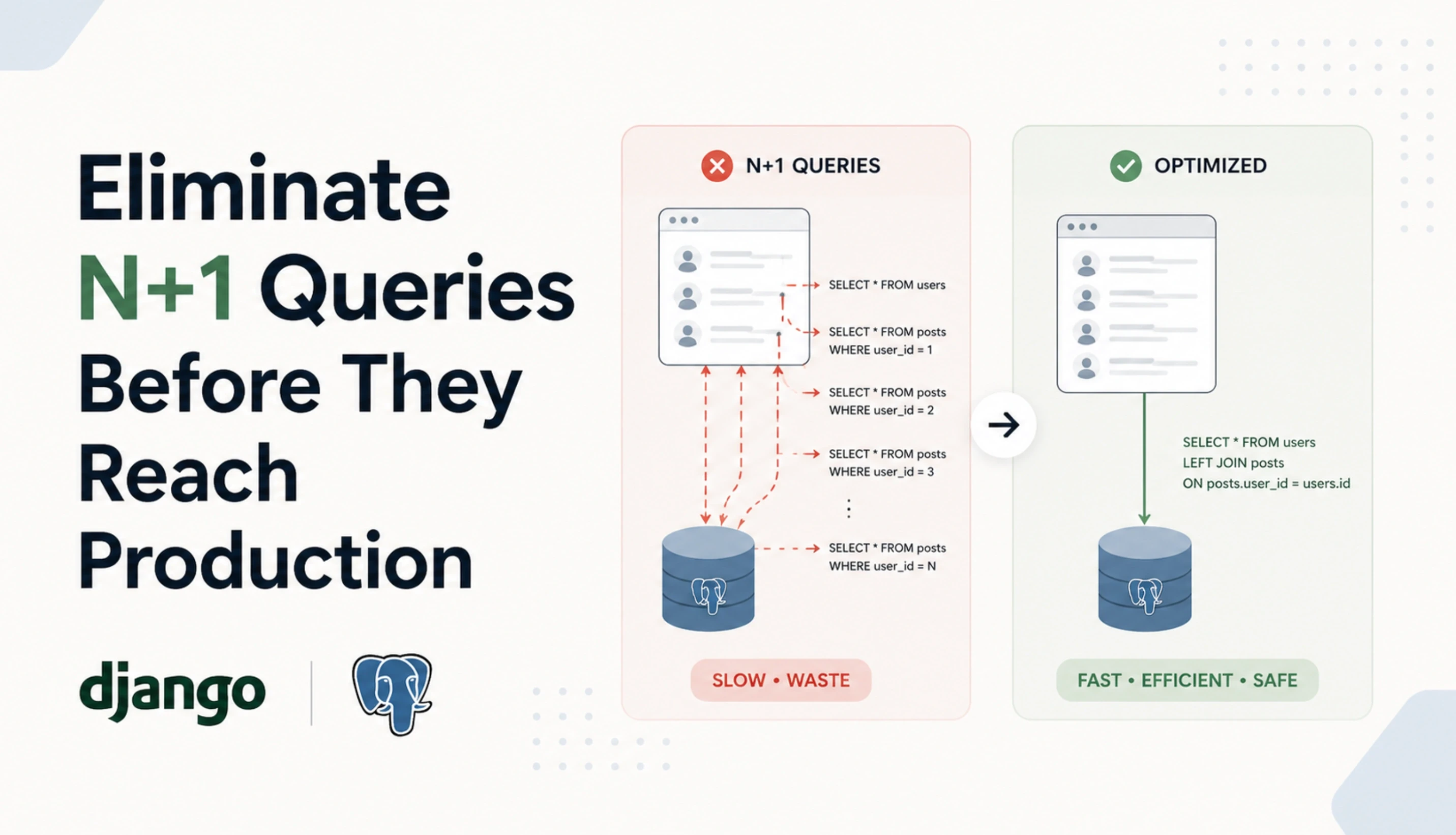
N+1 is the most common Django ORM performance killer and the easiest to introduce by accident. The pattern shows up when you fetch a queryset and then access a related object inside the loop. Django dutifully runs one extra query per iteration and your endpoint goes from 50ms to 5,000ms without a single error in your logs.
How N+1 Happens
# THE PROBLEM (1 + 100 queries)
books = Book.objects.all()  # 1 query
for book in books:
    print(book.author.name)  # 1 query each, 100 books = 100 queries
The Fix (2 queries total)
# Single JOIN, all data in 1 query
books = Book.objects.select_related('author').all()
for book in books:
    print(book.author.name)  # 0 extra queries
The two methods you need are select_related for ForeignKey and OneToOneField (uses SQL JOIN, single query) and prefetch_related for ManyToMany and reverse ForeignKey (uses 2 queries, joined in Python). They look similar but solve different shapes of relationship and produce different SQL underneath.
Table : select_related vs prefetch_related Decision Matrix
Use Case | Method | Why |
|---|---|---|
ForeignKey (book.author) | select_related | Single SQL JOIN, fastest |
OneToOneField (user.profile) | select_related | Single SQL JOIN, fastest |
ManyToMany (book.tags) | prefetch_related | JOIN impossible at SQL level |
Reverse ForeignKey (author.books) | prefetch_related | Separate batched query |
Filtered prefetch (active items) | Prefetch object | Custom queryset for prefetch |
Mixed relationships | Both, chained | Combine for full optimization |
Pattern 2: Index Every Column Your Application Filters On
PostgreSQL is fast, but only if the query planner can use an index. A WHERE clause on an unindexed column with 1 million rows runs a sequential scan that touches every row, which is between 100x and 10,000x slower than an indexed lookup depending on data shape. Most Django performance issues at scale are missing indexes, not slow ORM code.
The Three Indexes Every Django Model Needs
Foreign keys. Django auto-indexes foreign keys, which is why select_related joins are fast. Do not remove these.
Columns used in filters. Any column that appears in WHERE clauses for user-facing queries (email, status, created_at) needs an index. Add db_index=True or use Meta.indexes.
Columns used in ORDER BY. Sorting on an unindexed column means PostgreSQL has to fetch all rows and sort them in memory or temporary disk. Index the sort column, ideally with the filter column for composite efficiency.
Composite Indexes for Real Workloads
class Order(models.Model):
    user = models.ForeignKey(User, on_delete=models.CASCADE)
    status = models.CharField(max_length=20)
    created_at = models.DateTimeField(auto_now_add=True)
    class Meta:
        indexes = [
            models.Index(fields=['user', 'status', '-created_at']),
        ]
This composite index supports the query 'all orders for this user with this status, newest first' in a single index scan. Without it, PostgreSQL fetches all the user's orders, filters by status in memory, and sorts the result. With it, the database walks the index directly and returns the answer.
For the broader architectural patterns that determine where indexing fits inside a complete Python backend design, the guide on Python development architecture and frameworks walks through the design patterns each framework supports at scale.
Pattern 3: Stop Loading Columns You Do Not Use
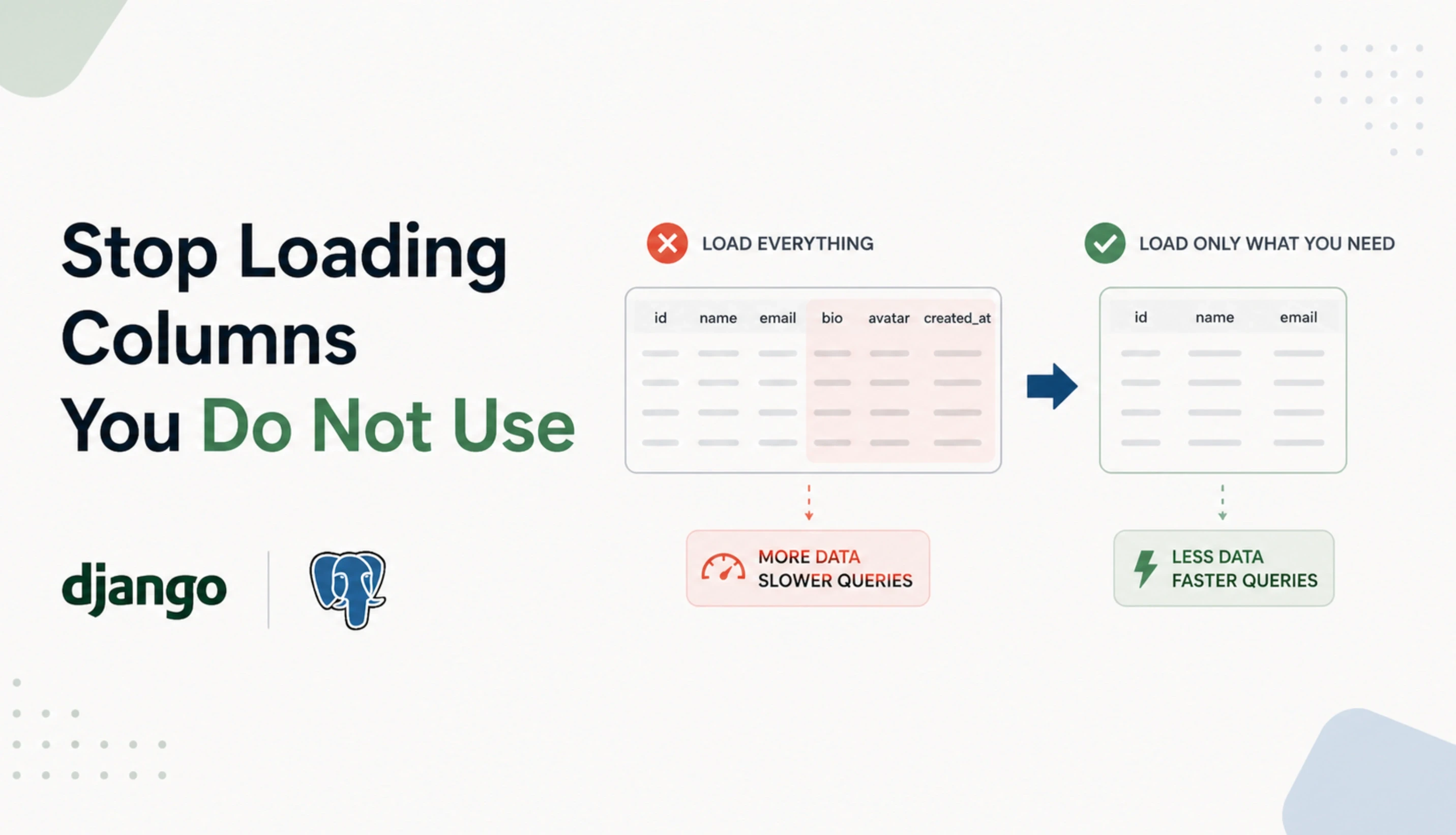
Django's default behaviour fetches every column on every model. If your User model has 30 columns and you only need email and name for a list view, you are still pulling 30 columns over the network and into memory per row. At 10,000 rows, that is wasted bandwidth, wasted memory, and wasted query planner work.
The Three Tools
only(): Fetch only specific fields, leaves the model object intact. Other fields trigger a query if accessed.
defer(): Inverse of only(). Fetch everything except specified fields. Use for columns that are large but rarely accessed (long text, blobs).
values() and values_list(): Return dicts or tuples instead of model instances. Faster, lighter, but loses model methods.
Practical Example
# Loading 30 columns per user (slow at scale)
users = User.objects.all()

# Loading 2 columns per user (fast at scale)
users = User.objects.values('email', 'name')

# Same as above but as model instances with limited fields
users = User.objects.only('email', 'name')
The general rule is to use values() or values_list() for read-only list views and admin tables, only() when you need model methods on a subset of fields, and defer() for tables with one or two heavy columns that are rarely needed.
Pattern 4: Bulk Operations Instead of Per-Row Saves
Saving objects one at a time inside a loop is the second most common Django performance mistake after N+1. According to Sentry's Django performance optimisation guide, the right approach is to use bulk_create() for inserts and bulk_update() for updates, which commits all instances in a single query rather than overloading the database with one query per object. For a 1,000-object insert, bulk_create runs one transaction instead of 1,000.
Bulk Create
# SLOW: 1,000 inserts, 1,000 transactions
for user_data in batch:
    User.objects.create(**user_data)

# FAST: 1 insert, 1 transaction
User.objects.bulk_create(
    [User(**data) for data in batch],
    batch_size=1000
)
Bulk Update
users = list(User.objects.filter(is_active=False))
for user in users:
    user.archived_at = timezone.now()
User.objects.bulk_update(users, ['archived_at'], batch_size=1000)
Always pass batch_size for large operations. Without it, PostgreSQL can hit query parameter limits or transaction memory limits on very large batches. A batch_size of 500 to 1,000 is a safe default for most workloads.
Need Senior Python Engineers Who Tune Django and PostgreSQL at Scale?
Acquaint Softtech provides senior Python engineers with hands-on experience in Django ORM optimisation, PostgreSQL query planning, indexing strategies, PgBouncer setup, and read replica configuration. Profiles in 24 hours. Onboarding in 48.
Pattern 5: Connection Pooling With PgBouncer or Django 5.1+ Native Pool
Each request in a Django app traditionally opens a fresh PostgreSQL connection unless connection pooling is in place. At low traffic this is invisible. At 1,000 concurrent requests, opening and closing connections becomes a measurable overhead, and PostgreSQL's default 100-connection limit becomes a hard wall.
Two Pooling Options in 2026
PgBouncer (recommended for production). External connection pooler running between Django and PostgreSQL. Transaction pooling mode handles thousands of client connections with a small server-side pool. Battle-tested for over a decade.
Django 5.1+ native connection pool. Django 5.1 introduced built-in connection pooling via the CONN_HEALTH_CHECKS and pooling settings. Simpler to configure, but does not match PgBouncer's mature feature set for high-scale production.
PgBouncer Sizing
A 20-worker Django deployment with 100 connections per worker quickly exhausts PostgreSQL's default 100-connection limit. PgBouncer with transaction pooling reduces this to a stable 20 to 50 server-side connections regardless of how many client connections come in. Set pool_mode = transaction in pgbouncer.ini and watch your connection count drop.
Pattern 6: Profile Before You Optimise
Most teams optimise blindly, fixing what they imagine is slow. Real production performance work starts with measurement. Without profiling, every optimisation is a guess.
Three Profiling Tools Every Django Team Should Use
django-debug-toolbar. In-development profiler showing every query per request, time per query, and N+1 patterns. Non-negotiable for any developer working on Django performance.
pg_stat_statements. PostgreSQL extension that aggregates query statistics. Enable it, query the top 20 slowest queries weekly, and you will find more performance problems in 5 minutes than in 5 weeks of speculation.
APM (Sentry, Datadog, New Relic). Production-grade application performance monitoring tracks p50, p95, and p99 latency per endpoint, identifies slow database queries, and surfaces N+1 patterns automatically.
The First Thing to Measure
# Add this temporarily to confirm query count
from django.db import connection, reset_queries
reset_queries()
# Run your code
books = Book.objects.all()
for book in books:
    print(book.author.name)
print(f'Queries executed: {len(connection.queries)}')
Run any view function under this measurement once before pushing to production. If the query count surprises you, that is a signal worth investigating before traffic hits.
Pattern 7: Read Replicas for Workloads That Outgrow a Single Database
In most consumer applications, reads outnumber writes by 5:1 to 10:1. Routing read-only queries to PostgreSQL replicas while keeping writes on the primary is one of the highest-ROI scaling moves available to a Django backend, and it is supported natively through database routers.
Django Database Router Pattern
class ReadReplicaRouter:
    def db_for_read(self, model, **hints):
        return 'replica'
    def db_for_write(self, model, **hints):
        return 'default'
The rule of thumb at 100,000 users is one primary plus two to four read replicas, scaled by traffic pattern. Use managed services (RDS, Cloud SQL) for the primary and replicas in production. Self-managing PostgreSQL replication adds operational risk without benefit unless your team has dedicated database engineering capacity.
For the broader scaling architecture that surrounds these database patterns, including caching, async I/O, and observability, the guide on how to build a scalable Python backend that doesn't collapse at 100,000 users walks through the seven layers of a production-grade scaling stack.
Django 2026 Features That Change the Optimisation Game
Django itself has shifted in important ways for production teams. According to a 2026 Django ORM guide on CopyProgramming covering recent releases, Django 6.0 and Django 5.2 LTS are the recommended production versions as of January 2026, with 5.2 LTS receiving long-term support through April 2029. The 5.2 release brought stable improvements to async ORM operations for high-concurrency applications, and 5.2.10 plus 6.0.1 patches in January 2026 added security and stability fixes that production teams should not skip.
Async ORM (Django 4.1+, Mature in 5.2)
Django's async ORM lets you write async views that hit the database without blocking the event loop. The aget(), afilter(), and acreate() methods mirror their sync counterparts. Use this when integrating Django with FastAPI services, async middleware, or workloads that benefit from concurrent I/O.
Stable Long-Term Support Path
Django 5.2 LTS (released April 2025, supported through April 2029) is the safer choice for production teams that prioritise stability. Django 6.0 (released late 2025) brings newer features but a shorter support window. Most enterprise teams in 2026 should standardise on 5.2 LTS unless a specific 6.0 feature is required.
Pitfalls That Look Optimised but Are Not
Some Django ORM patterns look like optimisation but actually hurt performance. Watch for these patterns in code review.
Using .filter().get() on prefetched data. This bypasses the prefetch cache and triggers a fresh query for each access. Filter inside the Prefetch object instead.
Forgetting deeply nested prefetches. prefetch_related('comments') is not the same as prefetch_related('comments__user__profile'). Walk the full relationship chain.
Using count() inside a loop. queryset.count() runs a SELECT COUNT(*). Inside a loop, that is one extra query per iteration. Use len() if the queryset is already evaluated.
Aggressive defer() without profiling. Deferring fields you actually need triggers extra queries when accessed. PostgreSQL reads most non-text columns from disk for a row anyway, so defer() is rarely worth using on small fields.
Using values() then accessing model methods. values() returns dicts, not model instances. Calling instance.full_name() will fail. Pick the right tool for the access pattern.
These patterns are common contributors to expensive Django rebuilds and architecture rewrites, mapping closely to the warning signs covered in the guide on Python development expensive red flags.
How Acquaint Softtech Optimises Django at Scale
Acquaint Softtech is a Python development and IT staff augmentation company based in Ahmedabad, India, with 1,300+ software projects delivered globally across healthcare, FinTech, SaaS, EdTech, and enterprise platforms. Our Django engagements follow the architectural framework described in the complete guide to hiring Python developers, and our senior engineers have shipped Django applications handling well over 100,000 concurrent users across the FinTech and analytics domains.
Senior Django and PostgreSQL engineers. Hands-on with Django 5.2 LTS and 6.0, query planning, composite indexing, PgBouncer transaction pooling, and read replica configuration.
ORM-to-SQL fluency. When the ORM is the wrong tool, our engineers know how to drop to RawSQL or use Django's queryset.extra() correctly without losing maintainability.
Healthcare-grade compliance experience. GDPR-compliant Django platform delivered for BIANALISI, Italy's largest diagnostics group, processing patient records with audit-grade query logging.
Transparent pricing from $20/hour. Dedicated Python engineering teams from $3,200/month per engineer. Django performance audits from $5,000.
To bring senior Django engineers onto your performance project quickly, you can hire Python developers with profiles shared in 24 hours and a defined onboarding plan within 48.
The Bottom Line
PostgreSQL is faster than your application thinks. Django's ORM is more capable than your application uses. The gap between developer-laptop performance and production performance is filled with seven patterns: eliminate N+1, index the columns you filter on, stop loading columns you do not use, use bulk operations, pool connections, profile before you optimise, and route reads to replicas when traffic justifies it. None of these are exotic. All of them are non-negotiable past 100,000 rows.
The teams that ship fast Django applications do not write smarter code. They apply discipline that the ORM does not enforce automatically. Run every view through django-debug-toolbar before merging. Check pg_stat_statements weekly. Treat 100 queries per request as a bug, not a feature. The ORM does not warn you, but the patterns above protect you. Use them before traffic finds you.
Django Performance Bottlenecks Eating Your Sprint Velocity?
Book a free 30-minute Django performance review. We will look at your slowest queries, your indexing strategy, and your ORM patterns, and give you a written remediation plan with the three highest-impact fixes. No sales pitch. Just senior engineers who have done this before.
Frequently Asked Questions
-
What is the difference between select_related and prefetch_related in Django?
select_related uses a SQL JOIN to fetch related objects in a single query and works for ForeignKey and OneToOneField relationships. prefetch_related runs a separate batched query and joins the data in Python, which is required for ManyToMany and reverse ForeignKey relationships where SQL JOIN is not possible. Most production querysets need both, chained together.
-
How do I detect N+1 query problems in Django?
Install django-debug-toolbar in development. It shows every query per request and flags repeated queries that look like N+1 patterns. In production, an APM tool like Sentry or Datadog tracks slow endpoints and surfaces the same patterns automatically. The 'connection.queries' attribute is also useful for ad-hoc measurement during code review.
-
Should I use Django ORM or raw SQL for complex queries?
Use the ORM by default. Drop to raw SQL only when the ORM cannot express the query, when performance profiling shows the ORM-generated SQL is genuinely suboptimal, or when you need a database-specific feature like PostgreSQL window functions or CTEs that are awkward in Django. Raw SQL should be a last resort, not a first choice, because it loses the type safety and migration tooling that make the ORM valuable.
-
How many database indexes is too many?
Each index speeds up reads but slows down writes (INSERT, UPDATE, DELETE) because the database has to update every relevant index on every change. For most read-heavy applications, indexing every column used in WHERE, JOIN, or ORDER BY is correct. For write-heavy systems, audit which indexes are actually used via pg_stat_user_indexes and remove the ones with zero scans. The right number depends on your read/write ratio.
-
What is PgBouncer and do I really need it?
PgBouncer is a connection pooler that sits between Django and PostgreSQL, multiplexing thousands of client connections onto a small pool of server connections. You need it once your concurrent request count approaches PostgreSQL's connection limit (default 100), which typically happens between 1,000 and 5,000 RPS depending on workload. Below that, Django 5.1+'s native pooling can be enough. Above it, PgBouncer is the standard production answer.
-
When should I add a read replica to my Django setup?
When read traffic begins constraining your primary database, typically around 10,000 to 50,000 concurrent users depending on workload. The signal is rising p95 query latency on the primary while CPU and memory still have headroom. A read replica with Django's database router can reduce primary load by 70 to 90% in read-heavy applications, buying significant headroom before the next architectural change is needed.
-
Is Django ORM fast enough for high-traffic applications?
Yes, when used correctly. Instagram and Pinterest run on Django at scales far above 100,000 concurrent users, and the ORM is rarely the limit. The bottleneck is almost always the database (missing indexes, N+1, no caching) or the application's interaction with the database. Most 'Django is slow' complaints disappear after fixing N+1 patterns, adding the right indexes, and putting Redis in front of hot reads.
We’re Acquaint Softtech, your technology growth partner. Whether you're building a SaaS product, modernizing enterprise software, or hiring vetted remote developers, we’re built for flexibility and speed. Our official partnerships with Laravel, Statamic, and Bagisto reflect our commitment to excellence, not limitation. We work across stacks, time zones, and industries to bring your tech vision to life.
Table of Contents
Get Started with Acquaint Softtech
- 13+ Years Delivering Software Excellence
- 1300+ Projects Delivered With Precision
- Official Laravel & Laravel News Partner
- Official Statamic Partner
Related Blog

When Is Python Development Too Expensive? Pricing Red Flags That Signal a Bad Vendor
Not all expensive Python development is justified. This guide identifies the exact pricing red flags that signal a bad vendor, with real benchmarks, warning signs, and what fair Python pricing actually looks like in 2026.
Acquaint Softtech
March 26, 2026
How to Hire Python Developers Without Getting Burned: A Practical Checklist
Avoid costly hiring mistakes with this practical checklist on how to hire Python developers in 2026. Compare rates, vetting steps, engagement models, red flags, and more.
Acquaint Softtech
March 30, 2026
Total Cost of Ownership in Python Development Projects: The Full Financial Picture
The build cost is just the beginning. This guide breaks down the complete TCO of Python development projects across every lifecycle phase, with real benchmarks, a calculation framework, and 2026 data.
Acquaint Softtech
March 23, 2026India (Head Office)
203/204, Shapath-II, Near Silver Leaf Hotel, Opp. Rajpath Club, SG Highway, Ahmedabad-380054, Gujarat
USA
7838 Camino Cielo St, Highland, CA 92346
UK
The Powerhouse, 21 Woodthorpe Road, Ashford, England, TW15 2RP
New Zealand
42 Exler Place, Avondale, Auckland 0600, New Zealand
Canada
141 Skyview Bay NE , Calgary, Alberta, T3N 2K6
Your Project. Our Expertise. Let’s Connect.
Get in touch with our team to discuss your goals and start your journey with vetted developers in 48 hours.