

SonarQube in CI/CD: What a DevOps Engineer Implements for Code Quality and Security
SonarQube in CI/CD catches code quality and security issues before they reach production. Here is what a DevOps engineer configures, which gates they set, and what it costs in 2026.

Taukir katava
As a DevOps Engineer at Acquaint Softtech, a software development partner, the most common gap I find after a team has automated their deployments is the absence of any automated code quality or security scanning in the pipeline. Code deploys successfully. Tests pass. But nobody is checking whether the new code introduces a critical vulnerability, duplicates logic that already exists, or has a complexity score that will make it unmaintainable in six months. SonarQube in the CI/CD pipeline closes this gap. This article covers what SonarQube actually does, how a DevOps engineer integrates it, which gates they configure, and what the implementation costs in 2026.

- Engineering leads who have automated testing in their pipeline but no code quality or security scanning
- CTOs whose teams have been told they need SonarQube but are not sure what it does or what to configure
- SaaS founders preparing for SOC 2 or ISO 27001 certification where code scanning is a required control
- Teams hiring a DevOps engineer and wanting to include SonarQube integration in the engagement brief
Most development teams treat code quality as a developer responsibility, not a pipeline responsibility. A developer submits a pull request, a reviewer checks the logic, and if the tests pass, the code merges. What neither the developer nor the reviewer have is a systematic, automated check against quality thresholds applied consistently on every merge. SonarQube brings that systematic check into the pipeline so quality gates fires before a merge is permitted, not after a problem appears in production.
Automated testing in the pipeline catches functional failures. SonarQube catches a different category of problem: structural issues in the code itself. The full testing integration guide covers what a DevOps engineer adds to the test layer. This article focuses specifically on the code quality and security scanning layer that SonarQube provides on top of testing.
What SonarQube Actually Does: Plain English

SonarQube is a static analysis platform. It reads your source code without executing it and identifies four categories of issues that automated tests do not catch.
Bugs
Code patterns that will almost certainly cause a runtime failure: null pointer dereferences, resource leaks, incorrect boolean logic, unreachable code. SonarQube identifies these patterns based on rules built from years of production bug analysis across millions of codebases.
Vulnerabilities
Security weaknesses in the code: SQL injection vectors, cross-site scripting (XSS) risks, hardcoded credentials, insecure deserialization patterns, and OWASP Top 10 violations. In CI/CD pipelines where the application handles user data or payment information, vulnerability detection is a compliance requirement, not just a quality preference.
Code Smells
Maintainability issues: overly complex functions (high cyclomatic complexity), duplicated code blocks, long method signatures, God classes, and code that violates language-specific best practices. Code smells do not break the application today. They accumulate technical debt that slows every future change.
Security Hotspots
Code patterns that require human review to determine whether they are actually vulnerable. SonarQube flags these for developer attention rather than blocking the pipeline automatically. Common hotspots include cryptographic implementations, file system access patterns, and HTTP request handling.
SonarQube integrates with every major CI/CD tool. The CI/CD tool comparison guide covers GitHub Actions, Jenkins, and GitLab CI. SonarQube has native integrations for all three, with the most seamless setup being GitHub Actions via the official SonarQube GitHub Action.
CI/CD Pipeline Running With No Code Quality Gate?
Tell Acquaint Softtech your CI/CD tool and tech stack. A vetted DevOps engineer will show you what a SonarQube integration looks like for your specific setup and send a matched profile within 24 hours.
How a DevOps Engineer Integrates SonarQube: The Implementation Sequence
SonarQube integration has four distinct configuration steps. Each step build on the previous one. A DevOps engineer who skips the quality gate configuration and jumps straight to running analysis produces a pipeline that reports issues but does not enforce them.
Step 1: SonarQube Server Setup or SonarCloud ConfigurationSonarQube can be self-hosted (SonarQube Community, Developer, or Enterprise edition) or run as a managed cloud service (SonarCloud). For most SaaS teams, SonarCloud is the right choice: no server to maintain, free for public repositories, and paid tiers starting at approximately $10/month for private repositories. For teams with strict data sovereignty requirements or large enterprise codebases, self-hosted SonarQube on an EC2 instance or Kubernetes cluster is appropriate. A DevOps engineer sets up and configures whichever option fits the team's requirements in day 1
Step 2: Project and Rule Set ConfigurationSonarQube ships with default rule sets for each supported language. A DevOps engineer reviews the default rules against the team's codebase and adjusts the Quality Profile: enabling rules relevant to the stack, disabling rules that produce false positives in the specific framework, and setting severity thresholds for each issue type. This step prevents the pipeline from failing on noise rather than genuine issues.
Step 3: CI/CD Pipeline IntegrationThe SonarQube analysis step is added to the pipeline after the build and unit test stages. For GitHub Actions: the sonarqube-scan-action runs the analysis and posts results back to the PR as a check. For Jenkins: the SonarQube Scanner plugin runs the analysis within the Jenkinsfile. For GitLab CI: the sonar-scanner binary runs as a pipeline job. The analysis takes 1 to 8 minutes depending on codebase size.
Step 4: Quality Gate Configuration and EnforcementThe Quality Gate is the most important configuration step. It defines the thresholds that determine whether the pipeline passes or fails. A DevOps engineer configures the gate with specific metrics: new code coverage threshold (typically 80%), new bugs allowed (0), new critical vulnerabilities allowed (0), and new code smells above a set complexity score. When the Quality Gate fails, the pipeline fails and the PR cannot merge until the issues are resolved.
For teams moving from manual deployments to automated pipelines where SonarQube is part of the first automation sprint, the manual to automated deployment guide covers the 30-day sequence and where code quality scanning fits in the build.
SonarQube Quality Gate: What a DevOps Engineer Configures
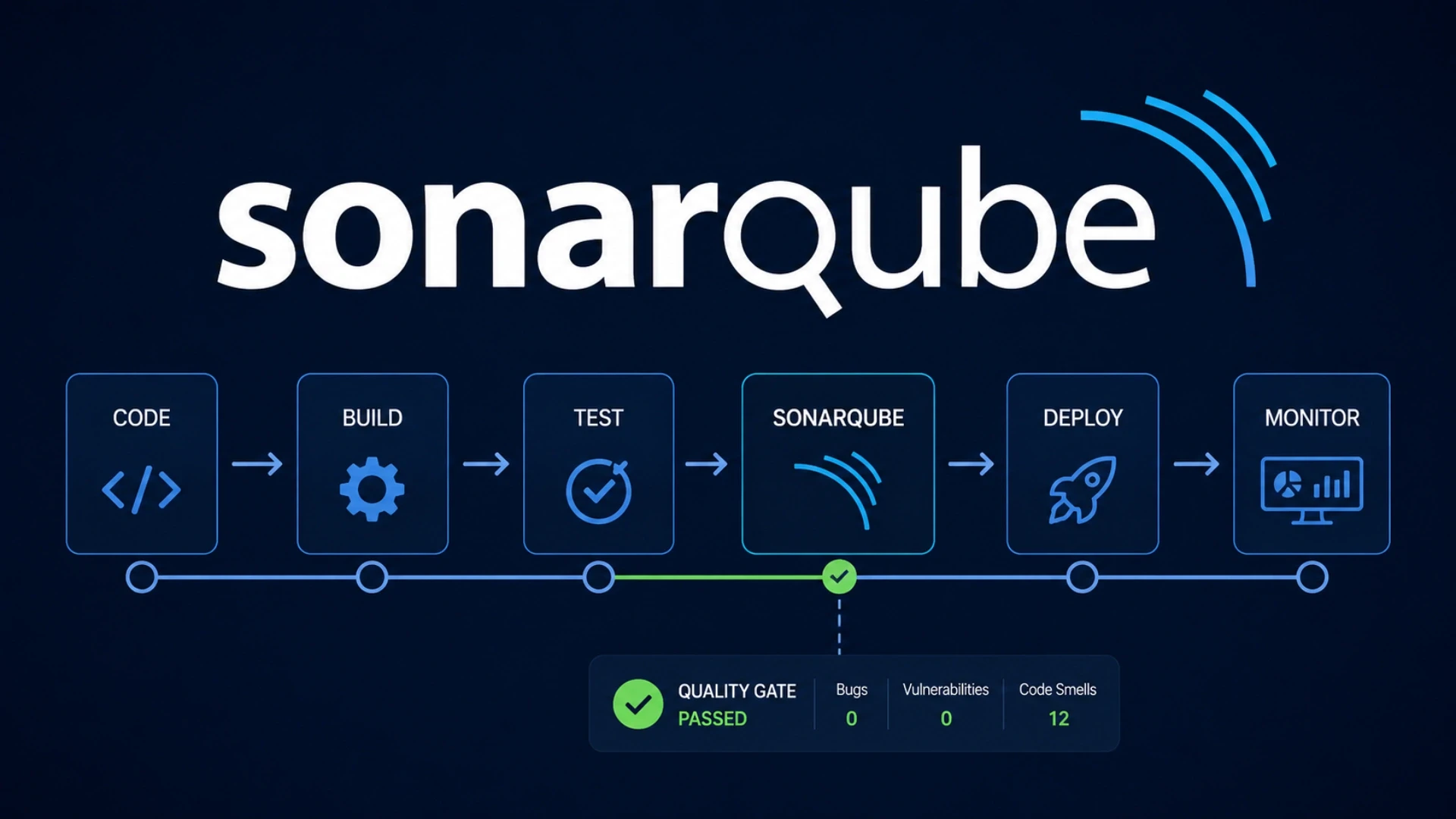
The Quality Gate is what turns SonarQube from a reporting tool into a pipeline enforcement tool. Here is what a well-configured gate looks like for a production SaaS application.
Metric | Threshold (new code) | What triggers failure |
New bugs | 0 | Any new bug introduced in the PR |
New critical vulnerabilities | 0 | Any new critical security vulnerability |
New blocker issues | 0 | Any issue rated Blocker severity |
New code coverage | At least 80% | PR adds untested code that drops coverage below 80% |
New duplicated lines | Under 3% | Significant code duplication in the PR |
New code smells (critical) | 0 | Critical maintainability issues in the PR |
Security hotspots reviewed | 100% | Any unreviewed security hotspot in new code |
What a failing Quality Gate looks like in practice
Developer pushes a PR with a new API endpoint.
SonarQube scans the new code and finds:
1 new SQL injection vulnerability (Critical)
New coverage: 67% (below 80% threshold)
1 new blocker: null pointer dereference in error handler
Quality Gate: FAILED
GitHub Actions check: FAILED
PR status: blocked from merging
The developer sees the exact issues in the PR check, fixes them,
pushes again, and the gate passes. The vulnerability never reaches staging.
Acquaint Softtech's hire DevOps engineers service provides vetted engineers with SonarQube implementation experience across GitHub Actions, Jenkins, and GitLab CI. Every engineer has configured Quality Gates in production environments. Matched profile in 24 hours.
For teams whose pipeline is already slow before adding the scanning step, the deployment pipeline fix guide covers how to structure analysis stages so SonarQube does not add significant pipeline time.
Want SonarQube Quality Gates Blocking Bad Code From Merging?
Taukir and the Acquaint Softtech DevOps team have configured SonarQube for Node.js, Python, PHP, and Java codebases across GitHub Actions and Jenkins. Tell us your stack and CI/CD tool. Matched profile in 24 hours. Gate configured in the first sprint.
What It Costs: 2026 Implementation Guide
The cost of a SonarQube integration have two components: the DevOps engineer time to implement it, and the ongoing SonarCloud subscription if using the managed service. Here are the honest 2026 numbers at Acquaint Softtech rates.
Implementation component | Time at $22/hour | Cost |
SonarCloud setup and project config | 0.5 to 1 day | $88 to $176 |
Rule set and Quality Profile configuration | 0.5 to 1 day | $88 to $176 |
CI/CD pipeline integration (GitHub Actions or Jenkins) | 1 to 2 days | $176 to $352 |
Quality Gate configuration and threshold setting | 0.5 to 1 day | $88 to $176 |
PR decoration and notification setup | 0.5 days | $88 |
Full SonarQube integration (all steps) | 3 to 5 days | $528 to $880 |
Ongoing SonarCloud subscription cost (cloud option)
Free tier: Public repositories. Unlimited analysis.
Developer: Private repos, 1 user: approximately $10/month.
Team: Up to 5 users: approximately $75/month.
Enterprise: Larger teams: custom pricing from SonarSource.
Self-hosted SonarQube Community Edition: Free. Requires server infrastructure.
Self-hosted on AWS EC2 (t3.medium): approximately $30/month in compute.
Total ongoing cost for most SaaS teams: $10 to $75/month (SonarCloud) plus
DevOps engineer time for rule set maintenance (typically 1 to 2 hours/month).
For the full DevOps engineer rate comparison by region and seniority, the DevOps engineer cost guide covers what each price tier delivers. Acquaint Softtech DevOps engineers start at $22/hour on a monthly retainer.
For individual DevOps capacity on a monthly retainer, Acquaint Softtech's staff augmentation model provides a dedicated engineer starting at $3,200/month. Available in 48 hours.
For teams needing a managed DevOps function covering pipeline quality, testing, and broader infrastructure, our dedicated development teams service covers the full engagement.
Ready to Add SonarQube to Your CI/CD Pipeline? Start in 48 Hours.
Pre-vetted DevOps engineers who configure SonarQube Quality Gates, PR decoration, and pipeline enforcement for GitHub Actions, Jenkins, and GitLab CI. Starting at $22/hour. Matched profile in 24 hours. Gate live in the first sprint.
Frequently Asked Questions
-
What does SonarQube do in a CI/CD pipeline?
SonarQube scans source code for bugs, vulnerabilities, code smells, and security hotspots on every PR or commit. A Quality Gate blocks the PR from merging if the new code violates defined thresholds. It catches structural issues that automated tests do not.
-
How do you integrate SonarQube with GitHub Actions?
Add the sonarqube-scan-action step to the GitHub Actions workflow after the build stage. Configure the SONAR_TOKEN and SONAR_HOST_URL secrets. Set the Quality Gate check to required in the branch protection rules. The analysis runs on every PR and posts results as a GitHub check.
-
What is a SonarQube Quality Gate?
A Quality Gate is a set of thresholds that determine whether the pipeline passes or fails. Common thresholds: zero new bugs, zero new critical vulnerabilities, minimum 80% code coverage on new code. When any threshold is violated, the gate fails and the PR is blocked.
-
How long does SonarQube analysis take in a pipeline?
SonarQube analysis takes 1 to 8 minutes depending on codebase size. For a 50,000 line Node.js codebase, analysis typically takes 2 to 3 minutes. This is added after the unit test stage and runs in parallel with integration tests to minimise total pipeline time.
-
What is the difference between SonarQube and Snyk?
SonarQube focuses on code quality and security issues in your source code. Snyk focuses on known vulnerabilities in your dependencies and container images. They solve different problems. A complete security scanning pipeline includes both.
-
How much does SonarQube integration cost at Acquaint Softtech?
A full SonarQube integration takes 3 to 5 days at $22/hour. Total cost: $528 to $880. This is typically absorbed into the first sprint of a monthly retainer engagement at $3,200/month.
-
Can SonarQube replace code reviews?
No. SonarQube catches objective, measurable code quality issues. It does not evaluate architecture decisions, business logic correctness, or code readability. It removes the mechanical quality checks from code reviews so reviewers can focus on higher-order decisions.
Taukir Katava is a DevOps Engineer at Acquaint Softtech with 4+ years of experience across AWS, Azure, and GCP. He specialises in Kubernetes cluster administration, CI/CD pipeline automation, and cloud infrastructure design for high-traffic platforms. Taukir writes about the practical side of production DevOps: what infrastructure decisions cost and what they actually deliver.
Table of Contents
Get Started with Acquaint Softtech
- 13+ Years Delivering Software Excellence
- 1300+ Projects Delivered With Precision
- Official Laravel & Laravel News Partner
- Official Statamic Partner
The Complete Guide to Hiring a DevOps Engineer in 2026: CI/CD, Cloud, Kubernetes, and What It All Costs
Everything you need before hiring a DevOps engineer in 2026. What the role covers, CI/CD to Kubernetes, what it costs in India vs the US, and how to start with a vetted engineer in 48 hours.

Acquaint Softtech
May 1, 2026
App Crashes Every Traffic Spike: The Infrastructure a DevOps Engineer Builds to Stop It
If your app crashes every time traffic spikes, the problem is infrastructure gaps, not code. Here is what a DevOps engineer diagnoses, builds, and delivers in the first 30 days.
Taukir katava
May 7, 2026
Cloud Bill Doubling Every Quarter: What a DevOps Engineer Finds and Fixes in 30 Days
AWS bill doubling every quarter without a clear reason? A DevOps engineer typically finds 20 to 40% of cloud spend as waste. Here are the 7 categories they fix first.
Taukir katava
May 8, 2026India (Head Office)
203/204, Shapath-II, Near Silver Leaf Hotel, Opp. Rajpath Club, SG Highway, Ahmedabad-380054, Gujarat
USA
7838 Camino Cielo St, Highland, CA 92346
UK
The Powerhouse, 21 Woodthorpe Road, Ashford, England, TW15 2RP
New Zealand
42 Exler Place, Avondale, Auckland 0600, New Zealand
Canada
141 Skyview Bay NE , Calgary, Alberta, T3N 2K6