

How to Build a University Website That Actually Works
To make a university website, plan a clear content structure, choose reliable hosting and a flexible CMS like WordPress or an enterprise platform, and build essential pages for academics, admissions and campus life with fast, mobile-friendly design. Know your audience, keep branding consistent on every page, and prioritise navigation so students find deadlines and courses instantly. A university website typically costs 5,000 to 50,000 USD and takes 3 to 10 months, depending on features.

Mukesh Ram
As the Founder and CEO at Acquaint Softtech, I have watched the university website become the single most important part of how institutions recruit and serve students. A modern university website development project is no longer a brochure; it is the front door of the campus, where prospective students research courses, applicants apply, and the whole community stays connected.
In this article, we walk through how to make a university website that actually works in 2026: knowing your audience, building a strong brand identity, choosing the right colours, fonts and imagery, keeping it simple and accessible, and getting the pages, CMS and cost right.
Whether you searched how to make a university website, university website builder or uni website builder, this is your map, whether you hire remote developers or build it yourself.

- You run a university, college or private institution going online.
- You want to know how to make a university website for students.
- You want brand, design and usability tips explained simply.
- You want website development for private colleges that converts.
- You are building across the USA, UK, Europe or Australia.
A great university website balances two audiences at once: prospective students deciding where to apply, and current students, faculty and alumni who need information every day. Get that balance right, with clear navigation, a consistent brand and fast, mobile-first design, and the site quietly does your recruiting and communicating for you.
Below, we cover how to know your audience, build brand identity, pick colours, fonts and imagery, keep the site simple, and get the structure, examples, case study and cost right, so you can build a university website that stands out.
Know Your Audience

Know who visits your site and why, then design mobile-first, easy-to-navigate pages around their goals.
It is important to know your target audience and their main aim in visiting your website. If you do not know this, it is hard to ensure visitors stick around and return.
Once you have identified who your visitors are, consider how best to design your website. People interact with websites mobile-first today, so make sure your content is optimised for viewing across phones, laptops and desktops.
Make it easy for people to find what they are looking for. Do not make visitors search or click through multiple pages; design your website so people can navigate it easily. That helps them feel comfortable and confident, which supports your objectives. Designing a website map before development is also crucial, and the best way to hit your goals is to work with a development agency that plans and executes strategically.
Create a Strong Brand Identity
Your brand identity is the foundation: a documented style guide and visual system that make the university stand out.
Your brand identity gives your website personality and helps you stand out. You already know your audience, so decide how they want to be spoken to, and create a style guide so everyone on the project knows how things should look and sound online.
Next comes your overall visual identity:
Which colours best represent your university?
Which fonts will do it justice?
What makes a good logo design?
What visual content best fits the university's profile?
This should come together in one core brand identity document, informing every decision from logo design to copywriting and content creation, and ensuring consistency across all platforms.
Do you know: according to PRNewswire, nearly 40% of users appreciate a good colour palette more than other visual elements on business websites.
Use the Right Colour Scheme

Choose an on-brand, accessible colour scheme that sets the mood and stays readable for every visitor.
Your colour scheme conveys a message, anchors your theme, creates a mood and generates visual interest. Colours should match the institution's brand and be easy to read and navigate. Consider these factors first:
The purpose of the website.
What your university stands for in culture, values and identity.
Which colours represent these aspects across social channels and the website.
Accessibility, so visitors with age-related or other vision conditions can read every hue clearly on screen.
Want a well-structured university website that recruits?
Tell me about your institution and programs, and within 48 hours I will map the structure, pages, and a launch plan tailored to you. No cost, no obligation.
Choose the Right Fonts
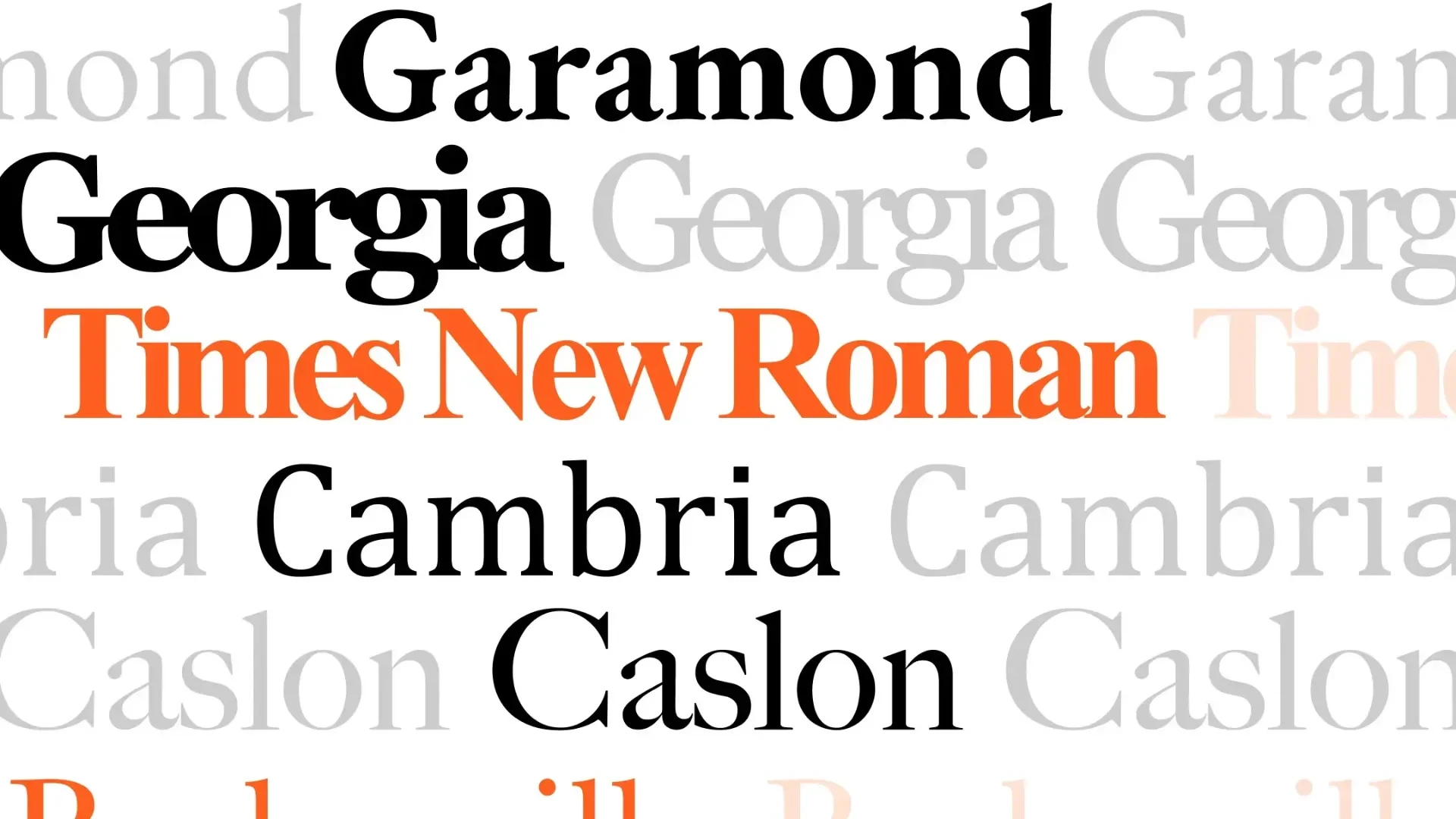
Use a small, purposeful set of readable fonts; too many or overly decorative fonts look unprofessional.
Choosing the right fonts is an important part of creating a website. Using too many different or decorative fonts can make your site look unprofessional.
Use serif fonts for body text and sans-serif for headlines, or another combination that fits your design.
Mix weights within each font family to give readers variety and improve readability across long passages, on screen and in print.
Grab Attention With Great Imagery
High-quality, relevant imagery captures attention and builds trust; keep it clear and easy to understand.
Images are integral to any website. A good collection captures your audience's attention and keeps them engaged. Images should be relevant, appropriate, and clear so visitors understand what they are looking at right away, and always high quality. Tools like InVideo make it easy to create images with GPT Image 2 from simple text prompts, helping you add clear, polished visuals to your site.
Keep It Simple and User-Friendly
Keep navigation simple, language clear, and design responsive, and add helpful features like chatbots.
Keep it simple and user-friendly so visitors find information quickly. Use clear, concise language and avoid dead links. Ensure the design is responsive, since almost everyone uses a mobile device, so the site adjusts automatically to any screen.
Adding features like chatbot technology helps answer common questions about coursework without human intervention. You can choose a framework like Laravel development, or build with core PHP or open source.
How to Make a University Website: Step-by-Step

Making a university website follows a clear sequence: plan structure, set up hosting and CMS, build pages, then test and launch.
Map your content: define clear sections for the homepage, admissions, courses, student life and news.
Prioritise navigation: ensure prospective students find application deadlines and course modules instantly.
Set up domain and hosting: secure a professional domain and robust hosting that handles high traffic.
Choose a CMS: install a flexible CMS like WordPress, a capable university website builder, so staff can update safely.
Design responsively and brand clearly: show the official name and logo on every page and test for fast, mobile-friendly performance.
Test and launch: check accessibility, speed, forms and search, then go live and keep content current.
If you are unsure how large to go, start with an MVP development covering admissions and key courses, then expand, and lean on effective CMS development so non-technical staff can manage content.
The table sums up the essential pages and features, grouped by goal.
Group | Pages/features | Purpose |
Recruit | Admissions, courses, apply | Convert prospective students |
Inform | News, events, research | Showcase and engage |
Serve | Portals, search, contact | Support current students, staff |
Want a real cost and timeline for your university site?
Share your must-have pages, and I will send a scoped plan with an honest cost estimate — in 48 hours, with no sales pitch.
Learn From the Best: University Website Examples
Studying strong university website examples shows the value of a consistent brand system across every touchpoint.
Looking at how to make a university website examples from world-class institutions is a smart first step. Take the University of Cambridge: it runs a consistent Cambridge web platform, backs it with a detailed Cambridge University style guide, uses professional, high-quality Cambridge University photography, and even provides branded assets like a University of Cambridge PowerPoint template for staff. The lesson is not to copy any institution, but to notice the pattern: one well-documented brand system applied consistently across the website, documents and imagery.
Consistent brand system: one style guide governing colours, type and logo use.
Professional photography: real campus imagery that builds trust and emotion.
Unified templates: matching web, document and presentation assets.
Clear information architecture: prospective students reach what they need fast.
Client Case Study
Acquaint Softtech built an education-focused learning platform for VRTL, with courses, search, payments and social features.
Case study snapshot
Client | VRTL, an education provider building a virtual-reality learning platform. |
Sector | Education and learning (directly comparable to a university or college web platform). |
Challenge | A robust website where students find and enrol in courses, pay securely and stay engaged. |
What Acquaint Softtech built | A virtual-reality learning platform with a course catalogue, secure payment gateway, robust search, newsletter, events, blog and social media integration, on WordPress, JavaScript and Photoshop. |
Outcome | A robust platform that helped VRTL reach a broader audience of learners eager to enrol and engage. |
Proof: See the education platform project, and verified reviews on Clutch.
This reflects a standard seen across a 5-star Clutch rating over 60+ reviews, 1,293+ clients on Upwork with a 98% success rate, and 1,300+ projects delivered by 70+ in-house engineers over 13+ years. We have also delivered a full university website (the University of West Florida); if you would prefer to feature that instead, Acquaint Softtech can swap it in. Explore more in our case studies.
Importance of a University Website
A great university website raises engagement and visibility, attracts applicants, and connects alumni and remote students.
A great university website is essential for increasing student engagement, boosting visibility and attracting prospective students. A well-designed site puts all the information applicants need in one place. It is also an excellent way to stay in touch with alumni and parents who want updates, and for off-campus and online students it provides access to resources like syllabi and discussion boards that supplement their learning.
Why Work With Acquaint Softtech
Acquaint Softtech is an experienced, Official Laravel Partner that builds fast, accessible, content-rich education websites end to end.
For 15+ years, Acquaint Softtech has delivered advanced web development, including education and content-heavy platforms. As an Official Laravel Partner with a dedicated QA team, we build secure, accessible university websites and portals, and you can use software development outsourcing or hire WordPress developers to build with Acquaint Softtech across the USA, UK, Europe, and Australia.
To Sum Up
This guide has given you ideas for creating a great university website: know your audience, build a strong brand identity, pick the right colours, fonts and imagery, and keep it simple, responsive and accessible. There is no one-size-fits-all solution, so experiment with layouts and colours until you find what works for your audience, and if your current site is falling short, it is time for an upgrade. If you want expert help, Acquaint Softtech can build it for you across the USA, UK, Europe and Australia.
Let's turn your campus into a website that recruits.
Book a free 30-minute call with our experts. We will scope the structure, pages, timeline and an honest cost, and you leave with a plan you can act on — even if you build it elsewhere.
Frequently Asked Questions
-
What are the top key pages to add to a university website?
A university website has many pages, but the most important are the home page, about us, contact us, academic or course pages, and the admissions page. Adding student life, news, research, and portal pages rounds out a complete site. Admissions and course pages matter most for recruiting applicants.
-
How much does it cost to build a university website?
Building a university website is not simple and can take 3 months to a year depending on features. As a general guide, website development for universities starts around 5,000 USD for a basic site with essential features and goes up to 50,000 USD or more, depending on features, the development firm's location, and other factors. Send your requirements for a detailed quote.
-
How much time does it take to develop a university website?
The time to build a university website varies with complexity. In our experience, it takes from 3 to 10 months. The more features you add, the more complex the build, and the longer it takes. Planning content and providing feedback quickly keeps the timeline on track.
-
How do I make a university website for students?
To make a university website for students, focus on what they need daily: clear course and timetable pages, portals or single sign-on, campus and support services, news and events, and fast site search, all mobile-friendly and accessible. Combine this with strong admissions pages to serve both current and prospective students.
-
What is the best CMS for a university website?
WordPress is a popular, flexible choice and acts as a capable university website builder, letting many staff update content safely with plugins for accessibility, events and forms. Very large universities may need an enterprise CMS. Pairing the CMS with a secure Laravel or Node.js backend supports portals, applications and integrations.
-
Can you build a website for a private college?
Yes. Website development for private colleges follows the same principles as larger universities, scaled to your size and budget: clear admissions and course pages, a manageable CMS, consistent branding, accessibility and mobile performance. An experienced partner like Acquaint Softtech can deliver a credible, conversion-focused college website.
I love to make a difference. Thus, I started Acquaint Softtech with the vision of making developers easily accessible and affordable to all. Me and my beloved team have been fulfilling this vision for over 15 years now and will continue to get even bigger and better.
Table of Contents
Get Started with Acquaint Softtech
- 13+ Years Delivering Software Excellence
- 1300+ Projects Delivered With Precision
- Official Laravel & Laravel News Partner
- Official Statamic Partner
Related Blog

Types of eLearning Platforms and Reasons for Building One
An e-learning platform is software that delivers educational content and courses online. The main types of eLearning platforms include learning management systems (LMS), virtual learning environments, MOOCs, corporate training platforms, mobile learning, online tutoring, course marketplaces, and language and simulation platforms. Most modern builds are cloud-based elearning systems with course catalogues, payments, dashboards, and analytics. A basic platform costs 8,000 to 15,000 USD; an advanced one runs 25,000 to 60,000 USD and up.
Mukesh Ram
July 11, 2023
How to Build a Professional Healthcare Website In 2026
To build a healthcare website, design a clean, minimalistic, mobile-friendly site with easy navigation and the key pages (home, about, services, testimonials, appointment booking). Add online appointment scheduling, a patient portal, telemedicine, secure payments, and a database system, and ensure compliance (HIPAA, GDPR). Use a secure stack such as Laravel, PHP, or Python with a CMS like WordPress. A basic site costs 2,000 to 5,000 USD, and advanced builds 15,000 to 80,000 USD and up.
Mukesh Ram
April 26, 2023
Why Use Laravel for Web Development?
Use Laravel because it is a powerful, secure and popular PHP framework that delivers high performance, strong built-in security, fast development and easy scaling. Its huge community, rich ecosystem (Forge, Vapor, Nova, Horizon and more), MVC architecture and ready-made libraries let you build websites, web apps and MVPs quickly and affordably. Laravel is regularly updated, cloud-friendly and ideal for everything from startups to enterprise applications, which is why over a million businesses rely on it.

Acquaint Softtech
March 29, 2023India (Head Office)
203/204, Shapath-II, Near Silver Leaf Hotel, Opp. Rajpath Club, SG Highway, Ahmedabad-380054, Gujarat
USA
7838 Camino Cielo St, Highland, CA 92346
UK
The Powerhouse, 21 Woodthorpe Road, Ashford, England, TW15 2RP
New Zealand
42 Exler Place, Avondale, Auckland 0600, New Zealand
Canada
141 Skyview Bay NE , Calgary, Alberta, T3N 2K6