

Building a Payment Links and Invoice System for SMBs
An integrated payment links and invoice system for small and medium businesses combines four core parts: an invoice engine that generates sequential numbers, line items, tax, and branding; a payment link generator that creates provider-backed URLs with pre-validated amounts and references; a secure, PCI-compliant hosted checkout page (such as Stripe Invoicing) where clients pay by card or wallet; and a webhook and reconciliation listener that updates invoice status and the ledger in real time.

Sanjay Prajapati
As Head of Business at Acquaint Softtech, and a developer before that, I get the same request from SMB founders every month: a clean way to send an invoice and get paid in one click. That is mostly hire Laravel development wrapped around a payment provider, and done right it can shave weeks off how long a business waits to be paid.
Payment link system explained in one line: it is software that turns an invoice into a shareable, secure checkout URL, then tracks that invoice from sent to paid automatically. Building a payment links and invoice system for SMBs online is now a core expectation, not a nice-to-have, because customers expect to tap a link and pay rather than mail a cheque.

- A founder or CEO building a billing or invoicing product for SMBs.
- A CTO scoping the invoice engine, link generator, and checkout.
- A product owner mapping features, tech stack, and cost.
- A team weighing whether to build in house or hire developers for a payment link system.
If you want the wider picture first, our guide on how payment gateways work maps the checkout and settlement flow that every payment link sits on top of.
This is a build guide, not a tool roundup. It covers the four core components, the create-to-settle workflow, the build-versus-buy decision, a step-by-step build, the features list, tech stack, compliance, 2026 trends, and honest cost.
What is a payment link and invoice system?
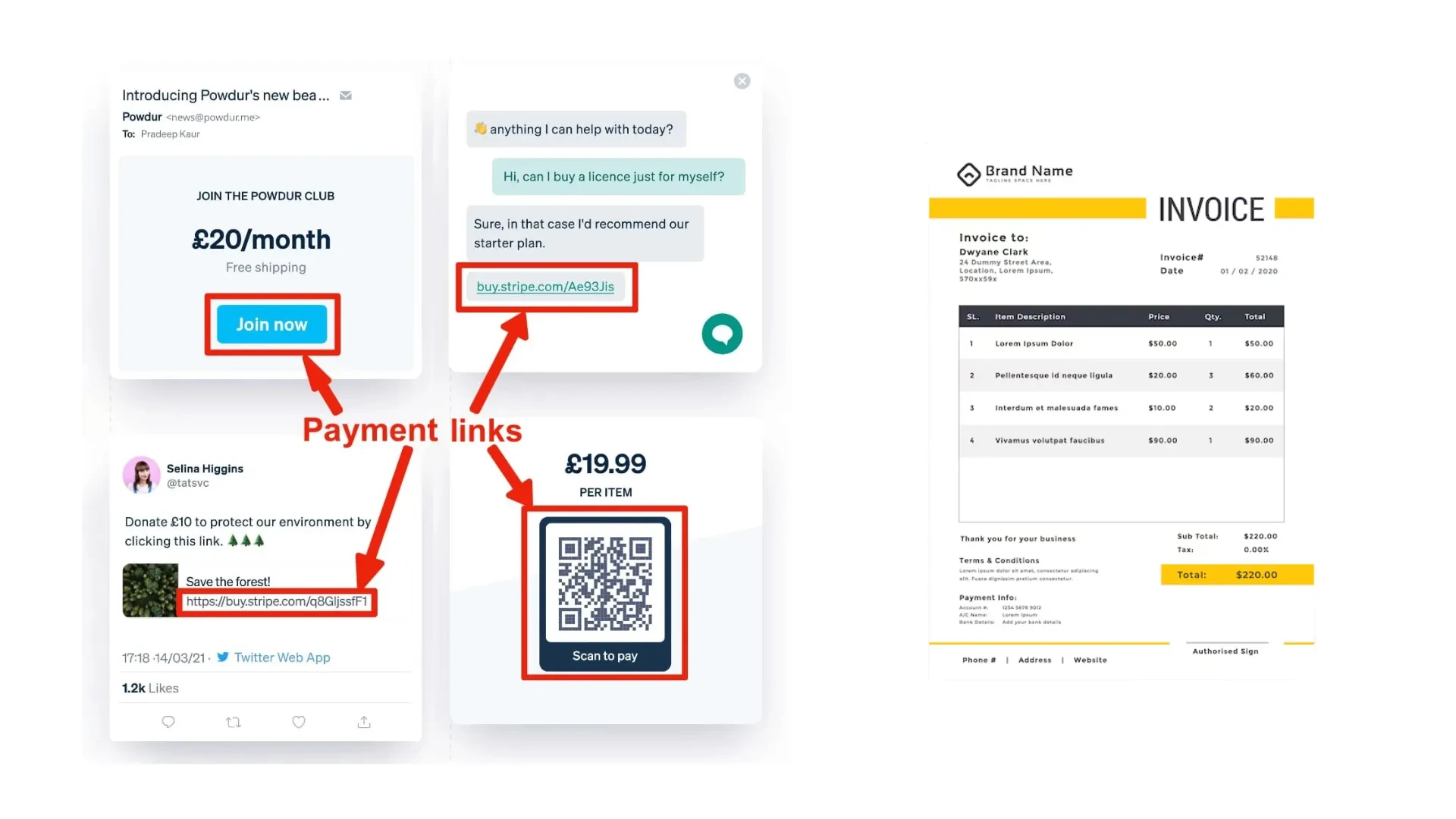
A payment link and invoice system is software that creates an invoice, attaches a secure payment URL, and tracks it from sent to paid. The customer clicks the link, pays on a hosted checkout page, and the invoice is marked settled automatically.
It has two halves that meet at the link. The invoice side handles numbering, line items, tax, and branding. The payment side turns the amount owed into a checkout page hosted by a provider such as Stripe or PayPal, so you never touch raw card data. That is what is meant by payment link system explained: invoicing plus one-click collection, joined together.
Payment link, payment form, or invoice: what is the difference?
A payment link is a URL that opens a hosted checkout for a set amount. A payment form is embedded in your own site for a full checkout experience. An invoice is the itemized request for payment that a link can be attached to. A complete system uses all three, and stitching them together is a core software product development task rather than a plugin.
The four core components
Every payment link and invoice system has four moving parts: an invoice engine, a payment link generator, a hosted checkout page, and a webhook and reconciliation listener. Get these four right and the rest is polish.
Invoice engine. Generates sequential invoice numbers, line items, tax calculations, and business branding.
Payment link generator. Creates stateless or invoice-attached URLs via a provider API with pre-validated amounts, currencies, and references.
Hosted checkout page. A secure, PCI-compliant window hosted by a gateway where clients pay by card or local wallet.
Webhook and reconciliation listener. Listens for success and failure events to update invoice status and ledger entries in real time.
The invoice engine and reconciliation listener are the parts that must stay exact, so teams hire MERN stack developers who have built financial-grade data models.
The workflow: create, distribute, checkout, settle
A payment moves through four stages: creation, distribution, checkout, and settlement. Mapping this flow up front is what keeps invoice status and money in sync.
Creation. The merchant drafts an invoice or calls the provider API to generate a one-time link.
Distribution. The link is embedded in an email PDF or sent on its own by SMS or chat.
Checkout. The customer opens the link, sees the itemized total, and pays by card, Apple Pay, or a local method.
Settlement and automation. Funds move to the merchant, a receipt is generated automatically, and the invoice is closed out.
The automation at the end is where most home-grown tools break, because a missed webhook leaves an invoice stuck as unpaid after the money has arrived. Making those event pipelines reliable is a good reason to hire DevOps engineers early.
Build, buy, or free: Stripe, PayPal, or custom?
You have three paths: use a provider’s built-in tools, build a custom system on top of a provider API, or start free. The right one depends on branding, volume, and how deeply payments must fit your product.
Stripe and PayPal both offer payment links and invoicing out of the box, and both have free or pay-per-transaction tiers. If you are only exploring, building a payment links and invoice system for SMBs free is realistic with those tools, at the cost of limited branding and no deep integration with your product.
A custom build wins when the invoice and payment flow is part of your own SaaS, when you need your branding on every screen, or when you must connect billing to inventory, CRM, or a ledger. That is when founders move from a provider dashboard to a hire Laravel developer built around the same provider rails.
Want a branded system, not a generic dashboard?
Our engineers have shipped invoice engines, provider-backed link generators, and reconciliation listeners for SMB and SaaS clients. Tell us your flow and we will map a custom payment link system solution, with a fixed scope and clear milestones.
How to build a payment link and invoice system, step by step
To build a payment link and invoice system: pick a provider, build the invoice engine, add the link generator, embed the hosted checkout, wire the webhook and reconciliation listener, then test and go live. Here is the development guide in seven steps.
Pick a provider. Choose Stripe, PayPal, or another gateway that fits your markets, methods, and fees.
Build the invoice engine. Generate sequential numbers, line items, tax, due dates, and branded PDF or hosted invoices.
Add the link generator. Create provider-backed URLs carrying the amount, currency, and invoice reference.
Embed the hosted checkout. Send customers to the provider’s PCI-compliant page so raw card data never hits your servers.
Wire webhooks and reconciliation. Verify signed events, update invoice status, and match payments to invoices idempotently.
Add receipts and reminders. Auto-generate receipts, send reminders on overdue invoices, and support partial payments.
Test, then go live. Run sandbox payments across devices and methods, then switch to production keys.
How do you keep the invoice status in sync?
Treat the signature-verified webhook as the source of truth, and make every handler idempotent so a repeated event never double-marks an invoice or double-counts revenue. A client redirect can be lost, so it can start a status check but must never be the final word.
Because these paths are repetitive to prove, it pays to hire automation engineers who keep the payment and reminder cases covered on each release. Keeping the build on schedule is easier when you hire a project manager to track it.
Payment link system features list
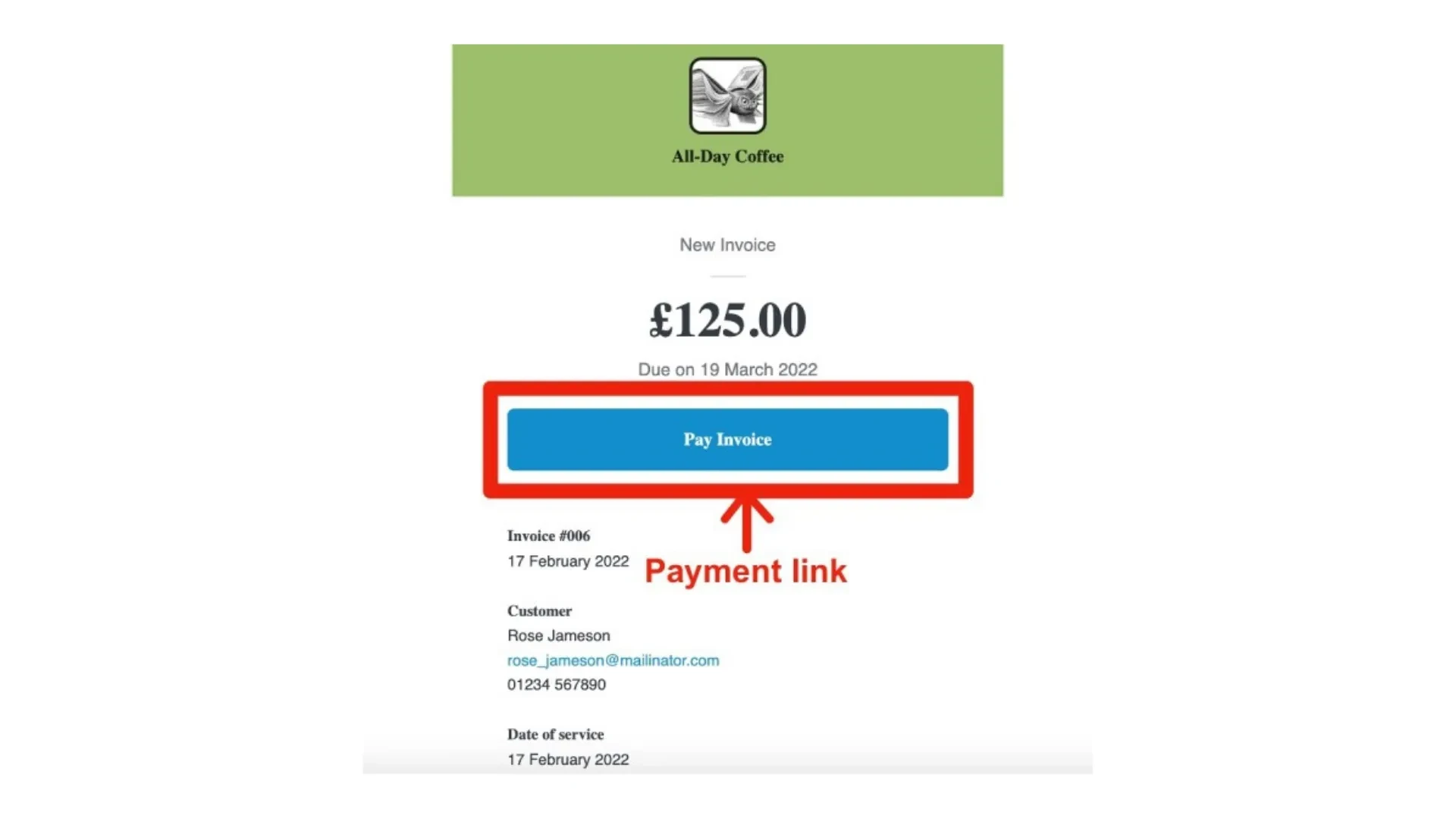
A production-grade payment link system features list spans invoicing, links, payments, and reporting. The items below decide whether SMBs actually adopt it.
Branded invoices with sequential numbers, line items, tax, and PDF export.
Single-use, reusable, and recurring payment links.
Hosted checkout with cards, Apple Pay, Google Pay, and local methods.
Automatic receipts, reminders, and overdue follow-ups.
Partial payments, refunds, and multi-currency support.
Real-time invoice status, reconciliation, and accounting exports.
That is a broad surface for a small team, so many founders use software development outsourcing to ship the core first. As tax rules and provider APIs change, version upgrade services keep the system current without breaking live billing.
Payment link system tech stack
The best tech stack for a payment link system pairs a solid transactional backend with a durable database, a queue for webhooks, and a clean dashboard. Correctness and reliability matter more than novelty.
Layer | Common choice | Why |
Backend | Laravel or Node.js | Reliable invoice and webhook logic |
Database | PostgreSQL or MongoDB | Durable invoice and payment records |
Queue | Redis or a message queue | Idempotent webhook processing |
Frontend | React or Vue | Invoice and dashboard UI |
Provider | Stripe or PayPal | Links, checkout, and payouts |
What is the best tech stack for a payment link system?
Laravel or Node.js with PostgreSQL is the dependable default, with Redis for webhook queues. Acquaint Softtech builds on this stack for billing tools, and the webhook and idempotency patterns are the same ones in our guide to building a fintech app with Laravel. For extra hands on the reconciliation logic, IT staff augmentation adds payment-experienced engineers fast.
Security and compliance
The core security rule is to never handle raw card data yourself. Use the provider’s PCI-compliant hosted checkout, verify webhook signatures, and keep invoices and tax records to the standards of your markets.
Card handling is governed by the Payment Card Industry Data Security Standard, and the PCI Security Standards Council publishes the requirements your checkout must meet, which is exactly why a hosted page from Stripe or PayPal is the safe default.
Invoices are also tax records, and bodies such as the Internal Revenue Service (IRS) set what a compliant invoice and its retention must include, while the EU and UK add their own e-invoicing mandates.
For teams that want a senior architect to set the compliance and integration approach up front, virtual CTO services provide that experienced hand before the first sprint.
Payment link system benefits for businesses

The payment link system benefits for businesses are immediate: faster payment, less manual chasing, fewer errors, and a professional, branded experience. A good system turns getting paid from a chore into a tap.
Benefit | What it means |
Get paid faster | One-click links beat bank details |
Less manual work | Receipts and reminders are automatic |
Fewer errors | Reconciliation matches paid invoices |
Professional image | Branded invoices and checkout |
Better cash flow | Clear status on every invoice |
Agencies and platforms that want to offer invoicing under their own brand can use white label development services to launch faster. Acquaint Softtech builds both custom and white-label billing tools with reconciliation solid from day one.
Payment link system trends 2026
The main payment link system trends 2026 are embedded invoicing, AI-assisted collections, instant payouts, and wider local payment methods. Building with these in mind keeps the product competitive.
Embedded invoicing. Billing lives inside SaaS and marketplace products, not a separate tool.
AI-assisted collections. Models predict late payers and time reminders for the best response.
Instant payouts. Funds reach the merchant in minutes, not days.
More local methods. Wallets and bank-transfer options lift conversion in each market.
Smarter reminders and collections are a natural fit for AI development services once the core billing flow is live. The cost drivers behind all of this are broken down in our FinTech app development cost guide.
Payment link system development cost by market

Payment link system development cost depends on scope and where your team sits. An MVP with invoicing and links is far cheaper than a full billing platform with recurring payments, multi-currency, and deep integrations.
Target market | MVP | Full billing platform |
United States / New York | $18,000 to $45,000 | $70,000 to $180,000+ |
United Kingdom | GBP 14,000 to 36,000 | GBP 56,000 to 145,000+ |
Europe (EU) | EUR 16,000 to 40,000 | EUR 64,000 to 165,000+ |
Australia | AUD 27,000 to 68,000 | AUD 105,000 to 270,000+ |
New Zealand | NZD 29,000 to 72,000 | NZD 112,000 to 290,000+ |
The biggest lever is engineering rate, not the feature list. That is why many founders hire remote developers from a payment link system development company in India, where the same build costs a fraction of local rates. A short discovery workshop turns that range into a fixed, defensible estimate.
Real case study: a global e-invoicing platform
Here is a real project from our public Clutch profile with a client whose whole business is invoicing, which is about as on-topic as proof gets.
Proof of work: DDD Invoices (Global e-invoicing compliance platform, Slovenia) • From our Clutch profile, rated 5.0
What did they need?
DDD Invoices powers mandatory e-invoicing compliance across 30-plus countries for SaaS, ERP, POS, marketplace, and payment-provider clients. They needed to cut the repetitive internal and partner questions about country-specific invoicing rules, automate onboarding and compliance-validation work, and do it without ever exposing sensitive compliance or partner data.
What did Acquaint Softtech build?
A team of six to ten engineers built an AI-powered internal system connected to the client’s knowledge base, API documentation, and compliance rules, with strict data-access boundaries so it respected every permission line. It was delivered sprint by sprint, adapting as requirements changed.
What changed?
Internal back-and-forth dropped, and mid-level staff could confidently handle tasks that previously needed escalation. Every sprint’s deliverables landed on schedule.
The fluency that project required in invoicing rules, API integrations, and strict data boundaries is the same fluency a payment link and invoice system demands.
Why teams struggle, and what to check before you hire
Most billing tools do not fail at the invoice. They fail at reconciliation, where a missed or duplicated webhook leaves invoices and revenue out of sync. That is an experience problem, not a tutorial one.
If you are deciding whether to build in house or hire developers for a payment link system, check for these before you commit:
Are their webhook handlers signature-verified and idempotent?
Do they keep the hosted checkout PCI-compliant, never touching card data?
Can they handle tax, partial payments, and recurring billing?
Do they have verifiable fintech and invoicing delivery?
That last point is where track record matters. Acquaint Softtech has delivered 1,300 or more projects over 13 or more years with 70 or more in-house engineers, 48 or more Clutch reviews, more than 1,290 Upwork jobs, and can deploy vetted developers within 48 hours.
When billing logic is complex, that reliability is a good reason to hire Python developers for the reconciliation and tax work.
After launch, billing needs care as provider APIs and tax rules change, which is where ongoing support and maintenance services keep invoices, receipts, and reconciliation healthy.
Get a free payment link and invoice consultation
Share your billing flow or a short brief. We will review your invoice engine, link generator, checkout, and reconciliation, then hand back a prioritised plan and a scope you can act on. This is the last step before you commit engineering time.
Frequently Asked Questions
-
How to make a payment link for an invoice?
Generate the link through your payment provider’s API or dashboard with the invoice amount, currency, and reference, then attach it to the invoice PDF or email. When the customer pays, a signed webhook marks that invoice as paid automatically.
-
How do I create my own payment link?
Use a provider such as Stripe or PayPal, specify the amount, currency, and description, and share the returned URL by email, SMS, or chat. For a branded, custom flow, build a link generator around the provider API rather than using the dashboard.
-
How to design a payment system?
Define the four components, an invoice engine, a link generator, a PCI-compliant hosted checkout, and a webhook and reconciliation listener, pick a licensed gateway, model invoice states, wire idempotent webhooks, then add security, tax compliance, and testing.
-
How to create a link for people to pay you?
Use a payment provider’s payment-link feature, set the amount and a clear description, and share the URL through any channel. The customer pays on a hosted checkout page, and the funds land in your merchant account.
-
How much does a payment link system cost to build?
An MVP with invoicing and links typically runs from the high teens into the low tens of thousands at local agency rates, while a full billing platform with recurring payments, multi-currency, and integrations costs more. Offshore delivery is materially cheaper.
-
What features does a payment link system need?
Branded invoices with numbering, line items, and tax; single-use, reusable, and recurring links; a hosted checkout with cards and wallets; automatic receipts and reminders; partial payments and refunds; and real-time status with reconciliation and accounting exports.
-
How long does payment link system development take?
A focused MVP usually takes about two to four months, while a full billing platform with recurring payments, multi-currency, and integrations can run six to nine months depending on scope.
-
What is the best tech stack for a payment link system?
Laravel or Node.js for the backend, PostgreSQL or MongoDB for records, Redis or a queue for idempotent webhook processing, React or Vue for the dashboard, and a provider such as Stripe or PayPal for links, checkout, and payouts.
I am Sanjay Parjapati, a developer at heart and a Head of business by work. My journey started with coding and helped me grow towards becoming a head of business which led me to focus on dual skills, i.e. technical know-hows and the business know-hows. My journey of 10+ years has helped me grow immensely from a professional viewpoint.
Table of Contents
Get Started with Acquaint Softtech
- 13+ Years Delivering Software Excellence
- 1300+ Projects Delivered With Precision
- Official Laravel & Laravel News Partner
- Official Statamic Partner
Related Blog

How to Add Payments to Your SaaS Platform With Stripe Connect
Stripe Connect for SaaS payments lets users connect their Stripe accounts so you can process payments and take a platform fee. It includes onboarding connected accounts, routing payments, handling webhooks, and ensuring accounts are verified. Most SaaS platforms use Standard or Express accounts for faster, compliant setup.
Sanjay Prajapati
August 10, 2026
Building a Cloud Accounting Platform for SMBs: Invoicing, Ledger, and Tax
Cloud accounting software helps businesses manage invoicing, bookkeeping, taxes, and finances online with real-time data. Modern platforms also support bank feeds, auto-reconciliation, and tax compliance.

Acquaint Softtech
August 5, 2026
How Payment Gateways Work: Transaction Flow, APIs, and Settlement Explained
A payment gateway is not a checkout button. It is a 7-step transaction pipeline that authenticates, routes, scores, and settles every card payment in under 2 seconds. Here is exactly how it works.

Ahmed Ginani
May 11, 2026India (Head Office)
203/204, Shapath-II, Near Silver Leaf Hotel, Opp. Rajpath Club, SG Highway, Ahmedabad-380054, Gujarat
USA
7838 Camino Cielo St, Highland, CA 92346
UK
The Powerhouse, 21 Woodthorpe Road, Ashford, England, TW15 2RP
New Zealand
42 Exler Place, Avondale, Auckland 0600, New Zealand
Canada
141 Skyview Bay NE , Calgary, Alberta, T3N 2K6