

Low-Bandwidth Virtual Classroom: Optimizing Video and Interaction for Slow Internet
To optimize video for a low-bandwidth virtual classroom on a slow internet connection, prioritize audio clarity by lowering video resolution, reducing frame rate, or turning off video feeds entirely. The practical strategies are: disable video feeds when connections lag, use adaptive bitrate streaming that scales resolution in real time, pre-record and compress heavy lectures rather than streaming them live, and switch to a wired connection where possible to reduce packet loss.

Sanjay Prajapati
As a developer and Head of Business at Acquaint Softtech, I hear the same frustration from education founders in every market: the classroom works beautifully on office fibre and falls apart the moment a learner joins on a weak mobile signal. Solving that is a core part of custom software product development for education, because a virtual classroom is only as good as its worst connection.
Here is the honest starting point. Low bandwidth, meaning, in plain terms, is a network connection with limited data-transfer capacity, and in a live classroom it shows up as frozen video, robotic audio, and dropped learners. Roughly a third of the world still has little or no reliable internet, according to the International Telecommunication Union (ITU), so designing for slow connections is not an edge case; it is the majority case in many regions you want to serve.

- Your virtual classroom struggles the moment learners are on slow internet.
- You serve students on mobile data, rural connections, or older Android phones.
- You are a CTO, COO, or founder who needs the class to work for everyone.
- You want real architecture, numbers and cost, not generic tips.
This problem-solution guide covers how to optimize video, keep interaction alive when video cannot survive, handle Android and offline realities, and then build and budget for it. It sits inside our wider EdTech software development guide, so you can branch into any related engineering topic from here.
Everything below is grounded in delivery experience. Acquaint Softtech has built education platforms with live-session integrations, media handling and mobile-first flows, and this guide distils what actually keeps a class usable when the network does not cooperate.
Low-bandwidth virtual classrooms explained
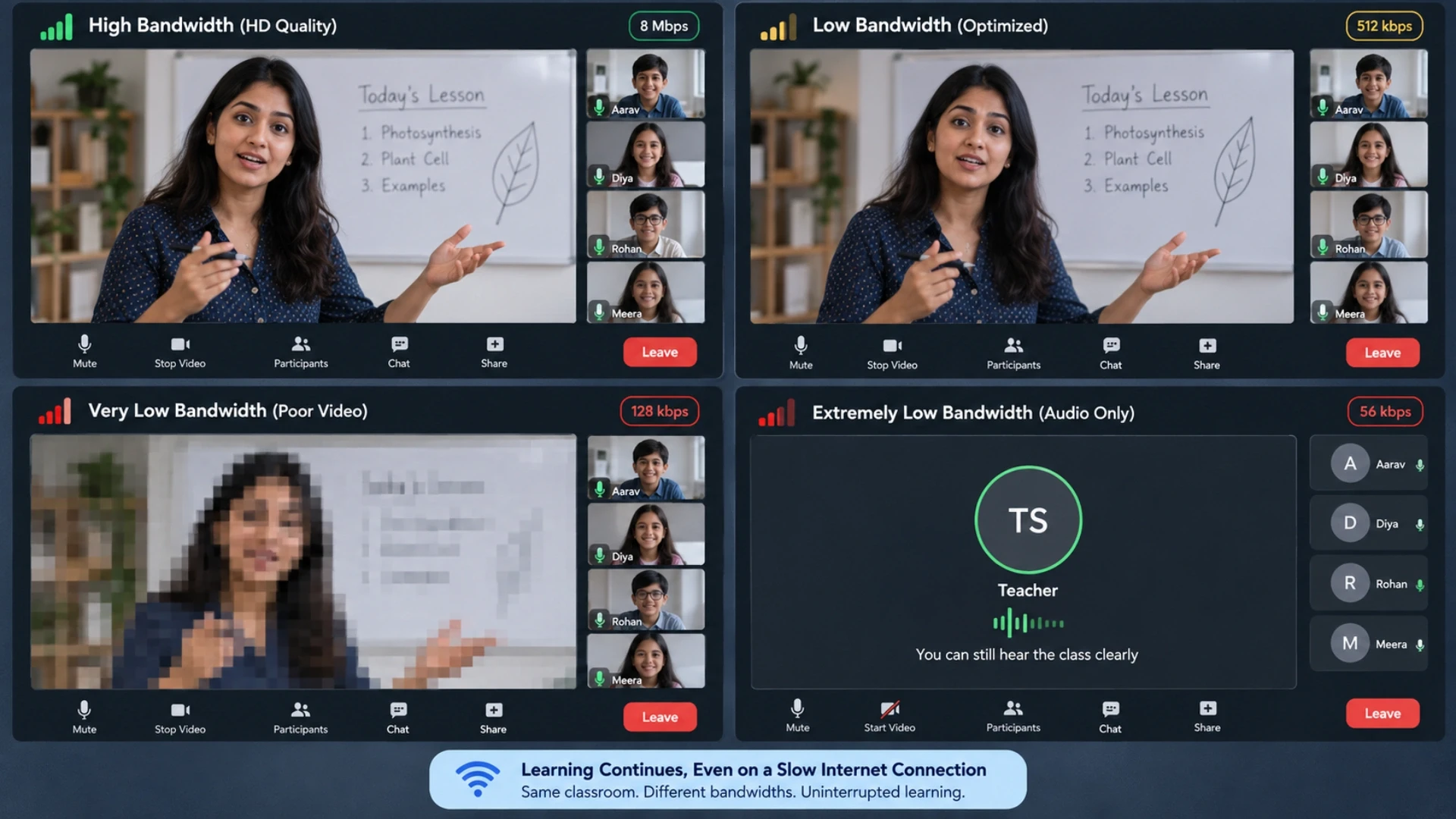
A low-bandwidth virtual classroom is a live online class engineered to keep audio and interaction working even when the connection is too weak for smooth video. The core principle is triage: protect the essential stream, which is almost always audio, and shed everything else in order. That is low-bandwidth virtual explained in one line, and it is the opposite of how most platforms are built, which assume fast, stable connections by default.
The reason this matters is simple. On a poor line, you cannot have it all, so the platform must decide what to sacrifice. Low-bandwidth synonyms you will see in the field include slow, constrained, throttled, or limited connectivity, and the same low-bandwidth meaning in work applies to any team on a weak link. Designing for it is real education AI software development, not a setting a user toggles in a panic.
Why standard classrooms fail on slow internet
Most virtual classrooms are read-light but video-heavy, and video is the single largest consumer of bandwidth. When the pipe narrows, unadaptive platforms keep trying to push high-resolution frames, which starves audio and causes the freezing every teacher dreads. Even mature tools show this: users routinely search for how to fix low network bandwidth Zoom problems precisely because default settings assume more headroom than a mobile learner has.
The winners take a different stance. They treat bandwidth as a budget to be spent deliberately, and they engineer the classroom to degrade in a controlled order rather than collapse. Our overview of software product engineering companies explains the deeper ownership this level of control requires, and why senior-hire Python developers are usually the ones who build the media and signalling backend behind it.
Optimizing video: the graceful degradation ladder

The way to optimize video on slow internet is a degradation ladder: as bandwidth falls, the platform steps down one rung at a time instead of freezing. Start at full resolution, then drop resolution, then drop frame rate, then move to audio plus a static slide, and finally to audio only. Each rung keeps the lesson alive while using less data, which is the whole game.
Connection | What the class shows | Rough bandwidth |
Good | HD video and audio | 1 Mbps and up per user |
Slow | SD video, reduced frame rate | 256 to 512 Kbps |
Very slow | Audio plus shared slides | Under 256 Kbps |
Critical | Audio only, video off | Around 64 Kbps |
Adaptive bitrate and layered video
Adaptive bitrate streaming is the engine of the ladder. The client and server continuously watch packet loss, latency, and jitter, then scale resolution and frame rate in real time, for example, dropping from 1080p to 360p as the signal weakens. Layered approaches such as scalable video coding send a small base layer everyone can decode plus enhancement layers that are dropped first when bandwidth falls. Building this well for phones is where experienced React Native developers earn their keep, because the mobile client has to measure and react without draining the battery.
The infrastructure underneath matters just as much. A selective forwarding unit that routes only the video layers each learner can handle, backed by well-placed relay servers, keeps the media path short and resilient.
Pre-record and compress the heavy stuff.
Not everything needs to be live. For dense lectures, pre-recording and compressing the video, then serving a lightweight file or even an audio-only version, removes the live-streaming risk entirely. This is a familiar idea to any user who has enabled a low-bandwidth mode in consumer apps, from Steam to video calls, and in a classroom it means the heaviest content never depends on a fragile live connection.
Keeping interaction alive when video cannot
The overlooked half of the problem is interaction, not video. A class is not just a face on screen; it is questions, polls, a shared whiteboard, and chat. The good news is that these cost almost nothing in bandwidth, so a well-built classroom keeps them fully alive even after video is gone. Engineering the class around lightweight interaction is what separates a real low-bandwidth classroom from a video call that happens to have a chat box.
Lightweight channels for real engagement
Text chat, polls, quizzes, raise-hand, and whiteboard strokes are tiny messages that travel over a data channel independent of the video stream. Because they are so small, they keep working at 64 Kbps when video has long since dropped. A hire MERN stack team can deliver this real-time interaction layer on a single JavaScript stack, so a learner who cannot see the teacher can still answer a poll, follow the whiteboard, and ask a question in text.
This is where thoughtful edtech module design pays off. Separating the interaction layer from the media layer means one can survive while the other degrades, and it makes the whole system easier to test. Pairing the build with hiring automation and QA engineers who simulate throttled and lossy networks is how you prove the class holds up before real students ever hit a bad signal. Our guide to hiring Python developers covers the backend skills this signalling and messaging work demands.
Design the lesson to need less.
Learning platform engineering meets learning design here. Chunk content into small units, lead with text and low-resolution graphics, and always provide a transcript so a learner who cannot stream still gets the substance. Recording every live session and posting it afterwards means a dropped learner is never penalised. These choices reduce the bandwidth the class needs in the first place, which is the cheapest optimization of all.
Offline, mobile-first and Android realities
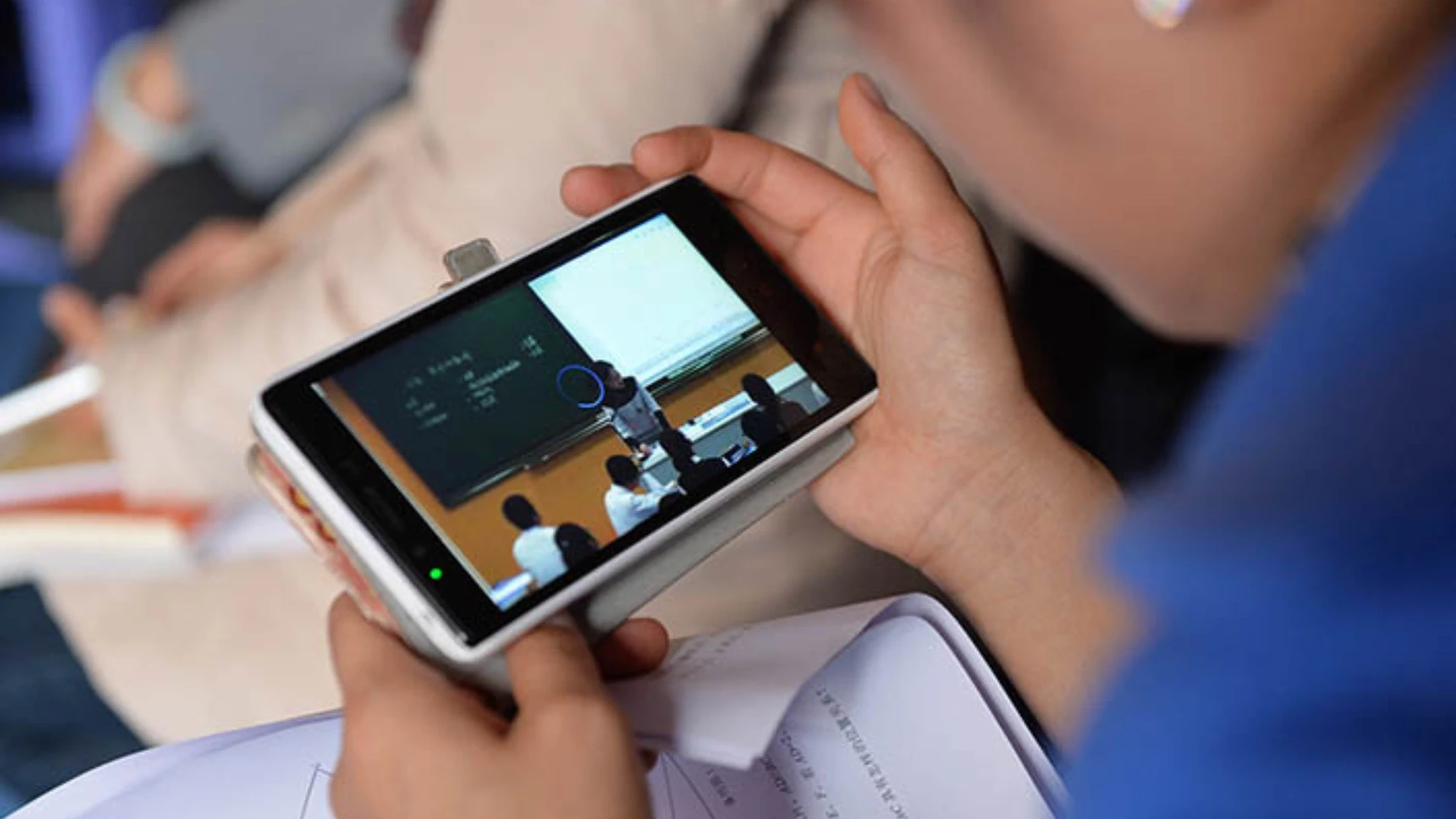
For most learners on slow internet, the device is an Android phone on mobile data, so a low-bandwidth virtual classroom that optimizes video for slow internet on Android is the real target, not a desktop on Wi-Fi. That changes priorities: smaller payloads, aggressive caching, offline-capable activities, and a client that survives a network switch from Wi-Fi to cellular without dropping the class.
Offline and store-and-forward
The most resilient classrooms assume the connection will break and plan for it. Offline mode lets a learner download resources and complete quizzes without a live link, then syncs responses when the network returns. Chat and answers queue locally and forward on reconnect, so a brief outage does not lose work. Building this reliably is real education tech implementation, and a dedicated software development team that owns the mobile client is usually the right model for getting the sync logic correct.
Android also demands attention to fragmentation: a wide range of devices, OS versions, and cheap hardware. Testing on real low-end phones, not just emulators, is non-negotiable. When the backend is Python-first, experienced Django developers keep the APIs lean, so the mobile client sends and receives as little as possible, and our note on Python development architecture and frameworks shows how to structure those services for low-overhead responses.
How to build a low-bandwidth virtual classroom
How to build a low-bandwidth virtual classroom comes down to four decisions: a real-time media stack that adapts, a separate lightweight interaction layer, an offline-tolerant mobile client, and relentless testing under bad networks. Get those four right and the class stays usable across the whole connection range, from office fibre to a rural mobile signal.
The core stack
Most teams build the live layer on WebRTC, the browser and mobile standard for real-time audio, video and data, using a selective forwarding unit to route streams efficiently and relay servers to punch through difficult networks. The interaction layer rides WebRTC data channels or lightweight WebSockets.
The mobile app caches aggressively and stores work offline. Standing this up quickly often means bringing in senior real-time engineers through software development outsourcing, because WebRTC at scale is a specialist skill.
Test against the real world, and know the numbers.
Bandwidth targets should be explicit, and useful public references such as the U.S. Federal Communications Commission broadband speed guide help set honest expectations for what different activities need. Then test against them: throttle connections to 3G speeds, inject packet loss, and switch networks mid-class to confirm the degradation ladder actually holds. Proving the class works at 256 Kbps is worth more than any feature list. Our Laravel SaaS architecture blueprint shows the same discipline of validating the core before scaling scope.
Need a classroom that works on a weak mobile signal?
The hard part is not the happy path on fast Wi-Fi. It is engineering a class that stays live when the connection drops to a trickle, on the exact phones your learners use.
Development cost and who builds it
.webp "Development cost and who builds it")
Cost depends on whether you optimize an existing classroom or build one for low bandwidth from scratch. Adding an adaptive video ladder, a lightweight interaction layer, and offline support to an existing platform typically runs from about $30,000 to $80,000.
Building a low-bandwidth virtual classroom from the ground up usually falls between $90,000 and $200,000 in year one, plus media infrastructure. That is the honest shape of the cost in 2026.
Scope | What it includes | Indicative year-1 |
Optimize existing | Adaptive video, data-channel interaction, offline | $30,000 to $80,000 |
Build from scratch | WebRTC stack, mobile client, testing | $90,000 to $200,000 |
Media infrastructure | Relay and forwarding servers, monitoring | $3,000 to $10,000 / mo |
Where location changes the maths
Edtech development cost in India, and the wider option to hire developers for low-bandwidth classroom work offshore, can cut engineering spend by up to 40 percent versus Western agencies without lowering quality. Many teams add real-time media specialists through IT staff augmentation for the build phase, then scale down once the platform is stable.
A custom learning platform, India-built or globally-built, still needs senior technical direction to make the right media trade-offs. A virtual CTO service gives you that oversight without a full-time hire, which matters when you build education software that has to perform on the weakest connections. Our cost-saving software development tips show how to do this economically without piling up technical debt.
How Acquaint Softtech builds resilient classrooms

Resilient live learning starts with getting integrations and delivery right, and this verified project shows that discipline. A Singapore-based e-learning company hired Acquaint Softtech to build its online education portal from the ground up, including live-session delivery, and the engagement holds a 5.0 out of 5 rating on Clutch across quality, schedule, and cost.
Challenge the client faced | How Acquaint Softtech solved it | Result |
No portal for students to browse and enrol | Built the course portal and CMS on Django and Python | Students self-serve with ease |
Live classes needed reliable delivery | Integrated Zoom, which adapts streaming to each connection | Sessions run across varied networks |
Payments had to be simple and secure | Integrated Stripe for a flexible payment gateway | Frictionless enrolment and payment |
Credentials needed to be verifiable | Integrated Accredible for issued certificates | Trusted, shareable credentials |
Everything had to ship on time | Full testing, configuration and bug fixing | 5.0 / 5 verified rating on Clutch |
The client, a Singapore e-learning company teaching business skills, needed students to browse, enrol, pay and attend live sessions without friction, backed by an admin console. The stack was Django, Python and PostgreSQL, and the live-session layer used Zoom precisely because it adapts video quality to each learner's connection, the same principle that underpins any low-bandwidth classroom. Lightweight flows for browsing and enrolment meant the platform stayed usable even on modest connections.
Delivery discipline is what makes resilience land on schedule. Assigning a dedicated project manager for your learning platform is how Acquaint Softtech sustains a 95 percent on-time sprint record across more than 1,300 projects, including live-learning builds.
Resilience also depends on what happens after launch, as networks and devices change. Long-term support and maintenance services keep the classroom performing on new Android versions and shifting mobile networks. Our roundup of MVP development companies is a useful reference if you are still choosing a delivery partner.
Ready to build a classroom that works for every learner?
Slow internet should not decide who gets to learn. A short scoping call turns your low-bandwidth requirements into a concrete architecture, timeline, and budget.
Frequently Asked Questions
-
Is 30Mbps enough for online classes?
Yes, 30 Mbps is comfortably enough for online classes, including HD video for several participants at once. A single HD video stream needs roughly 1 to 3 Mbps, so 30 Mbps leaves ample headroom for a full class plus screen sharing. The real challenge is rarely the fast connection; it is the learner joining on a weak mobile signal, which is what low-bandwidth optimization solves.
-
Is 100 Mbps fast enough for video conferencing?
Yes, 100 Mbps is far more than enough for video conferencing, even for large group calls with HD video and screen sharing. Most conferencing needs only 1 to 4 Mbps per HD stream, so 100 Mbps supports many simultaneous participants easily. For virtual classrooms, the priority is not raw speed on the strong side but graceful behaviour when a learner's connection is slow.
-
Is 40Mbps enough for Netflix?
Yes, 40 Mbps is enough for Netflix, including 4K streaming, which needs about 15 to 25 Mbps for a single stream. You could run one 4K stream and several HD streams at once on 40 Mbps. For a virtual classroom, the same logic applies: video is the heaviest component, which is exactly why low-bandwidth classrooms scale video down first and protect audio.
-
Is 300 Mbps enough for video conferencing?
Yes, 300 Mbps is vastly more than video conferencing requires; even a large HD meeting rarely exceeds a few tens of Mbps in total. At that speed, bandwidth is never the constraint. The engineering that matters for classrooms is not provisioning huge speed but designing the class to degrade gracefully for learners who have only a fraction of it.
-
How does a low-bandwidth virtual classroom work in EdTech?
It works by triage: the platform continuously measures the connection and steps video down a ladder, from HD to SD to audio with slides to audio only, while keeping lightweight interaction like chat, polls, and whiteboard alive over a separate data channel. Offline mode and recorded sessions cover total dropouts. The result is an unbroken lesson even on very slow internet.
-
What is the best implementation approach?
Build a real-time media stack that adapts bitrate automatically, keep interaction on a separate lightweight channel so it survives when video drops, and make the mobile client offline-tolerant. Then test relentlessly under throttled, lossy, and switching networks on real low-end Android devices. Prove the class works at 256 Kbps before adding features, because resilience is the product here.
-
What are the best practices for learning platforms?
Protect audio first, degrade video gracefully rather than freezing, and keep chat, polls, and whiteboard on a channel that survives at very low speeds. Pre-record heavy lectures, provide transcripts, and record every live session. Design mobile-first, cache aggressively, support offline activities with sync, and test on real low-end phones and slow networks, not just fast office connections.
-
How much does a low-bandwidth virtual classroom cost to build?
Adding adaptive video, lightweight interaction, and offline support to an existing platform typically costs about $30,000 to $80,000. Building a low-bandwidth virtual classroom from scratch usually runs $90,000 to $200,000 in year one, plus media infrastructure of roughly $3,000 to $10,000 per month. Building offshore can reduce these figures by up to 40 percent while keeping quality high.
I am Sanjay Parjapati, a developer at heart and a Head of business by work. My journey started with coding and helped me grow towards becoming a head of business which led me to focus on dual skills, i.e. technical know-hows and the business know-hows. My journey of 10+ years has helped me grow immensely from a professional viewpoint.
Table of Contents
Get Started with Acquaint Softtech
- 13+ Years Delivering Software Excellence
- 1300+ Projects Delivered With Precision
- Official Laravel & Laravel News Partner
- Official Statamic Partner
Related Blog
.webp "EdTech App Development for Students, Teachers & Enterprises")
EdTech App Development for Students, Teachers & Enterprises
EdTech app development builds mobile learning apps for students, teachers, and professionals. Modern apps support offline learning, personalized experiences, and secure user data.

Manish Patel
July 20, 2026.webp "How to Build an EdTech Startup: From Idea Validation to MVP and Scale")
How to Build an EdTech Startup: From Idea Validation to MVP and Scale
To build an EdTech startup, validate the learning problem, build a focused MVP, and scale after achieving product-market fit. Successful startups test demand before investing in full development.

Chirag Daxini
July 24, 2026
The Complete Guide to EdTech Software Development in 2026
Complete guide to EdTech software development in 2026. LMS architecture, virtual classroom tech stack, AI tutoring system design, MVP timeline, and cost.

Acquaint Softtech
May 4, 2026India (Head Office)
203/204, Shapath-II, Near Silver Leaf Hotel, Opp. Rajpath Club, SG Highway, Ahmedabad-380054, Gujarat
USA
7838 Camino Cielo St, Highland, CA 92346
UK
The Powerhouse, 21 Woodthorpe Road, Ashford, England, TW15 2RP
New Zealand
42 Exler Place, Avondale, Auckland 0600, New Zealand
Canada
141 Skyview Bay NE , Calgary, Alberta, T3N 2K6